EasyManua.ls Logo

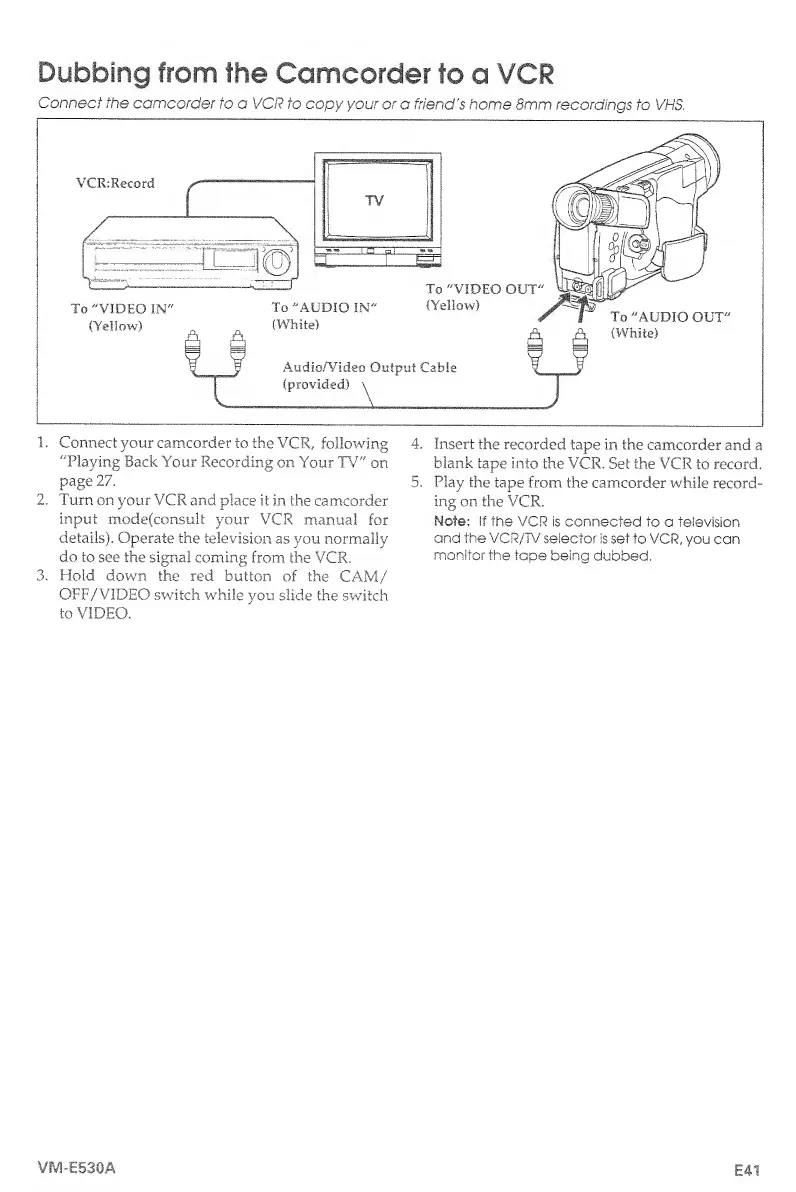
Hitachi VM-E530A - Dubbing from Camcorder to VCR; Dubbing from the Camcorder to a VCR

Hitachi VM-E530A
56 pages
Print Icon
To Next Page IconTo Next Page
To Previous Page IconTo Previous Page
Loading...
Dubbing
from
the
Camcorder
to
a
VCR
Connect
the
camcorder
to
a
VCR
to
copy
your
or
a
friend's
home
8mm
recordings
to
VMS,
1.
Connect
your
camcorder
to
the
VCR,
following
4.
Insert
the
recorded
tape
in
the
camcorder
and
a
"Playing
Back
Your
Recording
on
Your
TV"
on
blank
tape
into
the
VCR.
Set
the
VCR
to
record,
page
27.
5.
Play
the
tape
from
the
camcorder
while
record-
2.
Turn
on
your
VCR
and
place
it
in
the
camcorder
ing
on
the
VCR.
input
mode(consult
your
VCR
manual
for
Note:
If
the
VCR
is
connected
to
a
television
details).
Operate
the
television
as
you
normally
and
the
VCR/TV
selector
is
set
to
VCR,
you
can
do
to
see
the
signal
coming
from
the
VCR.
monitor
the
tape
being
dubbed.
3.
Hold
down
the
red
button
of
the
CAM/
OFF/VIDEO
switch
while
you
slide
the
switch
to
VIDEO.
VIVS-E53GA
E41

Table of Contents

Related product manuals