EasyManua.ls Logo

Hitachi VM-E530A - Zooming; Using Manual Focus; Using the Power Zoom; Using the Digital Zoom

Hitachi VM-E530A
56 pages
Print Icon
To Next Page IconTo Next Page
To Previous Page IconTo Previous Page
Loading...
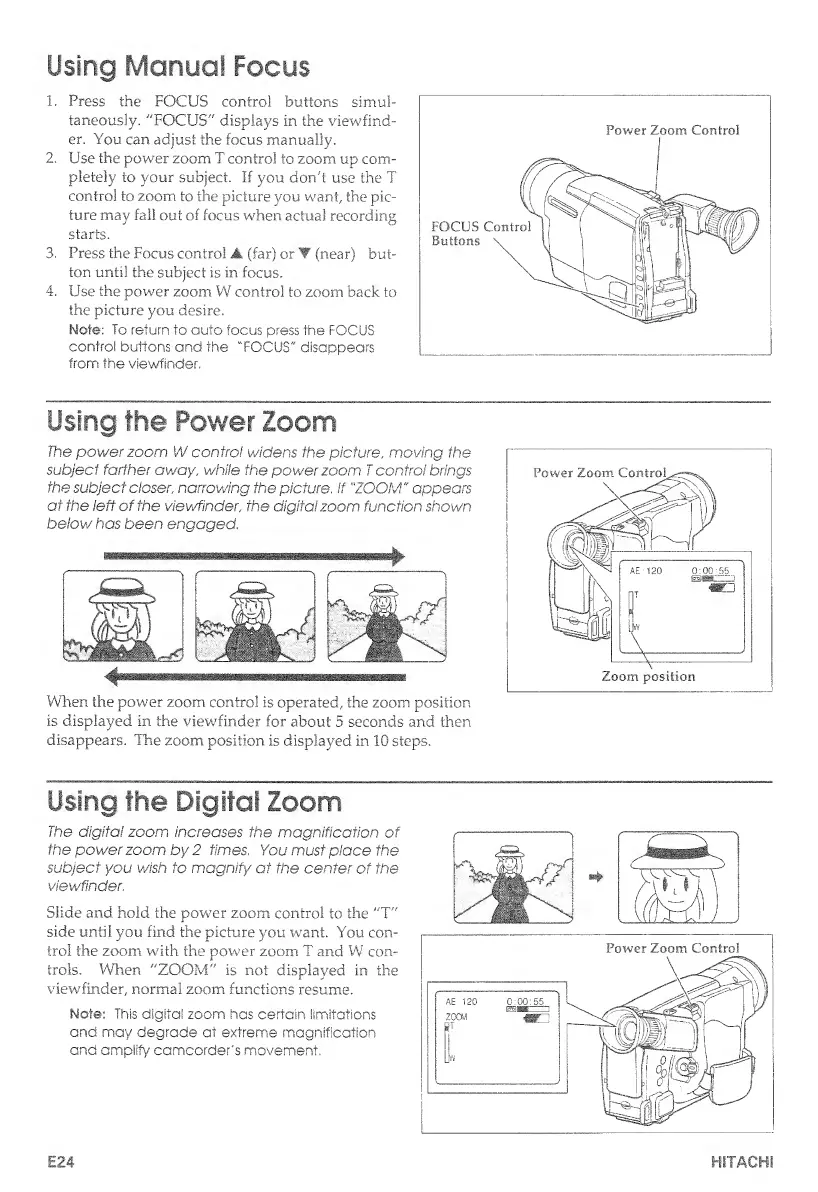
Using
Manual
Focus
1.
Press
the
FOCUS
control
buttons
simul¬
taneously.
"FOCUS"
displays
in
the
viewfind¬
er.
You
can
adjust
the
focus
manually.
2.
Use
the
power
zoom
T
control
to
zoom
up
com¬
pletely
to
your
subject,
if
you
don't
use
the
T
control
to
zoom
to
the
picture
you
want,
the
pic¬
ture
may
fall
out
of
focus
when
actual
recording
starts.
3.
Press
the
Focus
control
A
(far)
or
(near)
but¬
ton
until
the
subject
is
in
focus.
4.
Use
the
power
zoom
W
control
to
zoom
back
to
the
picture
you
desire.
Mote;
To
return
to
auto
focus
press
the
FOCUS
control
buttons
and
the
"FOCUS"
disappears
from
the
viewfinder.
Power
Zoom
Control
Using
the
Power
Zoom
The
power
zoom
W
control
widens
the
picture,
moving
the
subject
farther
away,
while
the
power
zoom
T
control
brings
the
subject
closer,
narrowing
the
picture,
If
"ZOOM"
appears
at
the
left
of
the
viewfinder,
the
digital
zoom
function
shown
below
has
been
engaged.
¥
4
—————
When
the
power
zoom
control
is
operated,
the
zoom,
position
is
displayed
in
the
viewfinder
for
about
5
seconds
and
then
disappears.
The
zoom
position
is
displayed
in
10
steps.
Using
the
Digital
Zoom
The
digital
zoom
increases
the
magnification
of
the
power
zoom
by
2
times,
You
must
place
the
subject
you
wish
to
magnify
at
the
center
of
the
viewfinder.
Slide
and
hold
the
power
zoom
control
to
the
"T"
side
until
you
find
the
picture
you
want.
You
con¬
trol
the
zoom
with
the
power
zoom
T
and
W
con¬
trols.
When
"ZOOM"
is
not
displayed
in
the
viewfinder,
normal
zoom
functions
resume.
Mote:
This
digital
zoom
has
certain
iimitations
and
may
degrade
at
extreme
magnification
and
amplify
camcorder's
movement.
j
>1mT
\
r
JSS&
''
-
\U/
/
E24
HITACHI

Table of Contents

Related product manuals