EasyManua.ls Logo

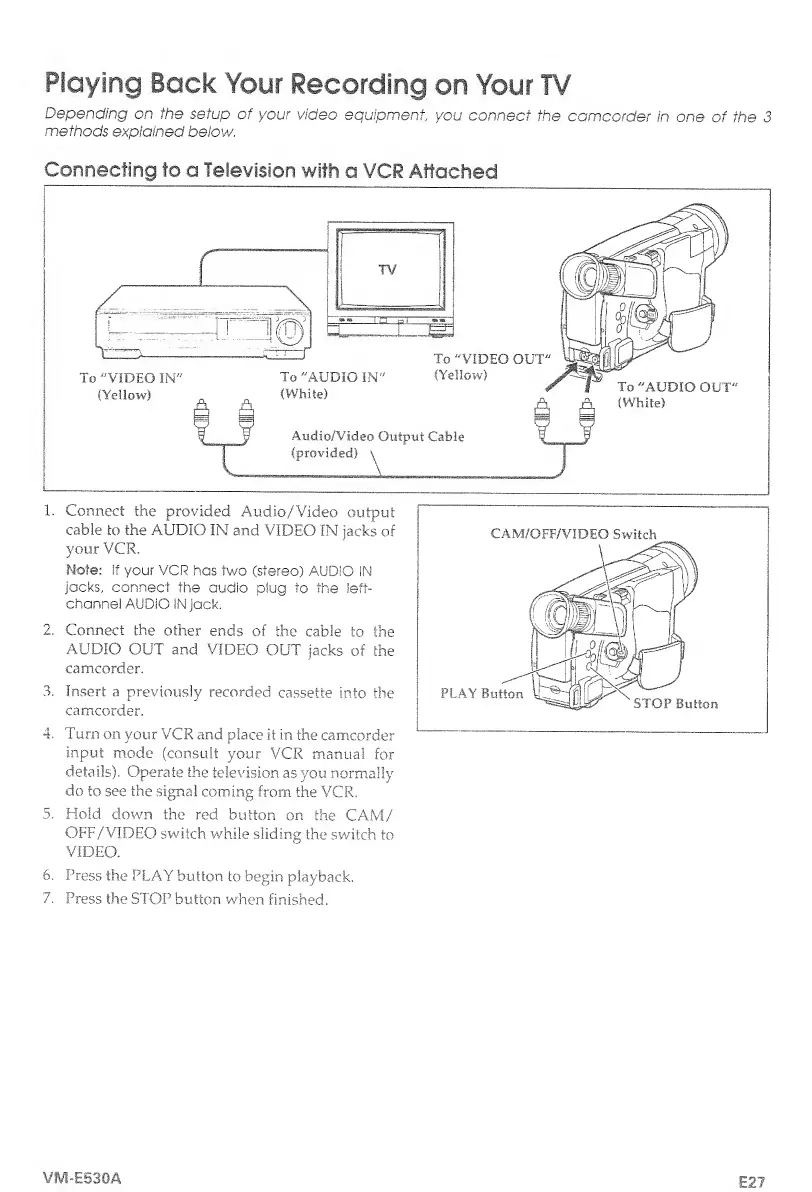
Hitachi VM-E530A - Playing Back Your Recording on Your TV; Connecting to a Television with a VCR Attached

Hitachi VM-E530A
56 pages
Print Icon
To Next Page IconTo Next Page
To Previous Page IconTo Previous Page
Loading...
Playing
Back
Your
Recording
on
Your
TV
Depending
on
the
setup
of
your
video
equipment
you
connect
the
camcorder
in
one
of
the
3
methods
explained
below.
Connecting
to
a
Television
with
a
VCR
Attached
1
.
Connect
the
provided
Audio/Video
output
cable
to
the
AUDIO
IN
and
VIDEO
IN
jacks
of
your
VCR.
Note:
if
your
VCR
has
two
(stereo)
AUDIO
IN
jacks,
connect
the
audio
plug
to
the
left-
channel
AUDIO
IN
jack.
2.
Connect
the
other
ends
of
the
cable
to
the
AUDIO
OUT
and
VIDEO
OUT
jacks
of
the
camcorder.
3.
Insert
a
previously
recorded
cassette
into
the
camcorder.
4.
Turn
on
vour
VCR
and
place
it
in
the
camcorder
input
mode
(consult
your
VCR
manual
for
details).
Operate
the
television
as
you
normally
do
to
see
the
signal
coming
from
the
VCR.
5.
Hold
down
the
red
button
on
the
CAM/
OFF/VIDEO
switch
while
sliding
the
switch
to
VIDEO.
6
.
Press
the
PLAY
button
to
begin
playback.
7.
Press
the
ST
OP
b
u
tton
when
f
i
n
i
shed.
VM-E530A
E27

Table of Contents

Related product manuals