EasyManua.ls Logo

Hitachi VM-E530A - Using Alternative Power Sources; Using the AC Adapter;Charger; Using a Car Battery

Hitachi VM-E530A
56 pages
Print Icon
To Next Page IconTo Next Page
To Previous Page IconTo Previous Page
Loading...
Using
Alternative
Power
Sources
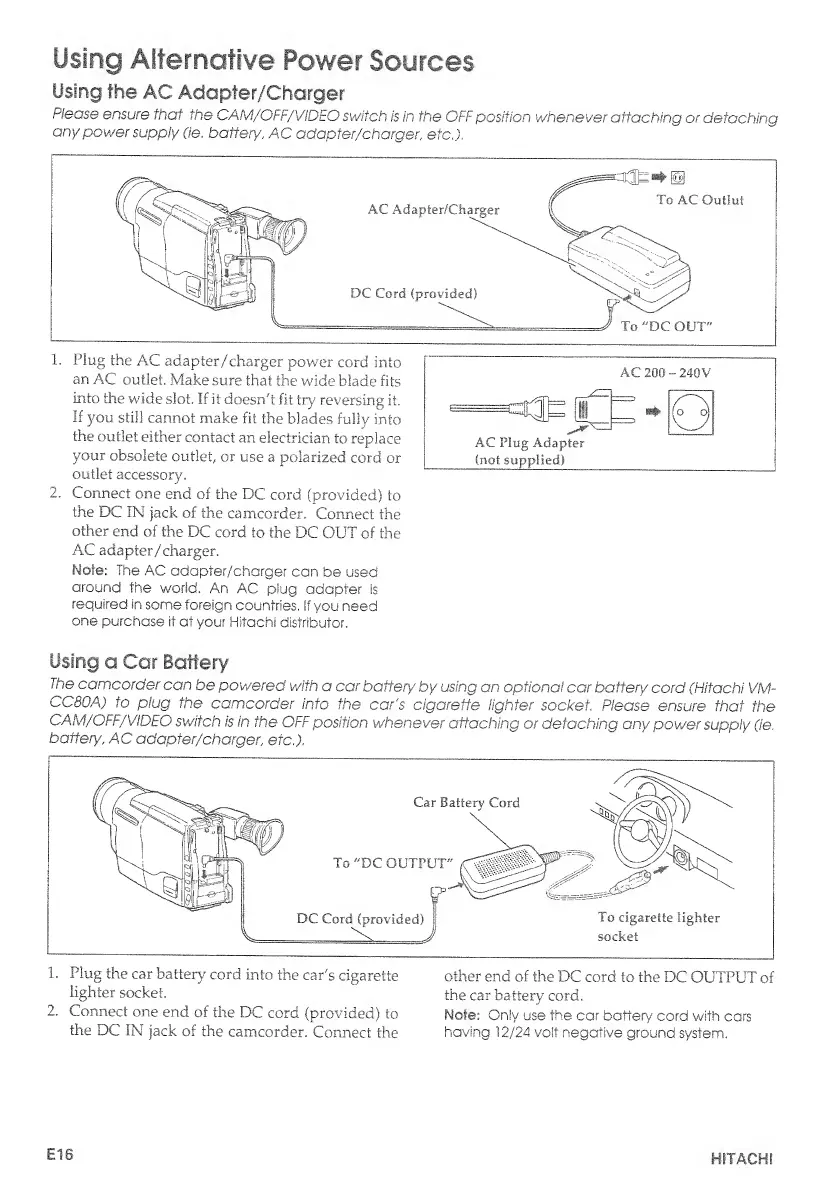
Using
the
AC
Adapter/Charger
Please
ensure
that
the
CAM/OFF/VIDEO
switch
is
in
the
OFF
position
whenever
attaching
or
detaching
any
power
supply
(ie.
battery,
AC
adapter/charger
,
etc.).
1.
Plug
the
AC
adapter/charger
power
cord
into
an
A.C
outlet.
Make
sure
that
the
wide
blade
fits
into
the
wide
slot.
If
it
doesn't
fit
try
reversing
it.
If
you
still
cannot
make
fit
the
blades
fully
into
the
outlet
either
contact
an
electrician
to
replace
your
obsolete
outlet,
or
use
a.
polarized
cord
or
outlet
accessory.
2.
Connect
one
end
of
the
DC
cord
(provided)
to
the
DC
IN
jack
of
the
camcorder.
Connect
the
other
end
of
the
DC
cord
to
the
DC
OUT
of
the
AC
adapter
/charger.
Note:
The
AC
adapter/charger
can
be
used
around
the
world.
An
AC
plug
adapter
is
required
in
some
foreign
countries,
if
you
need
one
purchase
it
at
your
Hitachi
distributor.
AC
200
-
2.40V
AC
Plug
Adapter
(not
supplied)
Using
o
Car
Battery
the
camcorder
can
be
powered
with
a
car
battery
by
using
an
optional
car
battery
cord
(Hitachi
VM-
CC80A)
to
plug
the
camcorder
into
the
car's
cigarette
lighter
socket.
Please
ensure
that
the
CAM/OFF/VIDEO
switch
is
in
the
OFF
position
whenever
attaching
or
detaching
any
power
supply
(ie.
battery',
AC
adapter/charger,
etc.).
the
DC
IN
jack
of
the
camcorder.
Connect
the
having
12/24
volt
negative
ground
system.
El
6
HITACHI

Table of Contents

Related product manuals