EasyManua.ls Logo

Hitachi VM-E530A - Cleaning the Camcorder Heads; Cleaning the Lees and LCD Panel of the Electronic Viewfinder

Hitachi VM-E530A
56 pages
Print Icon
To Next Page IconTo Next Page
To Previous Page IconTo Previous Page
Loading...
General
Maintenance
Cleaning
the
Camcorder
Heads
Dirt
can
accumulate
on
the
video
heads
on
the
camcorder
causing
the
playback
picture
to
become
blurred
or
appear
as
if
video
information
is
lost.
This
often
means
that
the
video
heads
are
dirty.
Use
a
video
head
cleaner
such
as
a
dry
type
head
cleaning
tape
to
clean
the
heads.
If
after
cleaning
the
heads
the
picture
does
not
clear
up
consult
your
nearest
dealer
or
VCR
service
center
for
professional
head
cleaning.
Cleaning
the
Lens
and
LCD
Panel
of
the
Electronic
Viewfinder
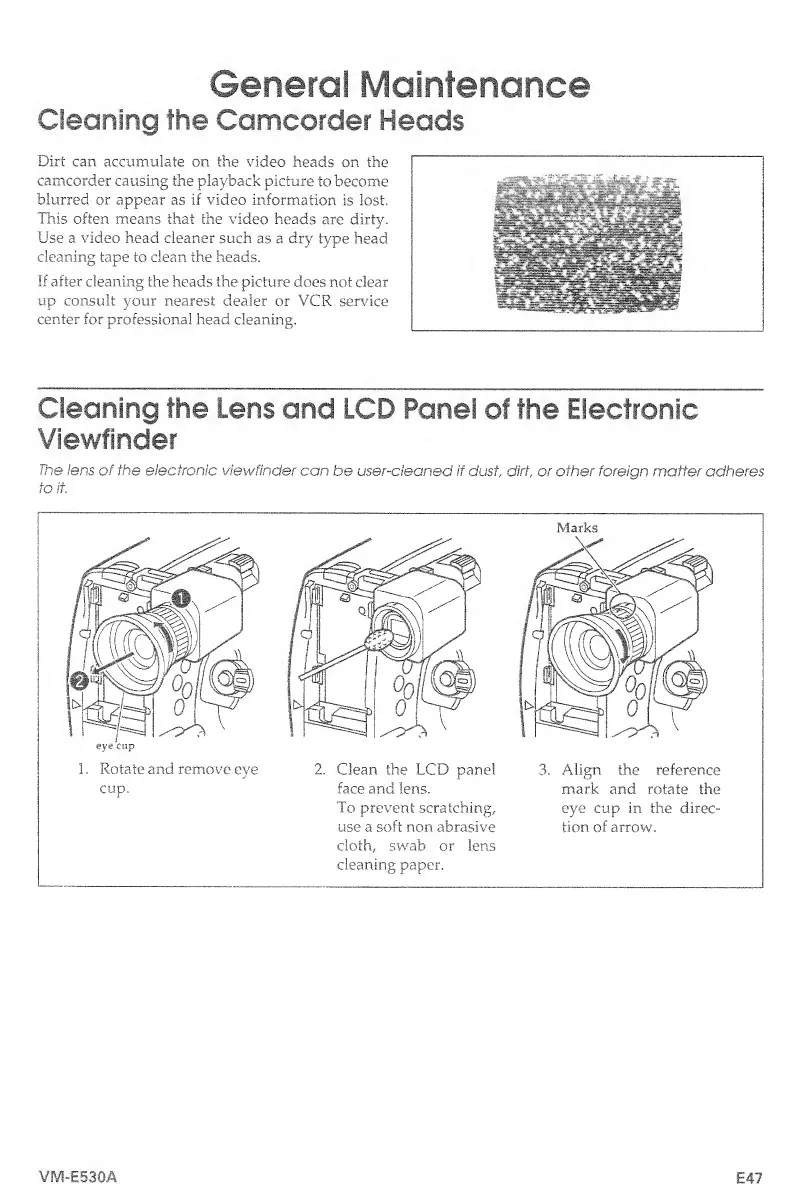
The
lens
of
the
electronic
viewfinder
can
be
user-cleaned
if
dust,
did,
or
other
foreign
matter
adheres
to
it.
1,
Rotate
and
remove
eye
cup.
2,
Clean
the
LCD
panel
face
and
lens.
To
prevent
scratching,
use
a
soft
non
abrasive
cloth,
swab
or
lens
cleaning
paper.
Marks
3.
Align
the
reference
mark
and
rotate
the
eye
cup
in
the
direc¬
tion
of
arrow.
VM-E530A
£47

Table of Contents

Related product manuals