EasyManua.ls Logo

Hitachi VM-E530A - Page 49

Hitachi VM-E530A
56 pages
Print Icon
To Next Page IconTo Next Page
To Previous Page IconTo Previous Page
Loading...
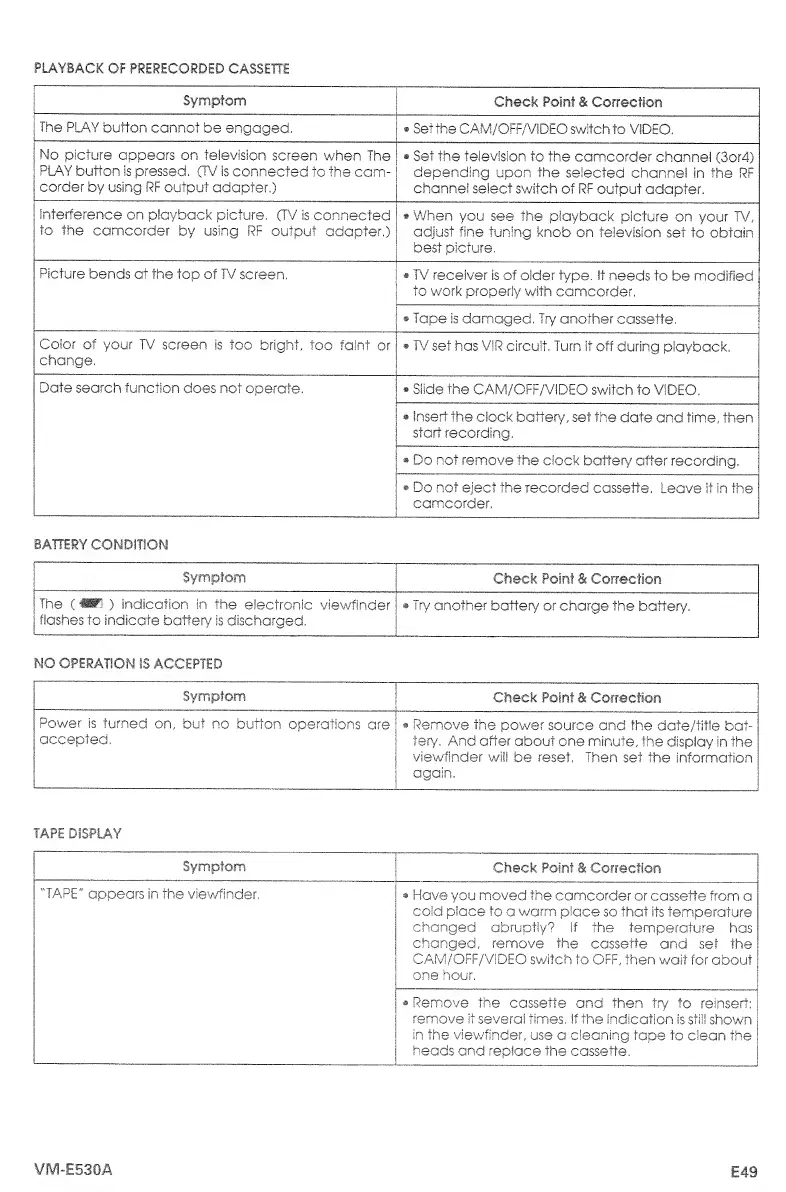
PLAYBACK
OF
PRERECORDED
CASSETTE
Symptom
Check
Point
&
Correction
The
PLAY
button
cannot
be
engaged.
Set
the
CAM/OFF/VIDEO
switch
to
VIDEO,
No
picture
appears
on
television
screen
when
The
PLAY
button
is
pressed.
(TV'
is
connected
to
the
cam¬
corder
by
using
RF
output
adapter.)
Set
the
television
to
the
camcorder
channel
(3or4)
depending
upon
the
selected
channel
in
the
RF
channel
select
switch
of
RF
output
adapter.
interference
on
playback
picture,
(TV
is
connected
to
the
camcorder
by
using
RF
output
adapter.)
When
you
see
the
playback
picture
on
your
TV,
adjust
fine
tuning
knob
on
television
set
to
obtain
best
picture,
Picture
bends
at
the
top
of
TV
screen,
TV
receiver
is
of
older
type.
It
needs
to
be
modified
to
work
properly
with
camcorder.
Tape
is
damaged,
Try
another
cassette,
Color
of
your
TV
screen
is
too
bright.,
too
faint
or
change,
*
TV
set
has
VIR
circuit,
Turn
it
off
during
playback,
Date
search
function
does
not
operate,
Slide
the
CAM/OFF/VIDEO
switch
to
VIDEO,
insert
the
clock
battery,
set
the
date
and
time,
then
start
recording,
Do
not
remove
the
clock
battery
after
recording.
*
Do
not
eject
the
recorded
cassette.
Leave
it
in
the
camcorder,
BATTERY
CONDITION
Symptom
Check
Point
&
Correction
The
(«P
r
l
)
indication
in
the
electronic
viewfinder
flashes
to
Indicate
battery
is
discharged,
Try
another
battery
or
charge
the
battery.
NO
OPERATION
IS
ACCEPTED
Symptom
Check
Point
&
Correction
Power
is
turned
on,
but
no
button
operations
are
accepted,
Remove
the
power
source
and
the
date/title
bat¬
ter/,
And
after
about
one
minute,
the
display
in
the
viewfinder
wii!
be
reset,
Then
set
the
information
again.
TAPE
DISPLAY
Symptom
Check
Point
&
Correction
"TAPE"
appears
in
the
viewfinder.
Have
you
moved
the
camcorder
or
cassette
from
a
cold
place
to
a
warm
place
so
that
its
temperature
changed
abruptly?
if
the
temperature
has
changed,
remove
the
cassette
and
set
the
CAM/OFF/ViDEO
switch
to
OFF,
then
wait
for
about
one
hour,
Remove
the
cassette
and
then
try
to
reinsert:
remove
it
several
times,
If
the
indication
is
still
shown
in
the
viewfinder,
use
a
cleaning
tape
to
clean
the
heads
and
replace
the
cassette,
VM-E530A
E49

Table of Contents

Related product manuals