STATUS
Version 1.0, 12/2014. Copyright 2012 Hitron Technologies
45
Version 1.0, 12/2014. Copyright 2014 Hitron Technologies
45
Hitron CGNM-2250 User’s Guide
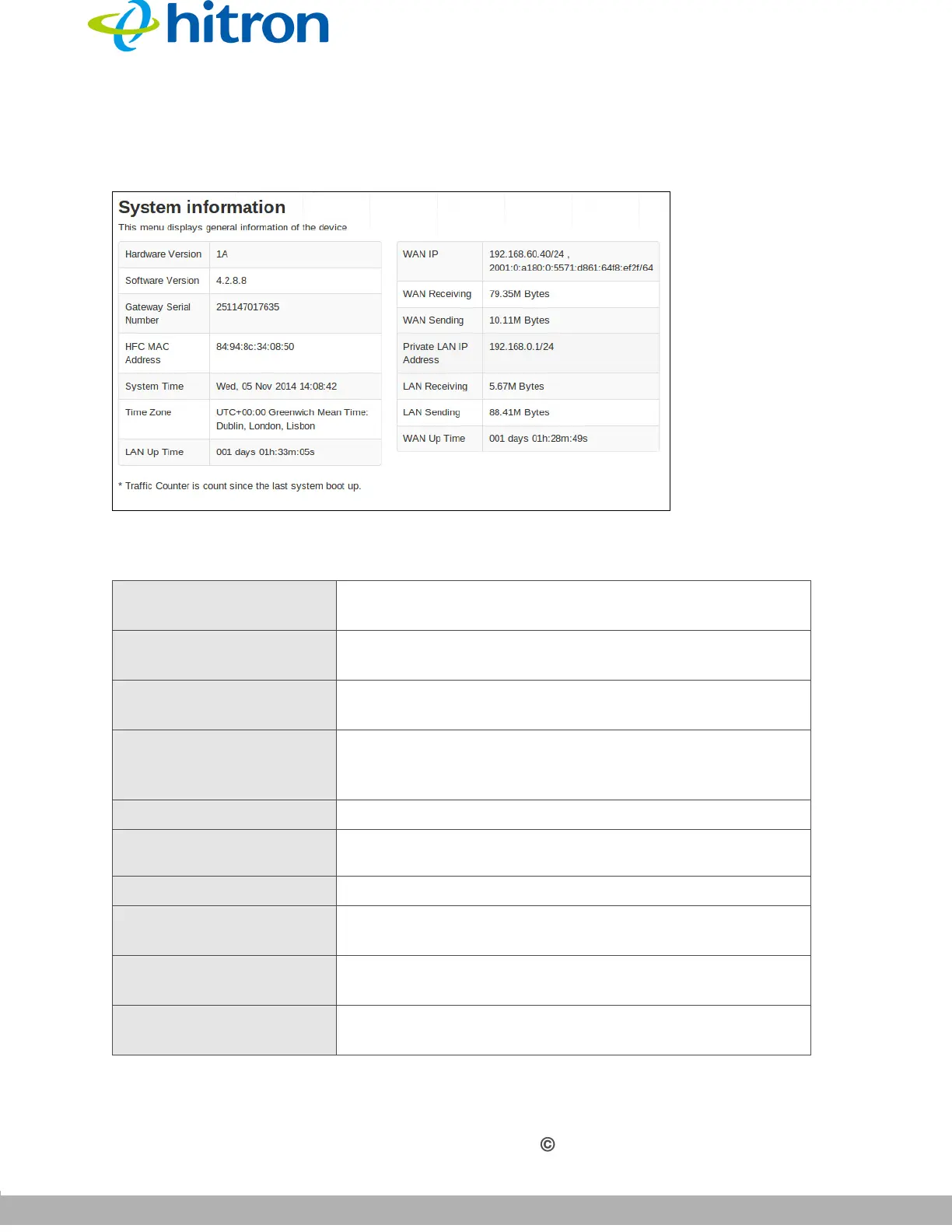
Click Status > System Information. The following screen displays.
Figure 14: The Status: System Information Screen
The following table describes the labels in this screen.
Table 12: The Status: System Information Screen
Hardware Version This displays the version number of the CGNM-2250’s
physical hardware.
Software Version This displays the version number of the software that
controls the CGNM-2250.
Gateway Serial Number This displays a number that uniquely identifies the
device.
HFC MAC Address This displays the Media Access Control (MAC) address
of the CGNM-2250’s RF module. This is the module that
connects to the Internet through the Cable connection.
System Time This displays the current date and time.
Time Zone
Use display the time zone when the ToD Function
enabled.
LAN Up Time
This displays the time the LAN has been online.
WAN IP This field displays the CGNM-2250’s IP address on the
WAN (Wide Area Network) interface.
WAN Receiving This displays the number of bytes that the WAN is
receiving.
WAN Sending This displays the number of bytes that the WAN is
sending.



 To Next Page