ADMIN
Version 1.0, 12/2014. Copyright 2012 Hitron Technologies
93
Version 1.0, 12/2014. Copyright 2014 Hitron Technologies
93
Hitron CGNM-2250 User’s Guide
6.6 The USB Storage Screen
Use this screen to configure your CGNM-2250’s USB settings.
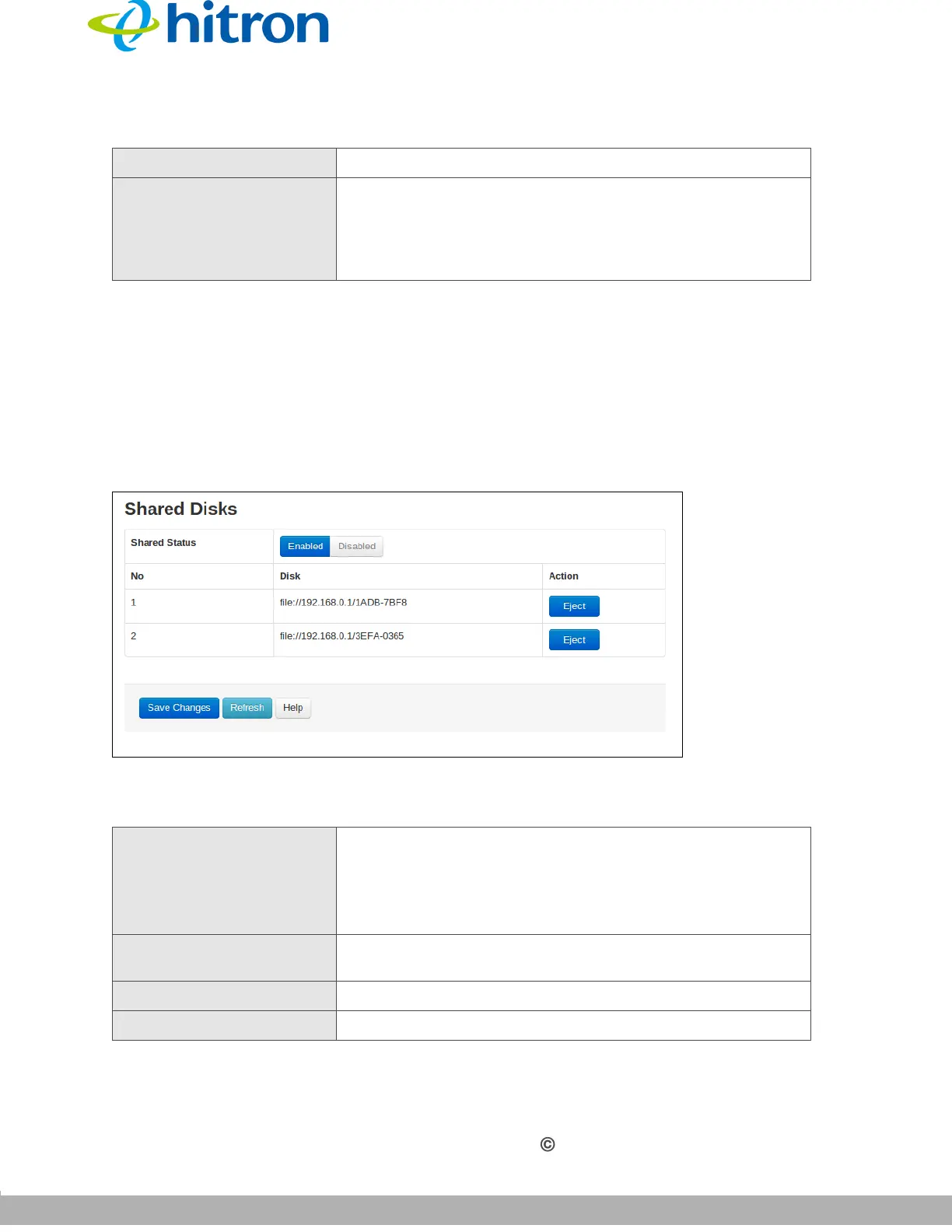
Click Admin >USB Storage. The following screen displays.
Figure 38: The Admin: USB Storage Screen
The following table describes the labels in this screen.
Reboot Device Click Reboot to restart your CGNM-2250.
Restore Factory Default
Settings
Click Factory to return your CGNM-2250 to its factory
default settings.
When you do this, all your user-configured settings are
lost, and cannot be retrieved.
Table 33: The Admin: USB Storage Screen
Shared Status
Use this field to select whether the shared status of USB
be active or not.
Select Enabled to activate the shared status.
Select Disabled to deactivate the
shared status.
No
This displays the arbitrary identification number assigned
to the shared disk.
Disk
This displays the network path of the shared disk.
Action Click Eject to remove the shared disk.
Table 32: The Admin: Backup Screen (continued)



 To Next Page