SECURITY
Version 1.0, 12/2014. Copyright 2012 Hitron Technologies
101
Version 1.0, 12/2014. Copyright 2014 Hitron Technologies
101
Hitron CGNM-2250 User’s Guide
7.3.1 Adding or Editing a Service Filter Rule
To add a new service filter rule, click Add Managed Service in the Security >
Service Filter screen.
To edit an existing service filter rule, locate the rule in the Security > Service
Filter screen and click its Manage button.
NOTE: Ensure that Enabled is selected in the Security > Service Filter screen in
order to add or edit service filtering rules.
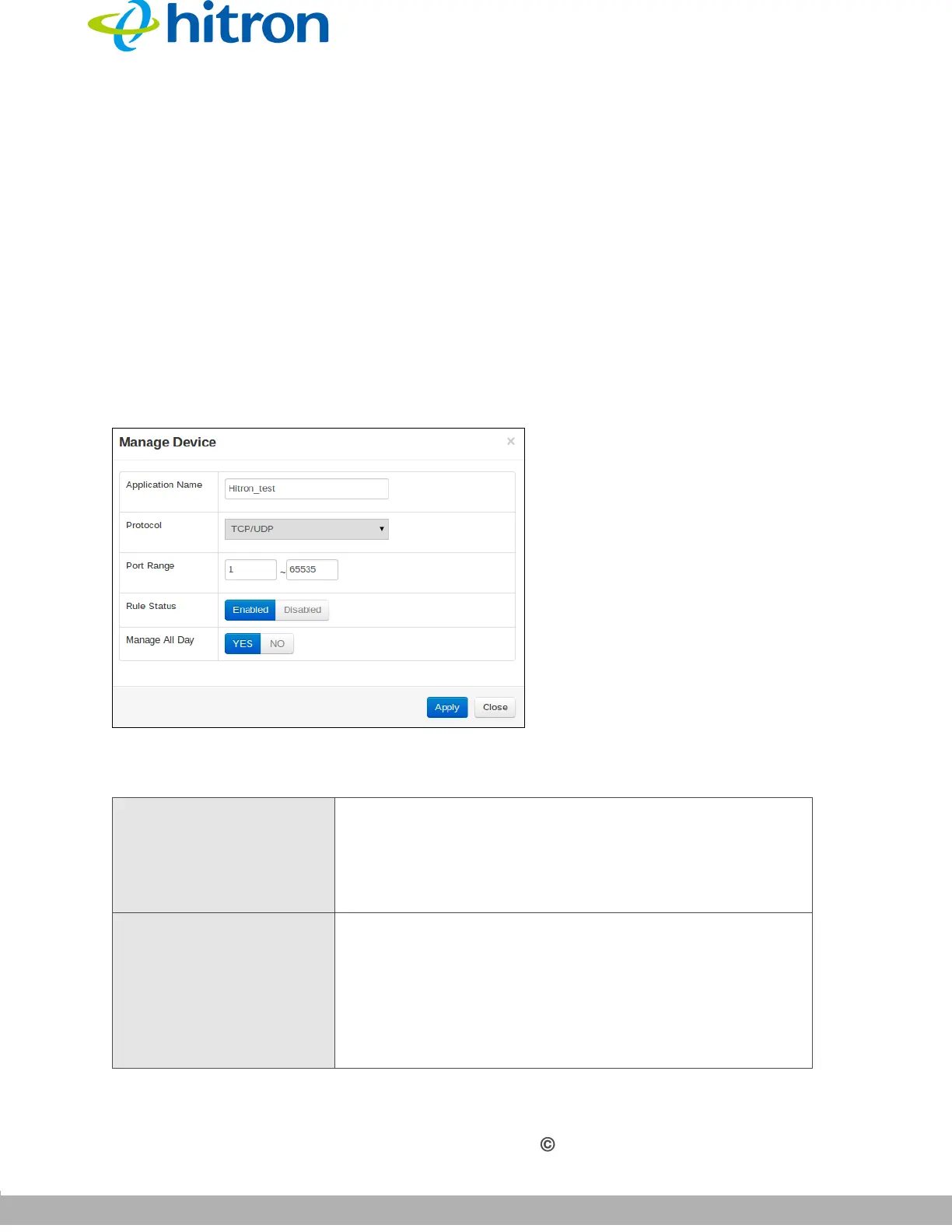
The following screen displays.
Figure 42: The Security: Service Filter Add/Edit Screen
The following table describes the labels in this screen.
Table 37: The Security: Service Filter Add/Edit Screen
Application Name Enter a name for the application for which you want to
create the rule.
NOTE: This name is arbitrary, and does not affect
functionality in any way.
Protocol Use this field to specify whether the CGNM-2250 should
filter via:
Transmission Control Protocol (TCP)
User Datagram Protocol (UDP)
NOTE: If in doubt, leave this field at its default (TCP).



 To Next Page