BASIC
Version 1.0, 12/2014. Copyright 2012 Hitron Technologies
57
Version 1.0, 12/2014. Copyright 2014 Hitron Technologies
57
Hitron CGNM-2250 User’s Guide
View information about the CGNM-2250’s connection to the WAN
Configure the CGNM-2250’s LAN IP address, subnet mask and domain suffix
Configure the CGNM-2250’s internal DHCP server
Define how the CGNM-2250 assigns IP addresses on the LAN
See information about the network devices connected to the CGNM-2250 on the
LAN.
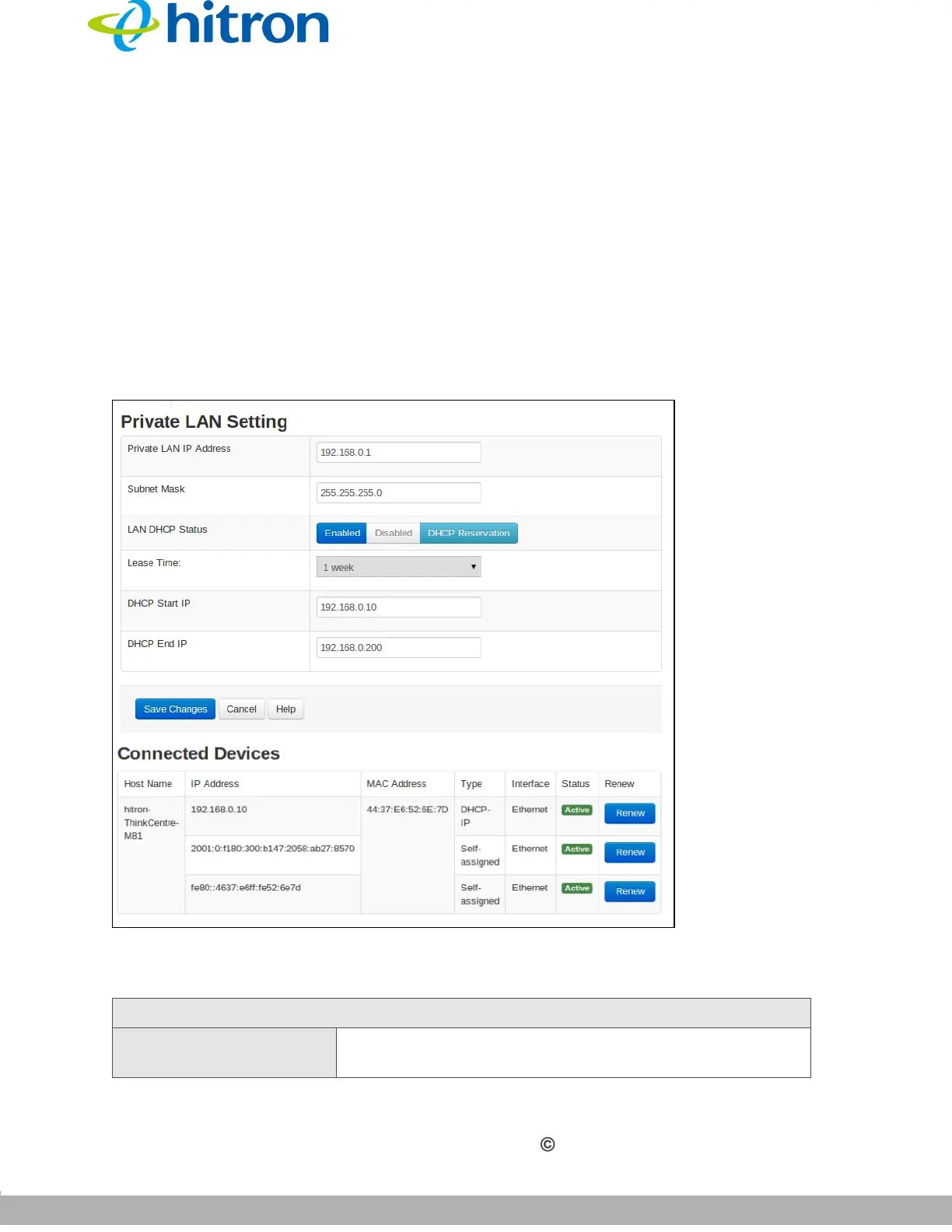
Click Basic > LAN Setup. The following screen displays.
Figure 20: The Basic: LAN Setup Screen
The following table describes the labels in this screen.
Table 16: The Basic: LAN Setup Screen
Private LAN Setting
Private LAN IP
Address
Use this field to define the IP address of the CGNM-
2250 on the LAN.



 To Next Page