ADMIN
Version 1.0, 12/2014. Copyright 2012 Hitron Technologies
91
Version 1.0, 12/2014. Copyright 2014 Hitron Technologies
91
Hitron CGNM-2250 User’s Guide
6.4 The Diagnostics Screen
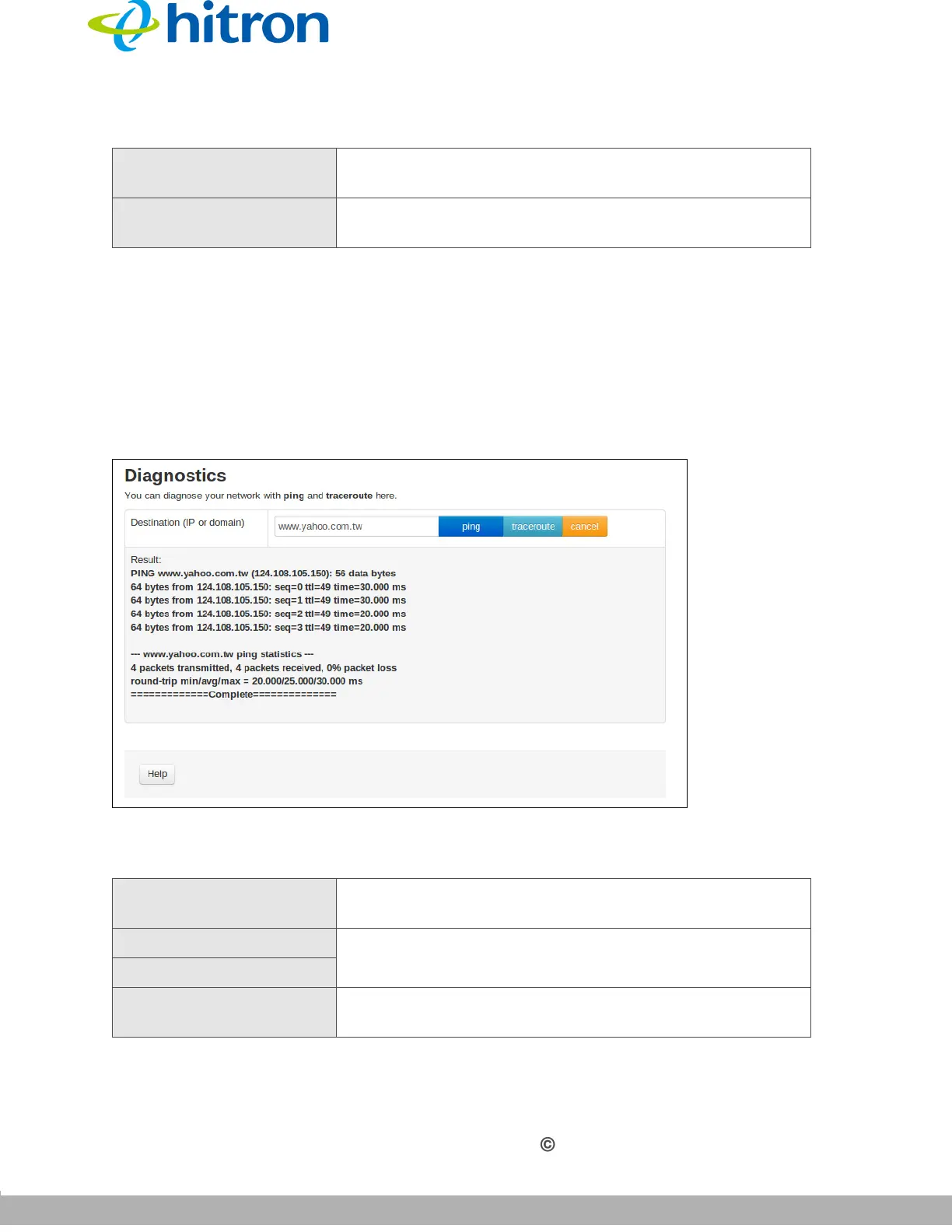
Use this screen to perform ping and traceroute tests on IP addresses or URLs.
Click Admin > Diagnostics. The following screen displays.
Figure 36: The Admin: Diagnostics Screen
The following table describes the labels in this screen.
Cancel Click this to return the fields in this screen to their last-
saved values without saving your changes.
Help Click this to see information about the fields in this
screen.
Table 31: The Admin: Diagnostics Screen
Destination (IP or
Domain)
Enter the IP address or URL that you want to test.
Ping Select the type of test that you want to run on the
Destination that you specified.
Traceroute
Result This field displays a report of the test most recently
performed.
Table 30: The Admin: Remote Management Screen (continued)



 To Next Page