ADMIN
Version 1.0, 12/2014. Copyright 2012 Hitron Technologies
90
Version 1.0, 12/2014. Copyright 2014 Hitron Technologies
90
Hitron CGNM-2250 User’s Guide
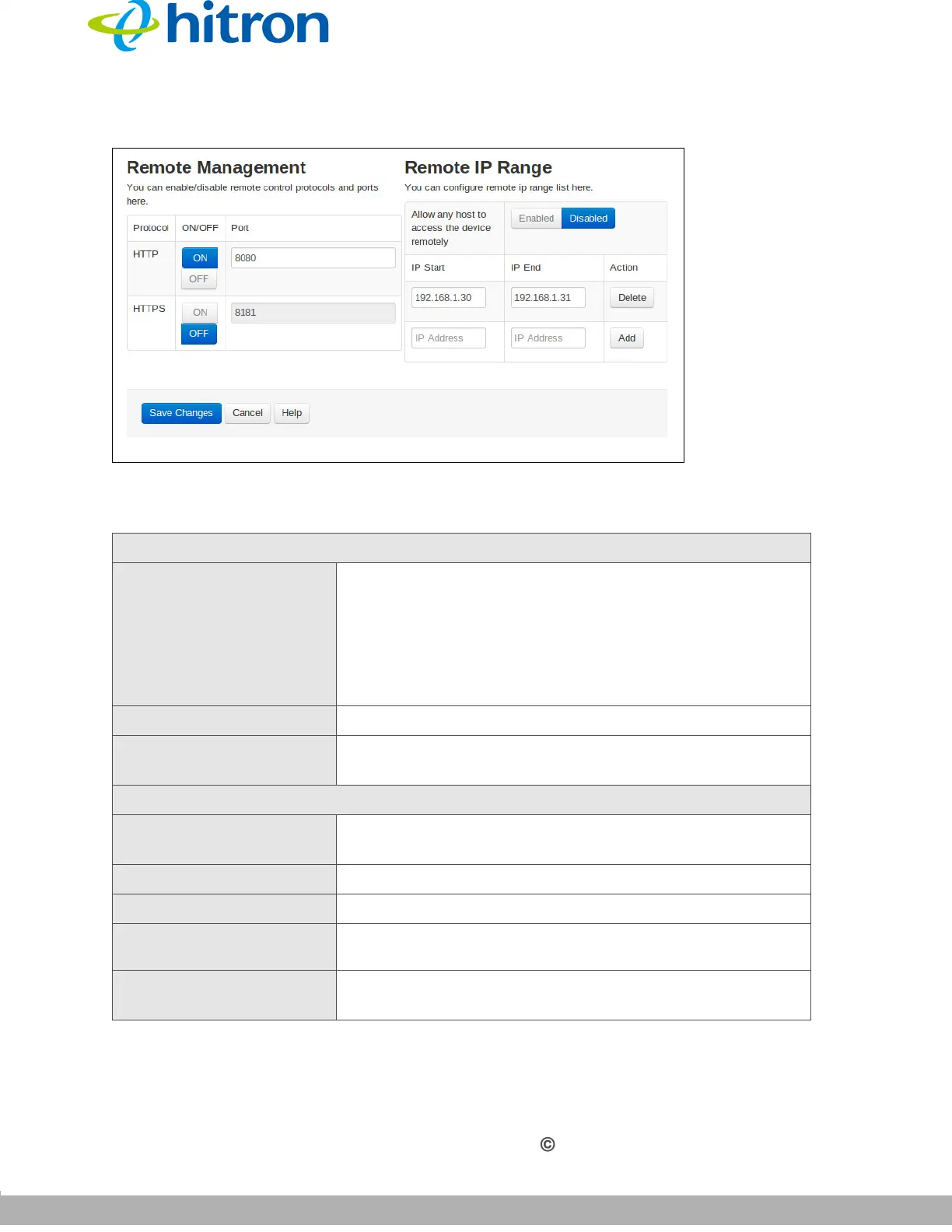
Figure 35: The Admin: Remote Management Screen
The following table describes the labels in this screen.
Table 30: The Admin: Remote Management Screen
Remote Management
Protocol Use this field to enable/disable remote control protocols
and ports on CGNM.
HyperText Transfer Protocol (HTTP)
HyperText Transfer Protocol Secure (HTTPS)
Telnet
ON/OFF Use this field to enable/disable each protocol.
Port Use this field to specify which port to use with each
protocol.
Remote IP Range
Remote Range Allow
All
This function allows you to grant access to a certain
range of IP addresses or all IP addresses.
IP Start Use this field to enter the start IP.
IP End Use this field to enter the end IP.
Action
Use this field to Delete a port forwarding rule. The deleted
rule’s information cannot be retrieved.
Save Changes Click this to save your changes to the fields in this
screen.



 To Next Page