Selenia User Guide
Chapter 4—Startup, Functional Tests, and Shutdown
32 MAN-03270 Revision 003
System Startup Procedures
3. Perform Pre-Startup Checks.
a. Look for open or loose panels, missing
hardware, and indications of damage.
b. Inspect the radiation shield for chips, cracks,
breaks, and for tight attachments.
c. Inspect the paddles for small cracks and wear.
d. Remove any obstructions to the Operator view
and C-arm movement.
4. Turn On the Selenia.
(If the Acquisition Workstation
does not start, reset the UPS for that
unit. See How to Turn On or Reset the
Uninterruptible Power Supply (UPS)
on page 39.)
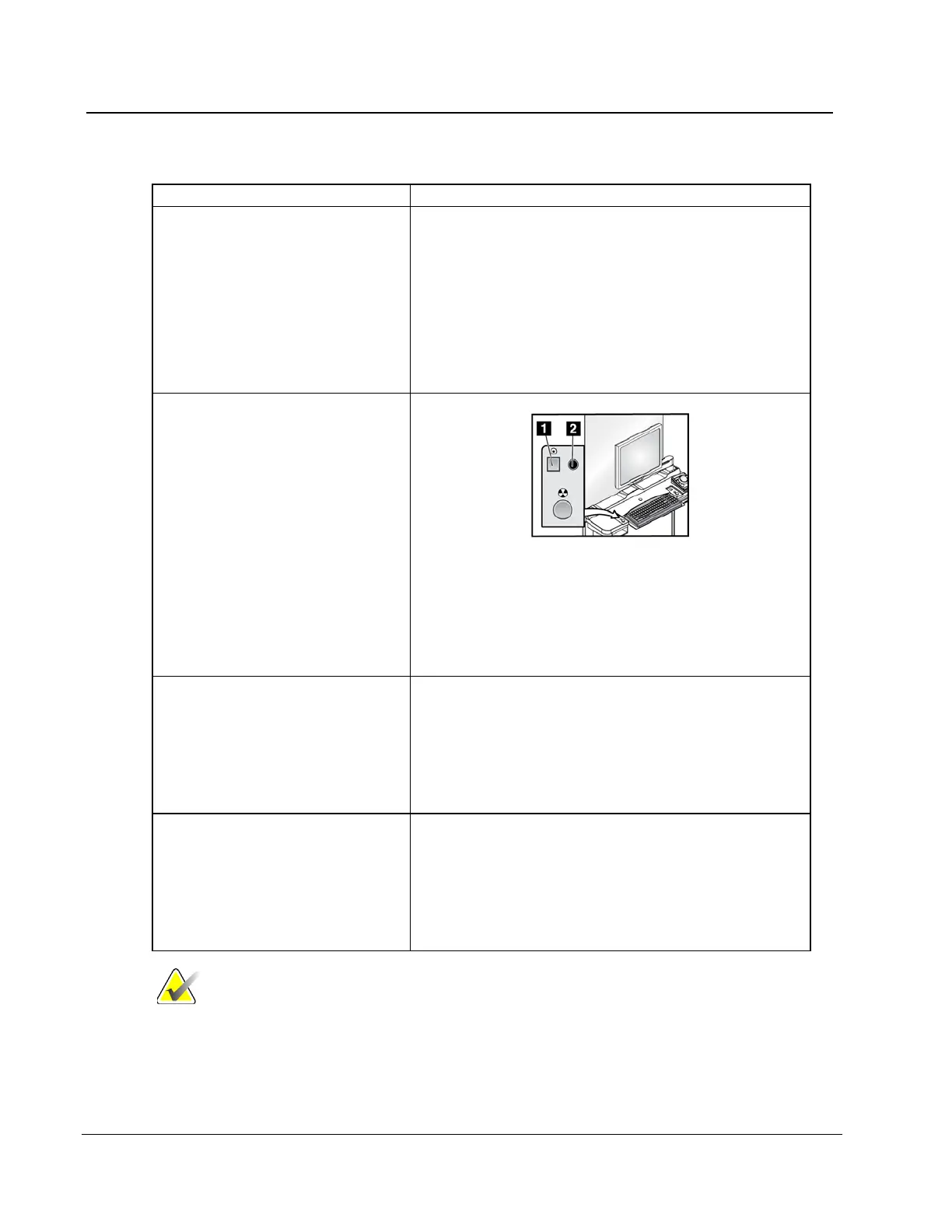
Figure 22: Power On Button and LED
a. Press the Power On button (item 1). The green
LED (item 2) illuminates.
b. Allow the time for initialization and diagnostic
tests to complete.
5. Log on to the Operating
System.
When the Logon dialog box appears:
a. Enter your user name (case sensitive) for the
Operating System.
b. Enter your Operating System password.
c. Select OK or press the Enter key.
6. Log in to the Application.
When the Login to System dialog box appears:
a. Select your ID from the drop-down list.
b. Enter your password (case sensitive). (Asterisks
appear in the field.)
c. Select OK or press the Enter key.
Note
If the system remains on over the night, reboot the system
daily to ensure best performance.












 To Next Page