Selenia User Guide
Chapter 6—The User Interface
84 MAN-03270 Revision 003
Actions on the Patient Views screen
Work with Views on page 84
Add/Edit the Patient Information
How to Add a New Patient on page 56
Add/Edit a Procedure (item 2)
New, Edit, Add a Procedure on page 58
Jobs in the Queue (item 3)
Displays the number of jobs in the outputs.
Change Exposure Techniques
Exposure Information on page 60
Acquire Images on page 85
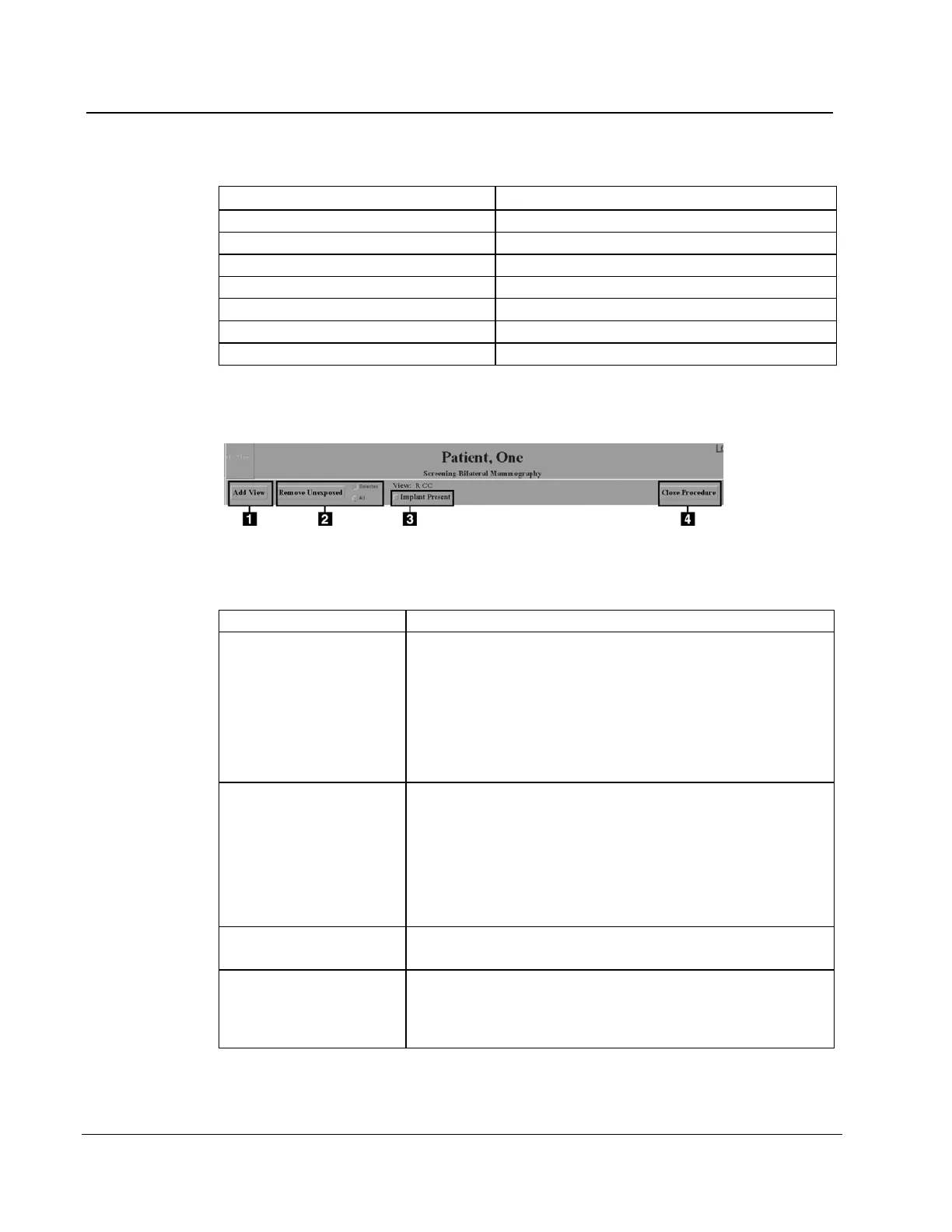
6.3.2 Work with Views
Figure 60: Buttons Used on the View Screen
1. Select the Add View button.
2. Select an additional View from the list of Standard
Mammography Views. To add multiple views, hold
down the Control key and select the View.
3. Select the OK button.
4. Select the new view icon before you acquire the image.
(item 2)
Unused view icons are automatically reclaimed, but you can
delete the views with the Remove Unexposed Views
1. Select the All button to remove all unused icons, or the
Selected button then indicate which views to delete.
2. Select the Remove Unexposed button.
Select the box if there is an implant present in the breast. The
box should remain checked for all views in the procedure.
1. Select the Close procedure button.
2. Select the Yes button to close the procedure or the No
button stay on the screen.












 To Next Page