ThinPrep
®
Integrated Imager Operator’s Manual
4.19
OPERATION
Subsequent Review
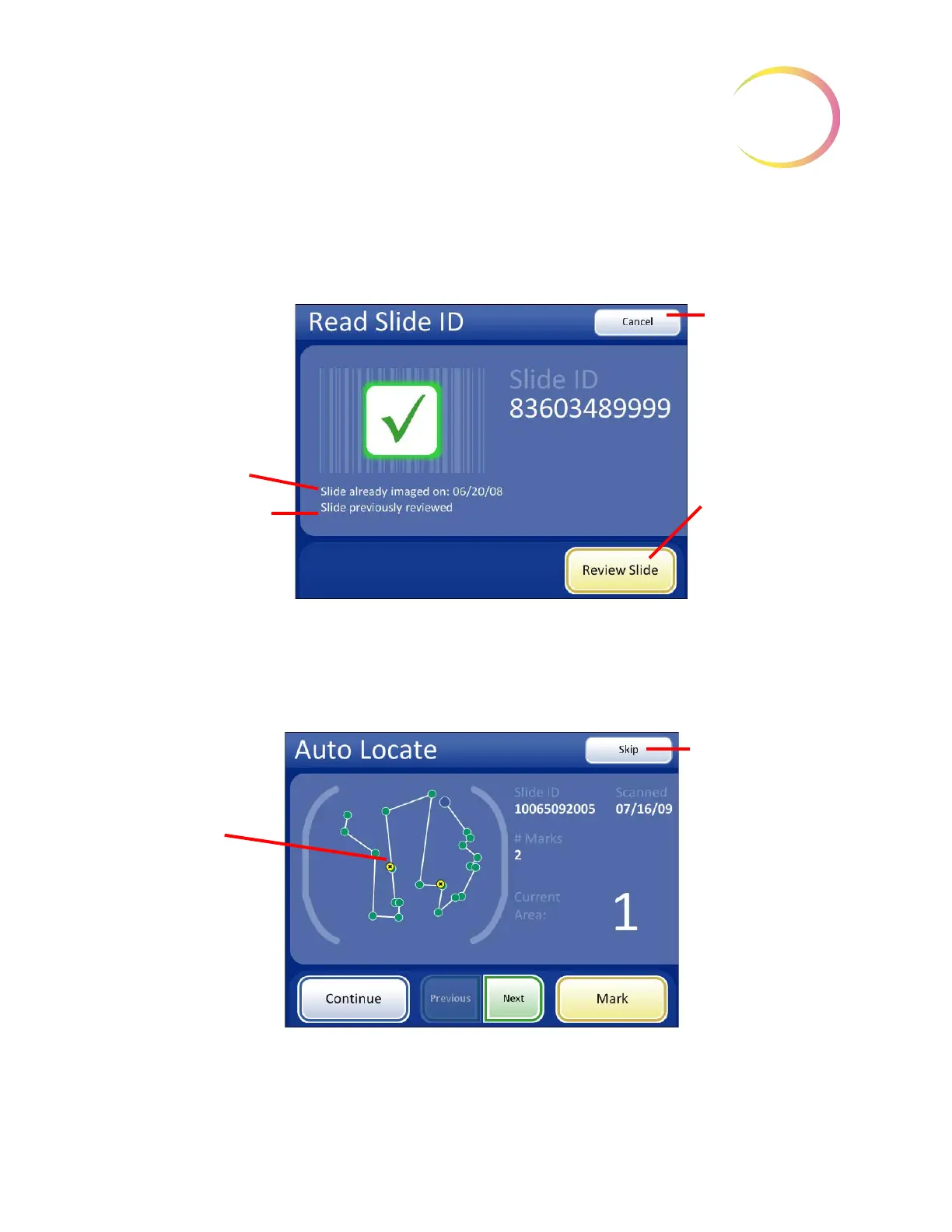
A slide that has already been imaged and reviewed may be reviewed again. When the slide ID is
scanned, the slide data record is retrieved from the database. See
Figure 4-20.
Figure 4-20 Slide Previously Reviewed
Press the
Review Slide
button to continue with review of the slide. The review goes in the same
order as an initial review: Auto Locate and then Auto Scan with a chance to review marks. Auto Scan
and Auto Locate are optional during a subsequent review.
Figure 4-21 Auto Locate During Subsequent Review
Slide status message:
Already imaged
Previously reviewed
Cancel
button, to
return to Load
Slide screen
Review Slide
but-
ton to proceed
with slide review
Auto Locate pres-
ents the 22 fields
of view including
any electronic
marks that were
made previously.
Skip
button, to
bypass Auto Locate
and proceed to the
Auto Locate Com-
plete screen



 To Next Page