NetCol5000-A(025, 035) In-row Air Cooled Smart
Cooling Product
User Manual (600 mm)
6 System Operation and Maintenance
Copyright © Huawei Technologies Co., Ltd.
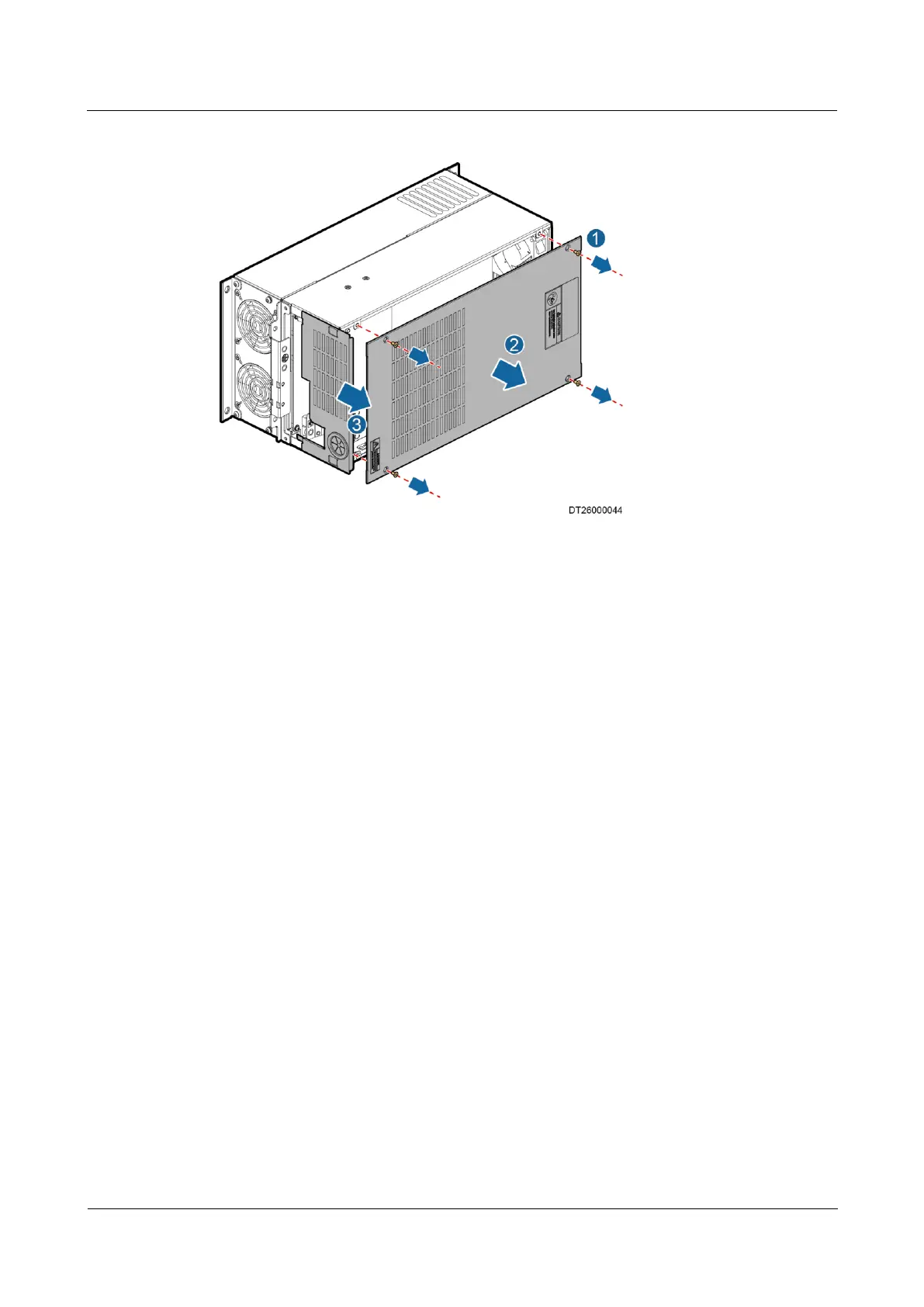
Figure 6-10 Removing the drive top cover and the baffle plate of the upper chassis
1. Remove the four screws for securing the drive top cover, as shown by 1 in Figure 6-10.
2. Remove the drive top cover, as shown by 2 in Figure 6-10. Cut off the cable ties using a
pair of diagonal pliers, record the installation positions of the relay wiring terminals and
cable shield layer, and remove relay wiring terminals 01, 02, 03, and communications
terminals 61, 68, 69. Remove the cable shield layer from the drive fixing plate at the
shield point and replace the control terminal with a new male connector from the drive
fittings.
3. Extract the baffle plate of the upper chassis in the direction shown by 3 in Figure 6-10
and draw out the cables.
Step 5 Remove the clamp for fixing the power cables on the input and output sides, loosen the
screws for securing the wiring terminals of the power cables using a Phillips screwdriver, and
draw out the power cables, as shown in Figure 6-11.



 To Next Page