NetCol5000-A(025, 035) In-row Air Cooled Smart
Cooling Product
User Manual (600 mm)
Copyright © Huawei Technologies Co., Ltd.
4.3 Power-On Commissioning
4.3.1 Quick Settings
Prerequisites
After the system is powered on, the LCD is started, and the progress bar in the startup screen
is full:
For initial power-on, the system enters the quick setting screen. Set the parameters by
following the instructions in this section.
For non-initial power-on, the LCD automatically enters the home screen as shown in
Figure 4-1.
Procedure
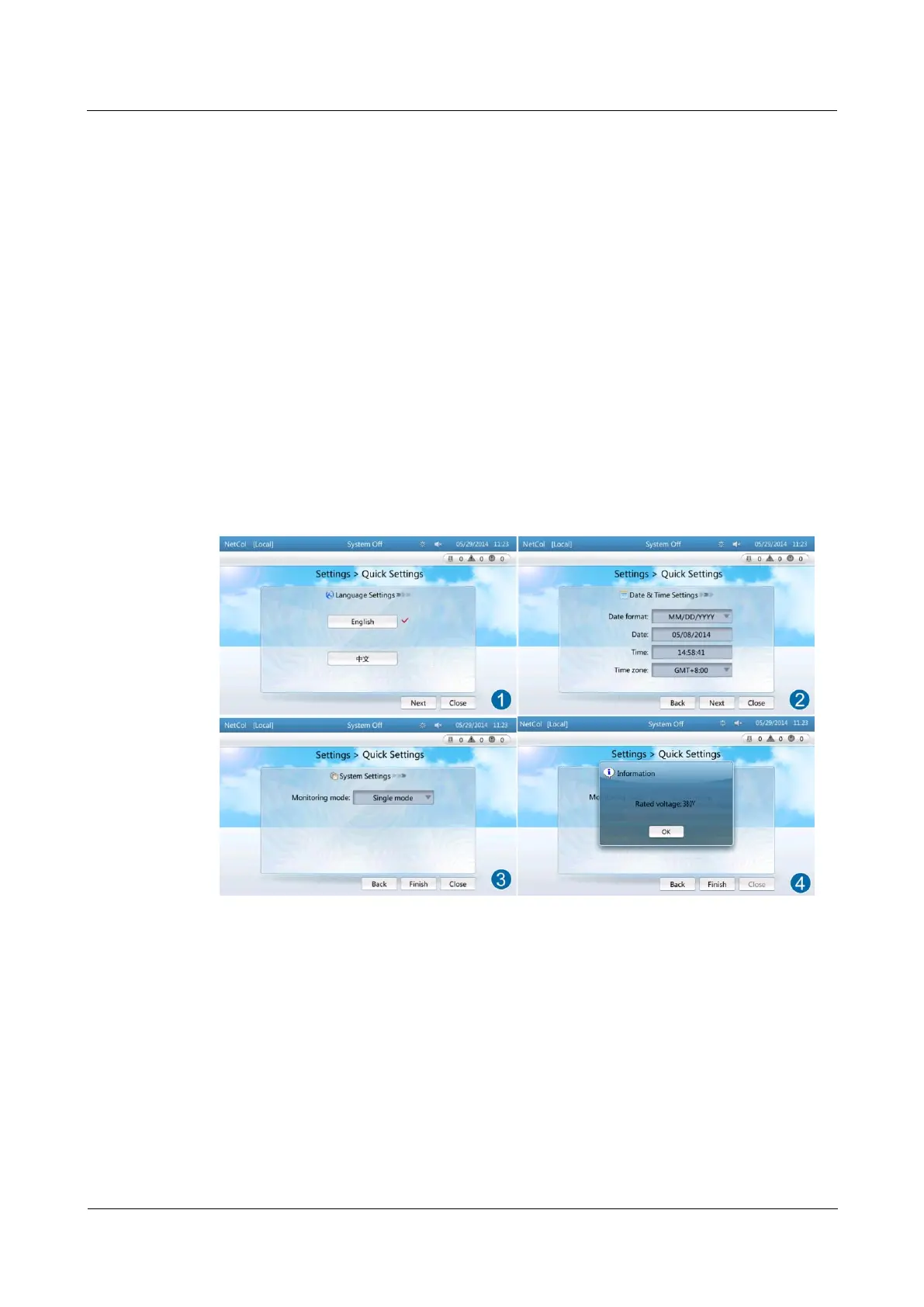
Step 1 Set the language and tap Next, as shown by (1) in Figure 4-3.
Figure 4-3 Quick settings
Step 2 Set the time and date and tap Next, as shown by (2) in Figure 4-3.
Step 3 Set system parameters and tap Finish, as shown by (3) in Figure 4-3.
Step 4 The system displays a dialog box for confirming the rated voltage. Tap OK after confirmation,
as shown by (4) in Figure 4-3.
----End
4.3.2 Initial Configuration



 To Next Page