Machine Maintenance: 4-16
CLEAN QC FILTER AND ORIFICE
Clean and inspect the in-line quick connect lter and
orice every 100 hours.
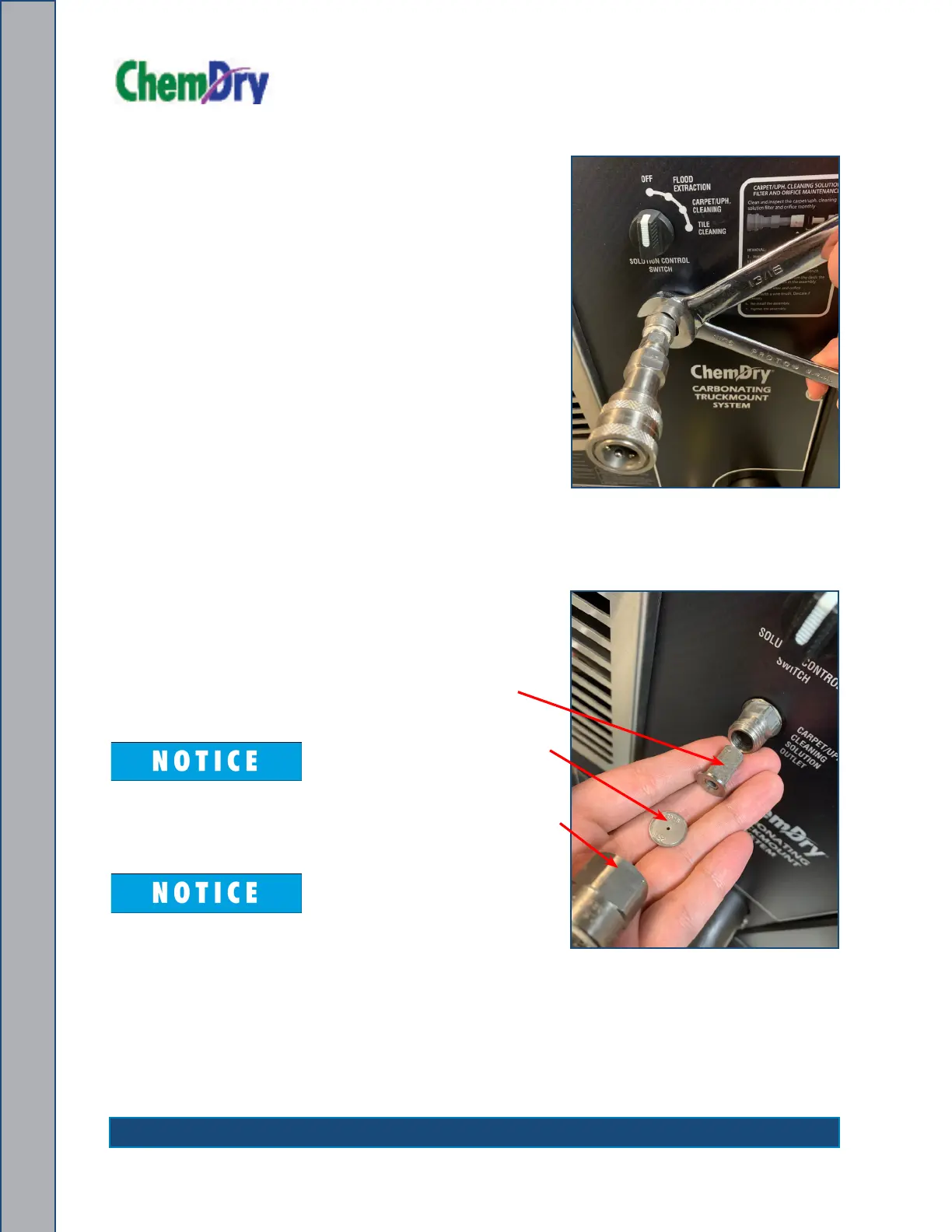
1. Remove the quick connect assembly on the
Carpet/Uph. Cleaning Solution Outlet (see
Figure 4-6).
2. Hold the hex closest to the panel using a 11/16”
open end wrench and turn the hex assembly for
the quick connect with a 13/16” open end wrench.
3. Remove the assembly from the dash; the orice
plate will remain in the assembly.
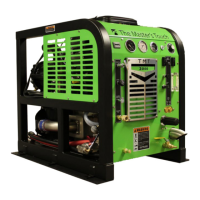
4. Remove the lter and orice (see
Figure 4-7).
5. Clean with a wire brush. Descale
if necessary.
6. Re-install the assembly.
7. Tighten the assembly.
The amount of torque may vary.
Run the pump to verify there are no
leaks. Re-tighten as required.
The assembly may move in
the dash during removal and
installation. This is normal; using
the 11/16” wrench will minimize
the movement.
Figure 4-6. Remove Quick
Connect Assembly
Figure 4-7. Remove Filter and Orice
Filter
Orice Plate
QC Assembly


 To Next Page