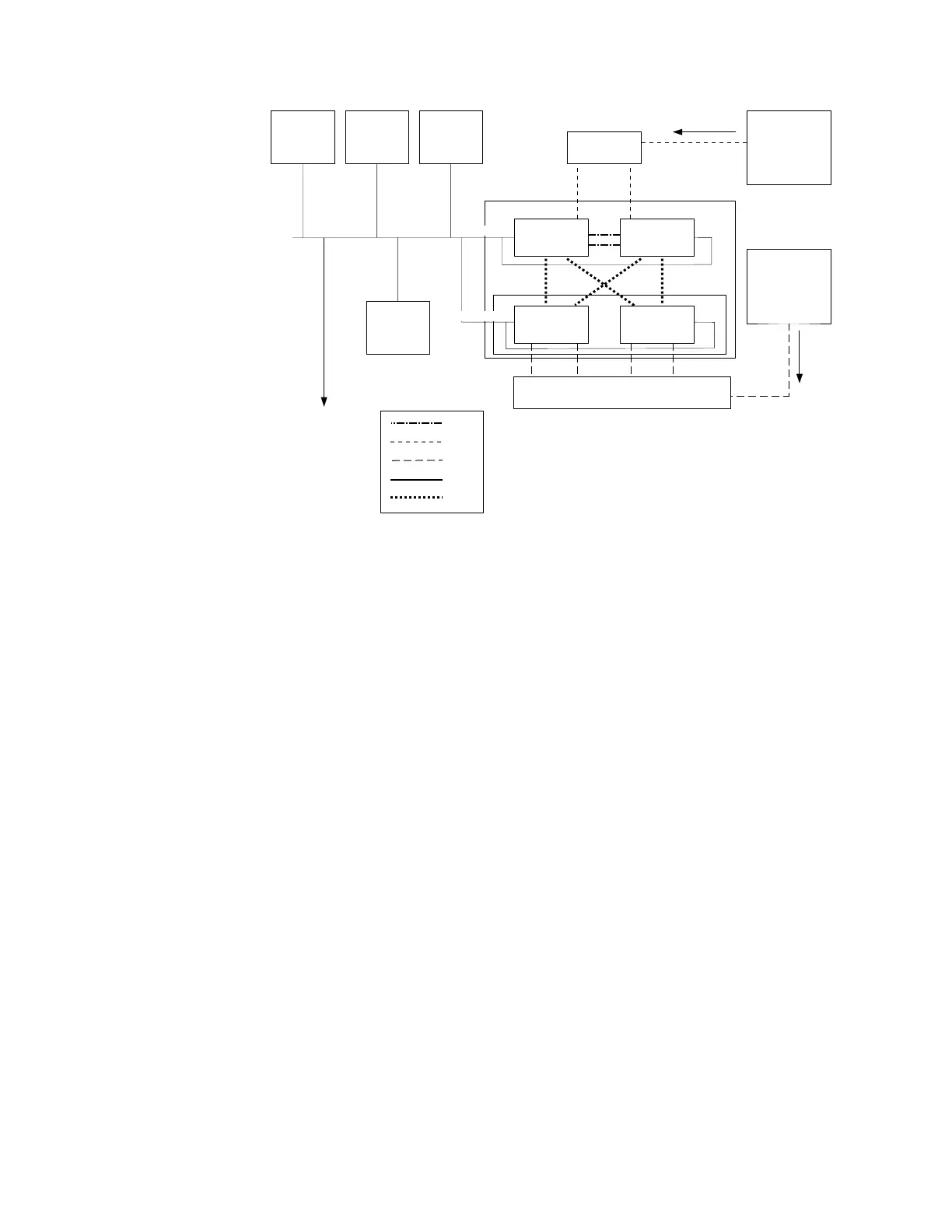
Legend for above graphic:
v 1 File storage path
v 2 Block storage path
v 3 Remote support services via internet
v A DNS server
v B NTP server
v C Email server
v D Authentication server
v E 10 Gbps Ethernet switch
v F Client machine
v G Client machine
v H Fibre Channel switch
v AA 1 Gbps Ethernet direct connection between the file modules
v BB 10 Gbps Ethernet network
v CC Fibre Channel network
v DD 1 Gbps Ethernet
v EE Fibre Channel direct connection from file modules to node canisters
Note: You cannot use VLAN-based subnets to configure the system network. To
configure the Storwize V7000 Unified management IP address, file module 1 and 2
IP addresses, subnet mask, and gateway address, you must provide non-VLAN
based network information. Also, all IP addresses entered must be on the same
subnet. After the system is configured, use the chnwmgt command to change the
Storwize V7000 Unified network settings to switch to a VLAN-based subnet. This
123.123.123.102 123.123.123.104123.123.123.103
123.123.123.11
123.123.123.101
123.123.123.12
99.99.99.100
99.99.99.101
123.123.123.21
123.123.123.22
99.99.99.200
99.99.99.1
A
B
C
E
1
F
2
D
3
123.123.123.10
123.123.123.20
ifs00053
G
File Module 1 File Module 2
Node cannister 1 Node cannister 2
Control Enclosure
AA
BB
CC
DD
EE
V7000 Unified
H
Figure 11. Examples of the IP addresses and network services needed for the system. The
expansion enclosures are not shown.
Chapter 1. Before you begin the installation 13


 To Next Page
 Loading...