41
8
DSC OPERATION
New2001
1
2
3
4
5
6
7
8
9
10
11
12
13
14
15
16
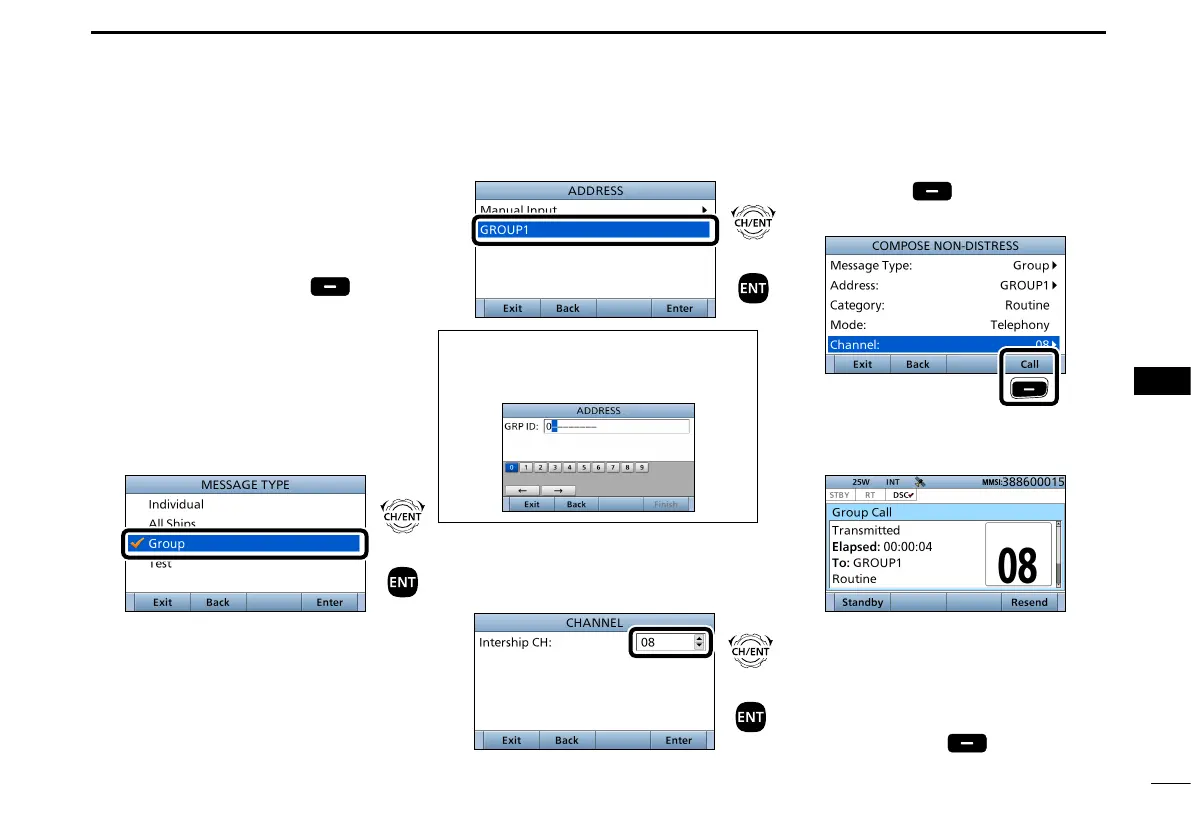
D Sending a Group call
The Group call function allows you to
transmit a DSC call to only a specic
group.
1. Push [
Compose Other]
to
display the COMPOSE NON-
DISTRESS screen.
L To display the screen from the Menu
screen:
([MENU] >
Compose Non-Distress
)
2. Select “Message Type,” then push
[ENT].
3. Select “Group,” then push [ENT].
4. Select “Address,” then push [ENT].
5. Select the Group address
or “Manual Input,” then push [ENT].
(Example: GROUP1)
When you select “Manual Input” in
step 5, push the keypad to manually
enter the Group ID. (p. 26)
6. Select “Channel,” then push [ENT].
7. Select the voice channel,
then push [ENT].
8. Push [Call]
to send the Group
call.
Push
9. After sending, the following screen
is displayed.
L See page 29 or page 30 for
details of the Task mode’s software
key functions.
10. Hold down [PTT] to announce the
message.
11. Push [Standby]
to return to
the Main screen.
+
Push
Rotate
+
Push
Rotate
+
Push
Rotate


 To Next Page