77
9
OTHER FUNCTIONS
Waypoint (Continued) ■
Editing the waypoint: Push [EDIT]
The stored waypoint name and its position data can be
changed.
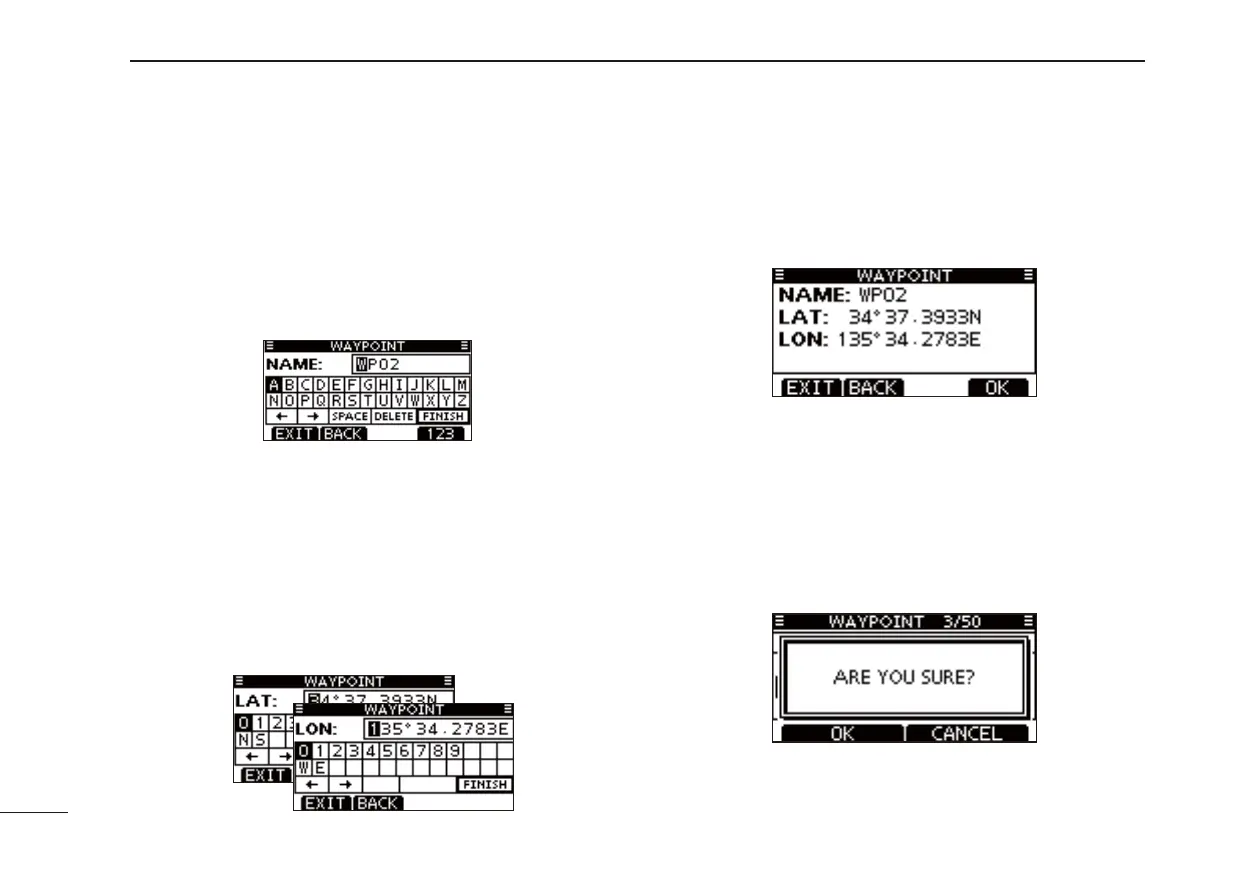
Push [EDIT] to enter the name programming screen. q
• The preprogrammed name is displayed.
•
If desired, enter a 10 digit name as described in the step w of
the previous page.
w
Edit specifi c latitude and longitude data in the following way:
• The preprogrammed position data appears on each screen.
• Select a desired number using [Y]/[Z]/[Ω]/[≈].
• Push [ENTER] to set the digit.
• Select N (North latitude) or S (South latitude) when the cursor
is on the ‘N’ or ‘S’ position.
• Select W (West longitude) or E (East longitude) when the cur-
sor is on the ‘W’ or ‘E’ position.
• To move the cursor, select either arrow, “←” or “→,” then push
[ENTER].
• To set the screen data, select “FINISH,” then push [ENTER].
After the confi rmation screen appears, push [OK] to save e
the waypoint and return to the waypoint list screen.
Deleting the waypoint: Push [DEL]
The stored waypoint can be deleted.
Please note that a deleted waypoint cannot be restored.
Push [DEL] to delete the waypoint. q
• The confi rmation screen “ARE YOU SURE?” appears.
Push [OK] to delete the waypoint and return to the way- w
point list screen.



 To Next Page