28
8
DSC OPERATION
1
2
3
4
5
6
7
8
9
10
11
12
13
14
15
16
Transmitting an Individual call (continued) D
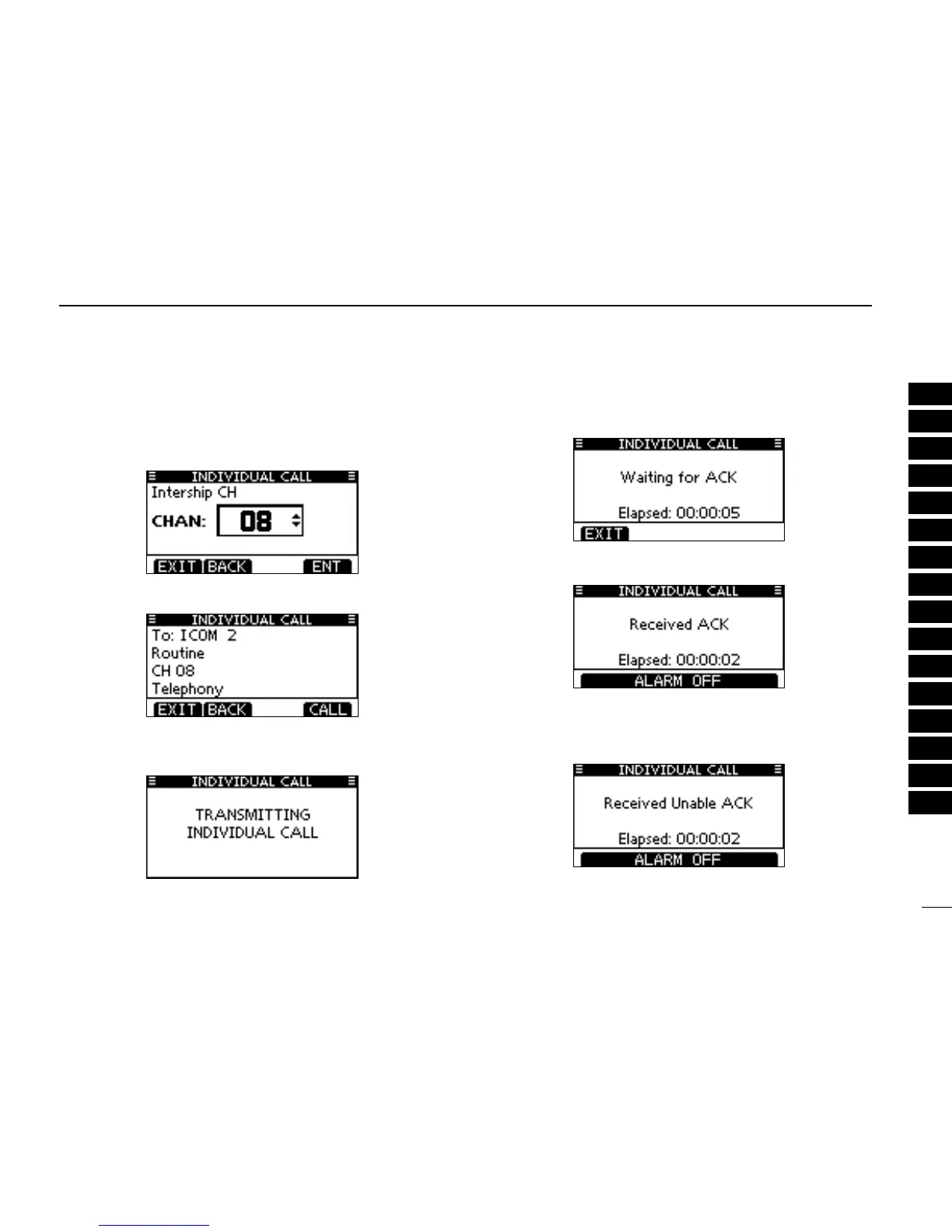
Select a desired intership channel using [ r Y](CH)/[Z](CH),
then push [ENT].
•Intershipchannelsarealreadypresetintothetransceiverinthe
recommended order.
A confirmation screen appears. t
•Conrmthecallcontents.
Push [CALL] to transmit the Individual call. y
•IfChannel70isbusy,thetransceiverstandsbyuntilthechan-
nel becomes clear.
Standby on Channel 70 until an acknowledgement is re- u
ceived.
When the acknowledgement ‘Able to comply’ is received, i
beeps sound and the screen below is displayed.
Or, when the acknowledgement ‘Unable to comply’ is re-
ceived, beeps sound and the screen below is displayed.
•Push[ALARMOFF]tostopthebeepsandthenreturntothe
operating channel (before you entered the MENU screen).



 To Next Page