2 Pass-Through Function Settings Procedure
27-4 WindO/I-NV4 User’s Manual
This section describes the settings procedure for the Pass-through function. The Pass-through function can be
configured with WindO/I-NV4 or in System Mode.
2.1 How to Enable the Pass-Through Function in WindO/I-NV4
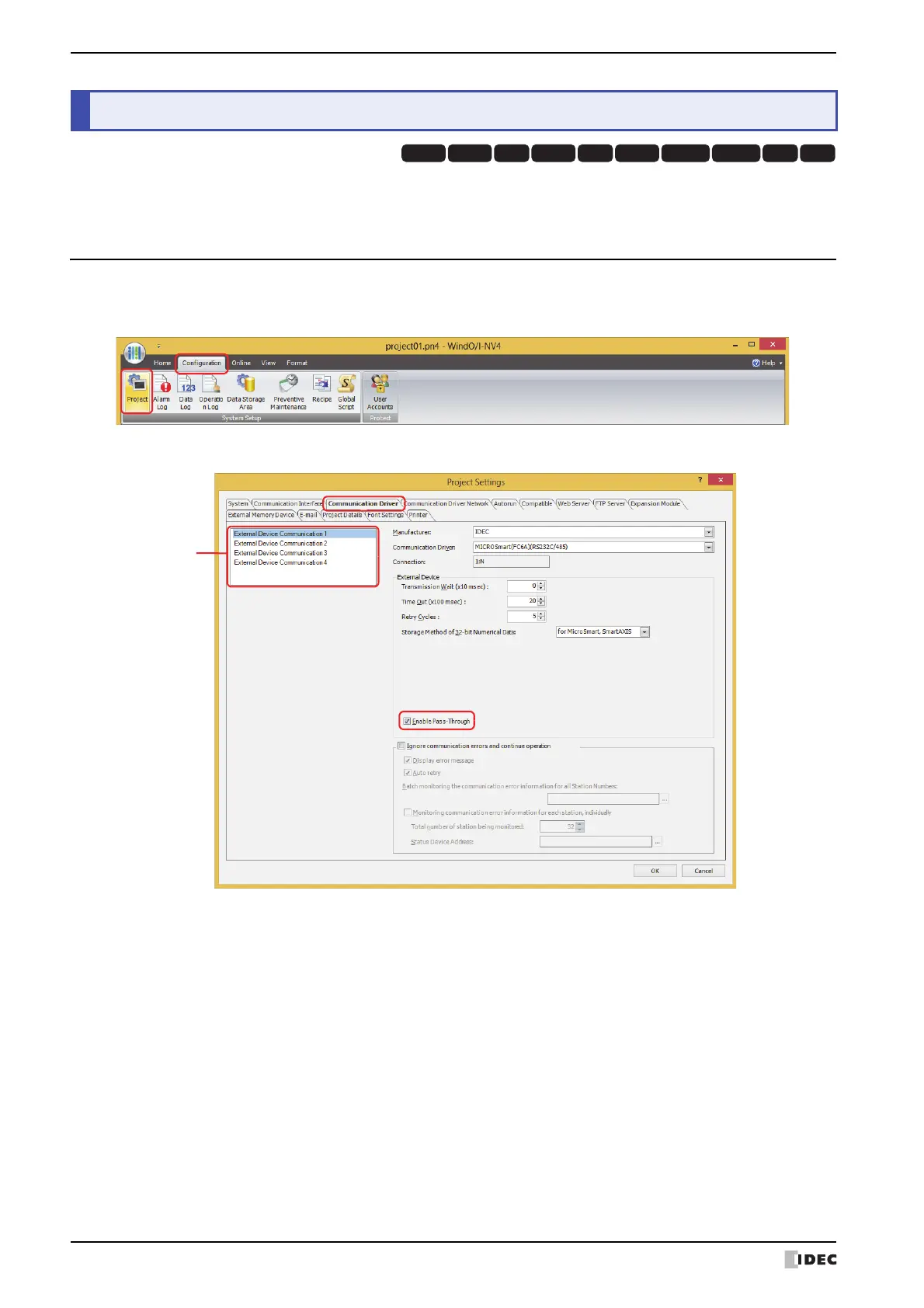
1 On the Configuration tab, in the System Setup group, click Project.
The Project Settings dialog box is displayed.
2 Click the Communication Driver tab.
3 Select the external device communication from the (Function) to make the Pass-through function is enabled.
4 Under External Device, select the Enable Pass-Through check box.
This option is accessible if the Communication Driver is supported. For details, refer to “1.2 Supported External
Devices” on page 27-2.
5 Click OK.
This concludes the configuration to enable the Pass-through function.
2 Pass-Through Function Settings Procedure
HG3G
HG2G-5FHG5G-V HG4G-V HG3G-V HG2G-V HG2G-5T
HG4G HG1G HG1P



 To Next Page
 Loading...