Platinum™ VX
Installation and Operation Manual Navigation
© 2016 Imagine Communications Corp. Proprietary and Confidential. Version 1.2 | Page 92
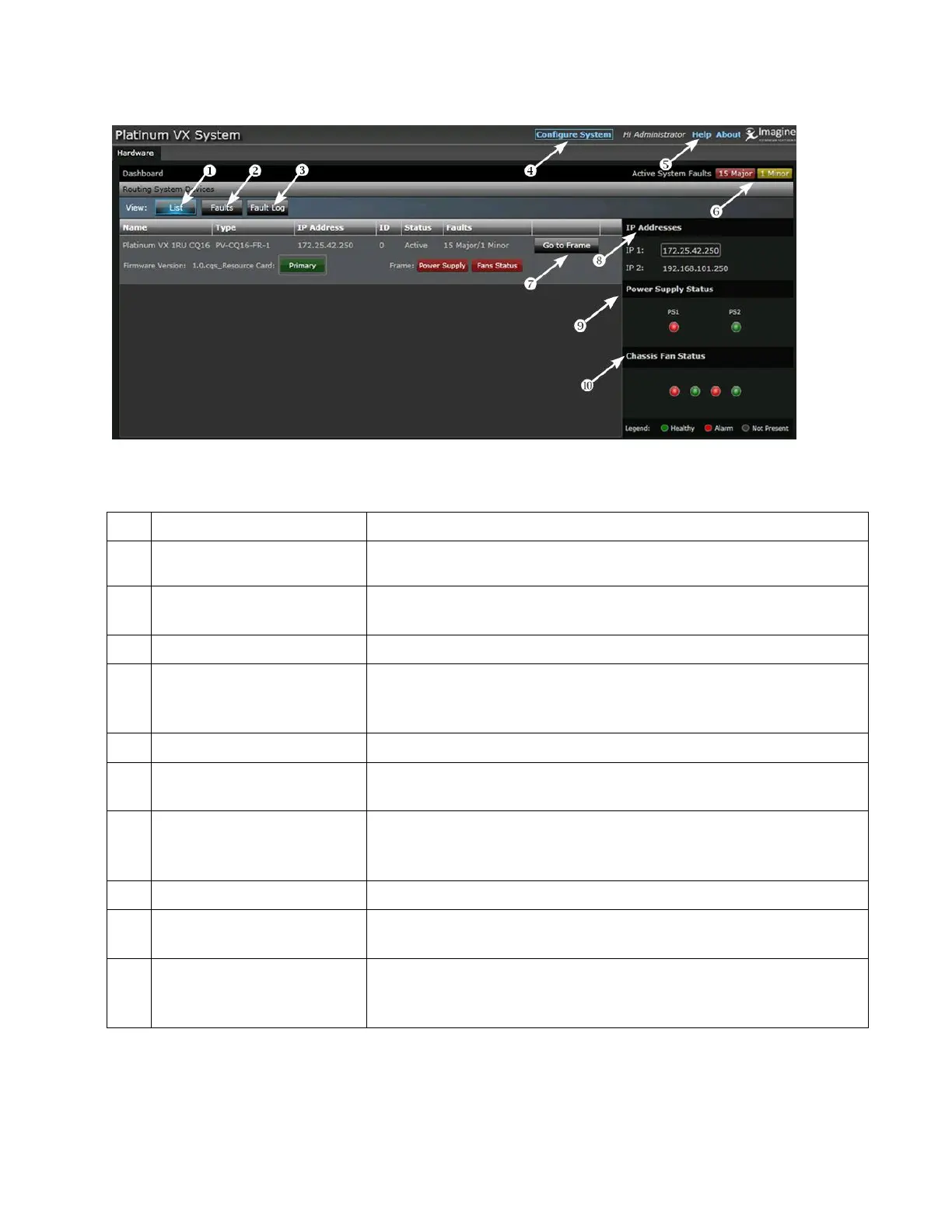
Figure 58: Dashboard for an 1 RU Platinum VX with CQS (PV-CQ16-FR-1)
Table 30: Platinum VX Dashboard
Physical view of the overall system (Default view)
An overview of components/modules with faults and links to open,
disable, or acknowledge faults. See Faults View (on page 135).
Link to the Fault Log (on page 136) that opens in a new window.
Links to configure the system and perform functions related to
Firmware Management, and User Accounts. See Configuration
Dashboard (see "System Configuration" on page 138).
Active System Faults. See the Faults Tab (Faults View (on page 135))
for details.
Platinum VX Frame details along with IP address, firmware versions,
resource card information, and fault information. See Frame Specific
Details (on page 95).
Defined in Manage Controller Settings (on page 139).
Indicators for power supplies. See Power Supply Status on the
Dashboard (on page 64)
Fan supply status categorized by location (front top, front bottom,
rear). See Chassis Fan Status on the Controller Dashboard (on page
37).



 To Next Page