Platinum™ VX
Installation and Operation Manual Platinum VX Modules
© 2016 Imagine Communications Corp. Proprietary and Confidential. Version 1.2 | Page 50
Resource/Crosspoint Status on the Frame
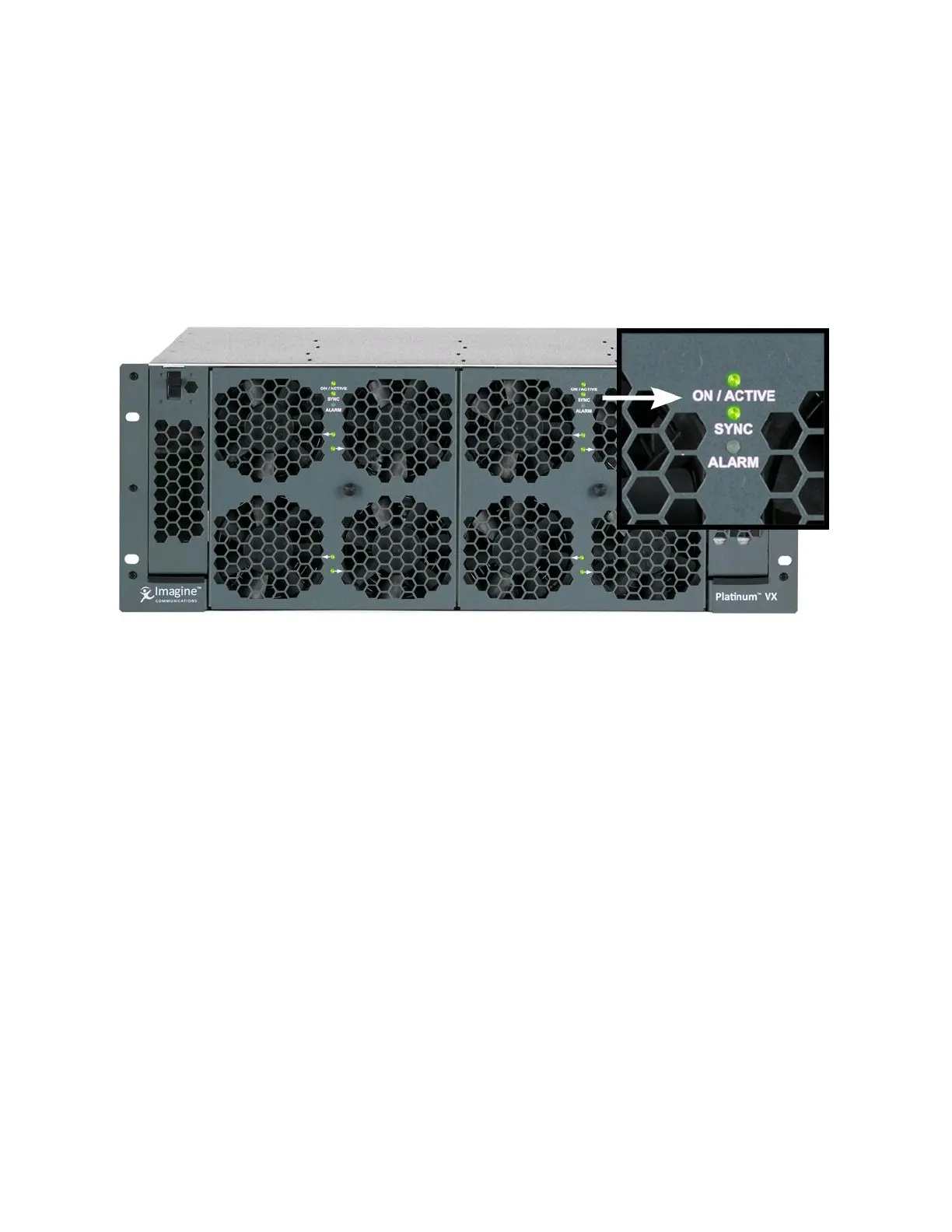
Crosspoint/Resource Modules in 4 and 8 RU frames indicate their status via ON/ACTIVE LEDs on the
front of the frame.
A 4 RU frame has 2 ON/ACTIVE LEDs on the front of the frame, one for each of the 2 Crosspoints (if
present). The LED is will be green for the active crosspoint, and yellow for the secondary crosspoint. If
there is only one Crosspoint in the frame, only 1 LED will be lit.
Figure 35: Resource/Crosspoint Module LEDs on a 4 RU Frame
An 8 RU frame has 4 ON/ACTIVE LEDs. When looking at the frame from the front:
The ON/ACTIVE LED on the top left and bottom left-hand corners represent one Crosspoint (both
crosspoint LEDs mirror each other)
The ON/ACTIVE LED on the top right and bottom right-hand corners represent the second
Crosspoint, if present (both crosspoint LEDs mirror each other)
The LEDs will be green for the active crosspoint, and yellow for the secondary crosspoint. If there is only
one Crosspoint in the frame, only 1 LED (top and bottom) will be lit.



 To Next Page