50 Personalized Messages
2. Dial the two-digit code for the message to display. A
confirmation tone sounds; the DND button LED flashes.
3. Replace the handset. (Activating DND or Call Forwarding
cancels selected message.)
Custom Messages
Selecting a Custom Message
1. Dial th e Message Access code [633], or press the MSG
ACCESS flexible button (if pre-programmed).
2. Dial the two-digit code for the desired message (21-30) to
display on your phone when called. A confirmation
sounds and the DND button LED flashes.
3. Replace the handset or press the ON/OFF button.
To program a Custom Message:
1. Dial [633].
2. Dial a valid code (18-20) for desired custom message.
3. Enter a custom message up to eight characters.
4. Press HOLD to save.
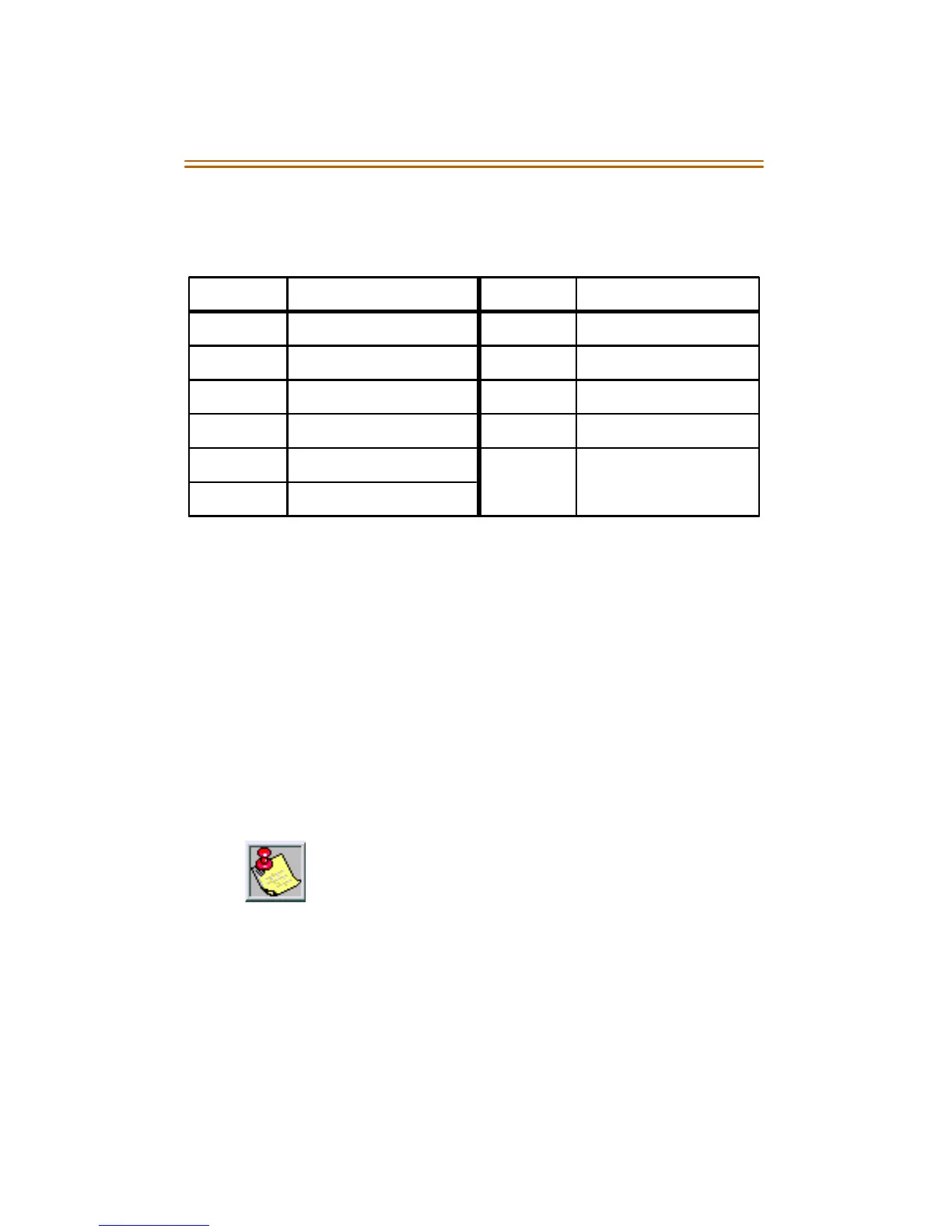
Code Message Code Message
00 Cl ear M essa ge 06 O n Tri p
01 O n Va cation 07 In Me eting
02 Re turn A M 08 A t Home
03 Re turn PM 09 On Brea k
04 Return Tomorrow 10 At Lunch
05 Return Next Wee k
The system a dminist rator p rogra ms the ten custom
messages at the first attendant station (Station 100).
These messages can be used i n the sa me man ner as
in
Personalized Messages
.



 To Next Page