Elite
TM
Large Screen Telephone Qui ck Reference Car d
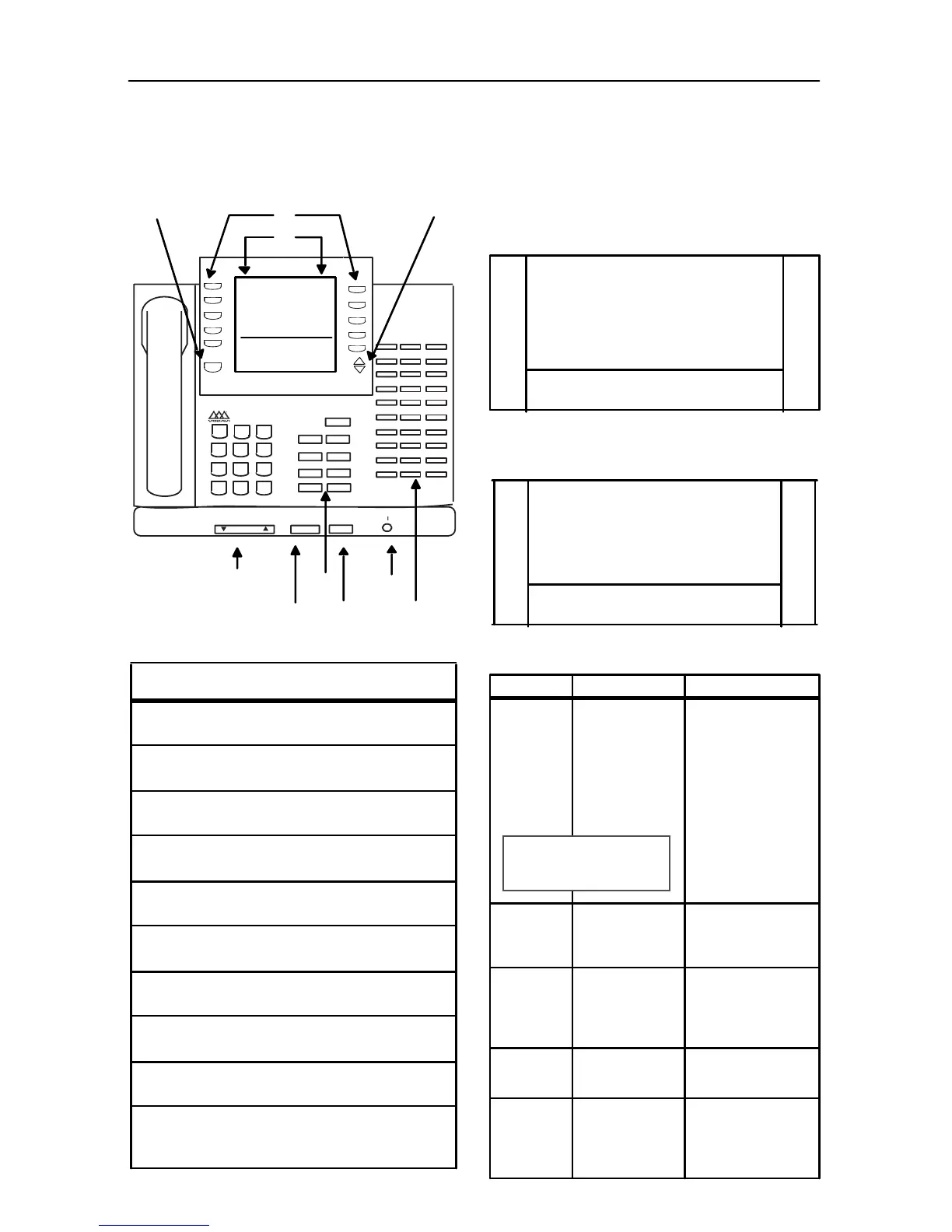
Large Screen Display Features
The Elite digital 30-button model provides a 7-
line by 16-character display with 10 SOFT keys, a
MENU key, and UP/DOWN scroll keys.
Us ing the Soft Keys
From the main menu, use the soft keys to access
th e option s lis ted.
Ca lend ar Mo de
-- When in idle mode, the
default monthly calendar will display. The
calendar may also be accessed by pressing the
MENU so ft key.
Ma in Men u
-- To access the main menu at any
time, pres s the MENU soft key.
To select a main menu option:
Feature/Button Descriptions
1. DSS Console -- Provides access to 30 flexible
feature/functions.
2. Fixed Feature Keys -- Used to access specific fixed
feature/ func tions.
3. HOLD Key --Used to place calls on hold and to
retrieve held calls.
4. LARGE Screen -- Designed to provide a 7-line by
16 - chara cte r v ie wing ar ea.
5. MENU Key -- Toggles between main menu screen
and monthly calendar.
6. MICrophone -- Used to talk w ith other party
wi thout usi ng the handset .
7. ON/ OFF Key -- Used to ma ke a call wi thout l ifting
the handset.
8. PAG E Up/Do wn Ke ys -- Us e d to adva nce to t he
NEXT and PREVIOUS option screens available.
9. Soft Keys -- Used to access specific features and
functions.
10 . VO LUM E Cont rol B ar -- Used to a djus t le ve l o f
tones, background music, ringing, receiver volume,
and display contrast.
PAGE
MENU
1
ABC
2
TUV
8
PRS
7
MNO
6
JKL
5
GHI
4
DEF
3
WXY
9
0
*
ON/OFF HOLD
t
VOLUME
s
MIC
HTP
CONFTRANS
FWD
MUTE
MSG
FLASH
CAMP ON
SPEED
#
DIGITAL
DIRECTORY DND
SPEED DIAL LNR
PA R K P IC KU P
MUS IC
FEATURES
STA XXX
MMM D D YY HH:MMx
Q
Q
Q
Q
Q
MM M YY YY
SUN MON TUES WED THURS FRI SAT
1 2 3 4 5
6 7 8 9 10 11 12
1 3 1 4 15 16 17 18 19
2 0 2 1 22 23 24 25 2 6
27 28 29 30 31
Q
Q
Q
Q
Q
_
STA XXX
MMM DD YY HH:MMx
V
W
Q
Q
Q
Q
Q
DIRECTORY DND
SPEED DIAL LNR
PARK PI CKUP
MU SIC
FEATURES
Q
Q
Q
Q
Q
_
STA XXX
MM M D D YY HH:MM x
V
W
Press… Disp lay shows… Then…
DIRECTORY
ABC
DE F
GH I
JK L
MN O
press the soft key
associated with the
desired number.
Use the PAG E UP/D N
keys to display the
previous or nex t 5
names in Directory.
To scroll through the
list, press the [
6
] key
to v ie w t he prev ious
entry, or [#] to view
the nex t e ntry.
SPEED
DIAL
Ente r Bi n
Nu mb er
dial the bin number
associated with
desired external
phone number.
PARK
PICKUP
PAR K 1
PAR K 2
PAR K 3
PAR K 4
PAR K 5
select desired Park
loca ti on wher e cal l is
holding (1-5). Press
PG D N
W
to se le ct
PA RK lo ca ti ons 6-8 .
MUSIC
BG M 1
BG M 2
BG M O FF
select desired
background music
option.
FEATURES
CALL FWD
PAGE I N TER N AL
PAGE E XTE RN AL
VOICE MAIL
MO R E
select one of the
options listed.
NOTE -- Wait for the desir ed
number to display before
pressing the SPEE D button.



 To Next Page