41
First Time Setup—Continued
If you connect an u-capable Onkyo RI Dock to the
TV/Tape IN, Game IN or VCR/DVR IN jacks, for u to
work properly, you must change this setting.
This setting can only be changed on the AV receiver.
Note:
DOCK can be selected for the TV/Tape or Game or
VCR/DVR input selector, but not at the same time.
Changing the Input Display
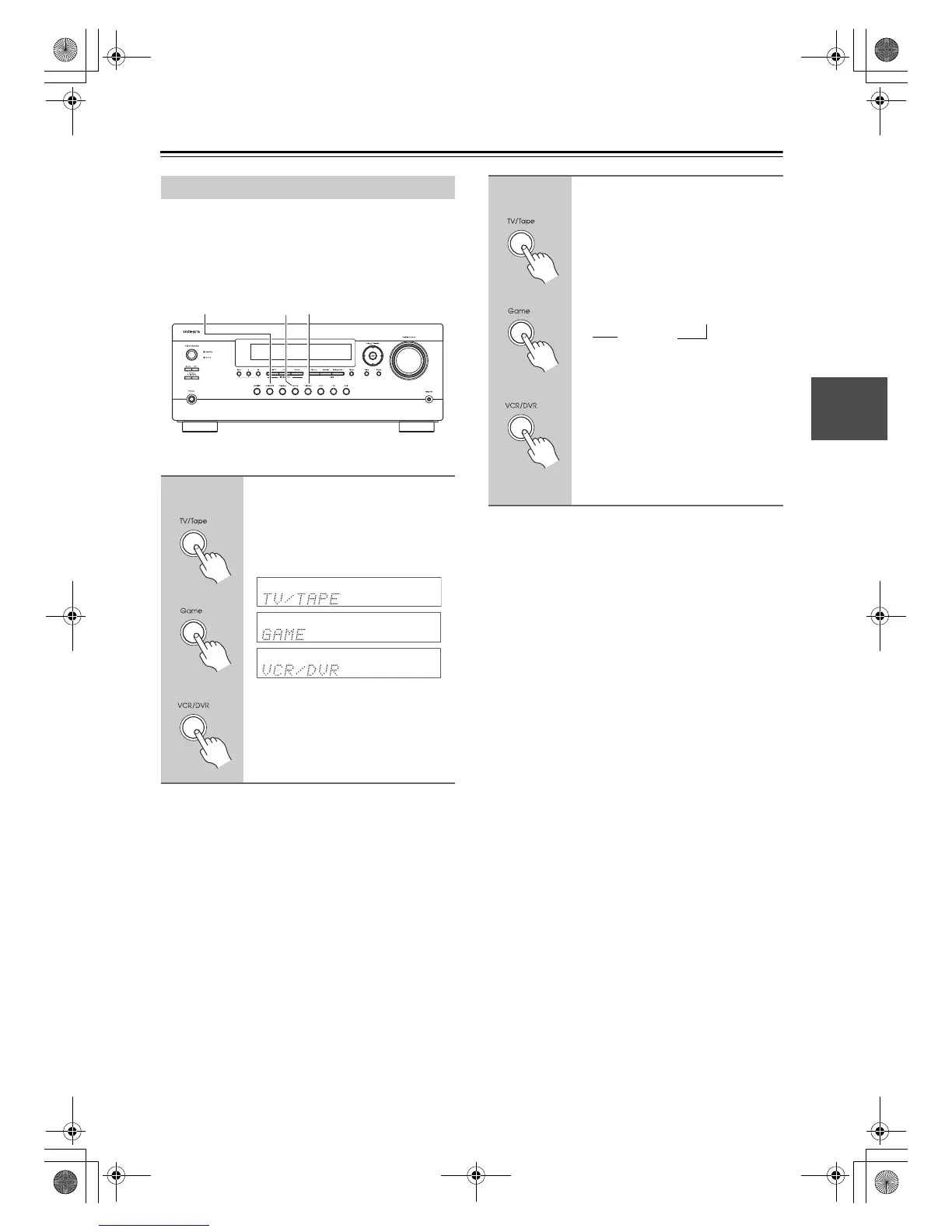
1
Press the [TV/Tape], [Game] or
[VCR/DVR] input selector button
so that “TV/TAPE”, “GAME” or
“VCR/DVR” appears on the
display.
GameVCR/DVR TV/Tape
oror
or
2
Press and hold down the
[TV/Tape], [Game] or [VCR/DVR]
input selector button (about 3
seconds) to change the setting.
Repeat this step to select DOCK.
For the TV/Tape input selector, the
setting changes in this order:
For the Game input selector, the setting
changes in this order:
GAME
↔ DOCK
For the VCR/DVR input selector, the
setting changes in this order:
VCR/DVR
↔ DOCK
See “Controlling Other Components”
on pages 86, 87
oror
or
TV/TAPE → MD → CDR
DOCK
→
→
DTR-20.1_En_A.book Page 41 Wednesday, April 8, 2009 10:06 PM



 To Next Page