46
Listening to the Radio
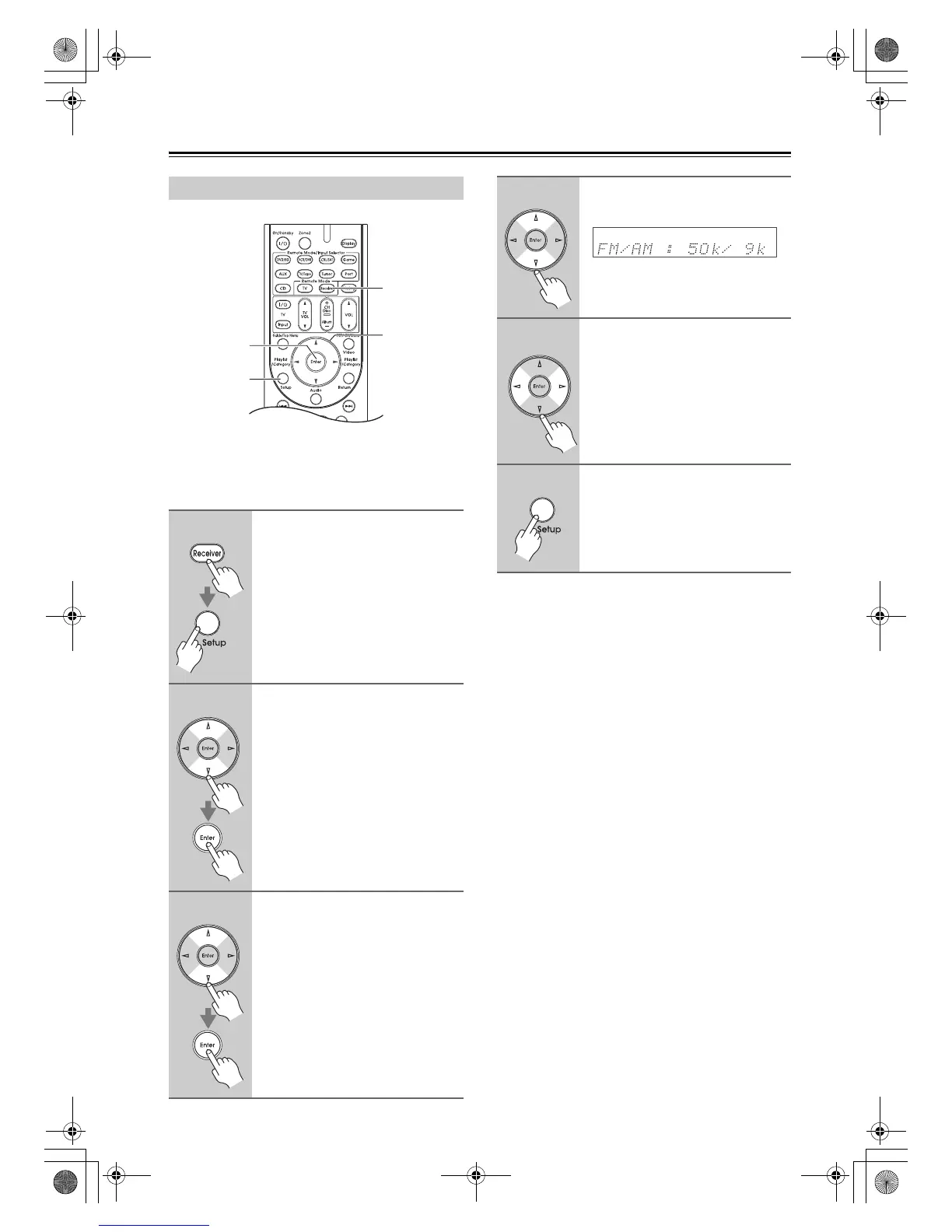
For AM/FM tuning to work properly, you must specify
the AM/FM frequency step used in your area. Note that
when this setting is changed, all radio presets are
deleted.
Note:
This procedure can also be performed on the AV receiver
by using its [Setup] button, arrow buttons, and [Enter]
button.
AM/FM Frequency Step Setup
1
Press the [Receiver] button,
followed by the [Setup] button.
2
Use the Up and Down [q]/[w]
buttons to select
“7.HardwareSetup”, and then
press [Enter].
3
Use the Up and Down [q]/[w]
buttons to select “7-3. Tuner”,
and then press [Enter].
Receiver
qwer
Enter
Setup
4
Use the Up and Down [q]/[w]
buttons to select “FM/AM”.
5
Use the Left and Right [e]/[r]
buttons to select:
200k/10k:
Select if 200k/10k steps are
used in your area.
50k/9k: Select if 50k/9k steps are used
in your area.
6
Press the [Setup] button.
Setup closes.
DTR-20.1_En_A.book Page 46 Wednesday, April 8, 2009 10:06 PM



 To Next Page