84
Controlling Other Components—Continued
u CLR button
Cancels functions and clears entered numbers.
Notes:
• If you enter the remote control code for a HD DVD or
Blu-ray player that has A, B, C, and D or colored
buttons, the [Search], [Repeat], [Random], and [Play
Mode] buttons will work as colored or A, B, C, D
buttons. In this case, these buttons cannot be used to
set repeat playback, random playback, or select play
modes.
• Buttons marked with an asterisk (*) are not supported
by the function.
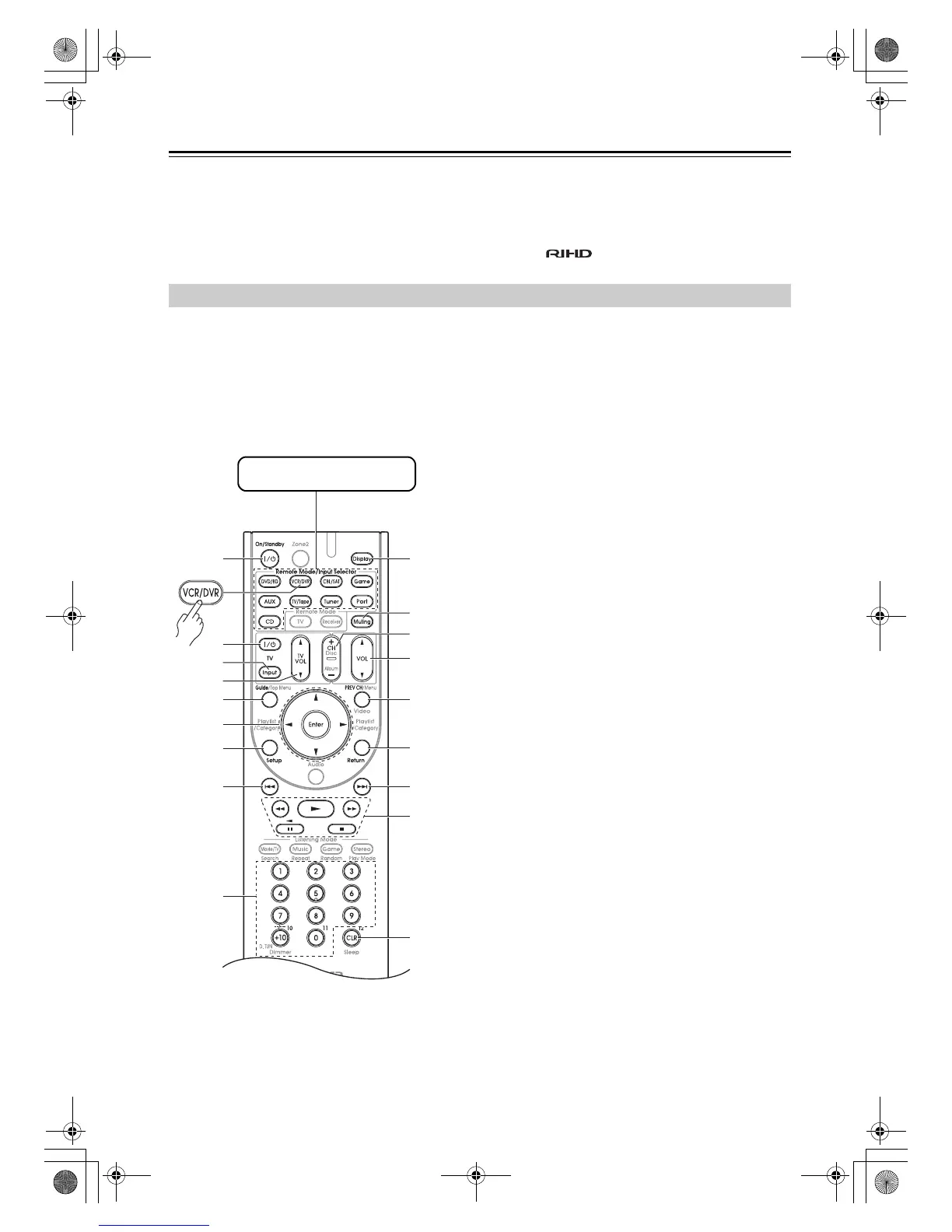
By pressing the Remote Mode button that’s been
programmed with the remote control code for your VCR
(TV/VCR, PVR, DBS/PVR combination or cable/PVR
combination), you can control your video recorder with
the following buttons.
For details on entering a remote control code for a
different component, see page 80.
a On/Standby button
Set the video recorder to On or Standby.
b TV [9] button
Set the TV to On or Standby.
c TV [Input] button
Selects the TV’s external inputs.
d TV VOL [q]/[w] button
Adjust the TV’s volume.
e Guide button
Displays the program guide or navigation list.
f Arrow [q]/[w]/[e]/[r] and Enter buttons
Used to navigate menus and select items.
g Setup button
Displays the video recorders setup menu.
h Previous [7] button
Previous or instant replay function.
i Number buttons
Enter numbers. The [0] button enters 11 on some
components. The [+10] button works as a +10
button or “--/---” button.
j Display button
Displays information.
k Muting button (43)
Mutes or unmutes the AV receiver.
l CH +/– button
Selects TV channels on the video recorder.
m VOL [q]/[w] button (42)
Adjusts the volume of the AV receiver.
n PREV CH button
Selects the previous channel.
o Return button
Exits the menu or returns to the previous menu.
p Next [6] button
Next or advance function.
q Playback buttons
Play [1], Pause [3], Stop [2], Rewind [5],
and Fast forward [4].
r CLR button
Cancels functions or enters the number 12.
Note:
With some components, certain buttons may not work as
expected, and some may not work at all.
Controlling a VCR or PVR
j
m
l
o
n
r
i
e
f
g
c
d
b
a
k
h
q
p
Press the appropriate
Remote Mode button first
DTR-20.1_En_A.book Page 84 Wednesday, April 8, 2009 10:06 PM



 To Next Page