– 99 –
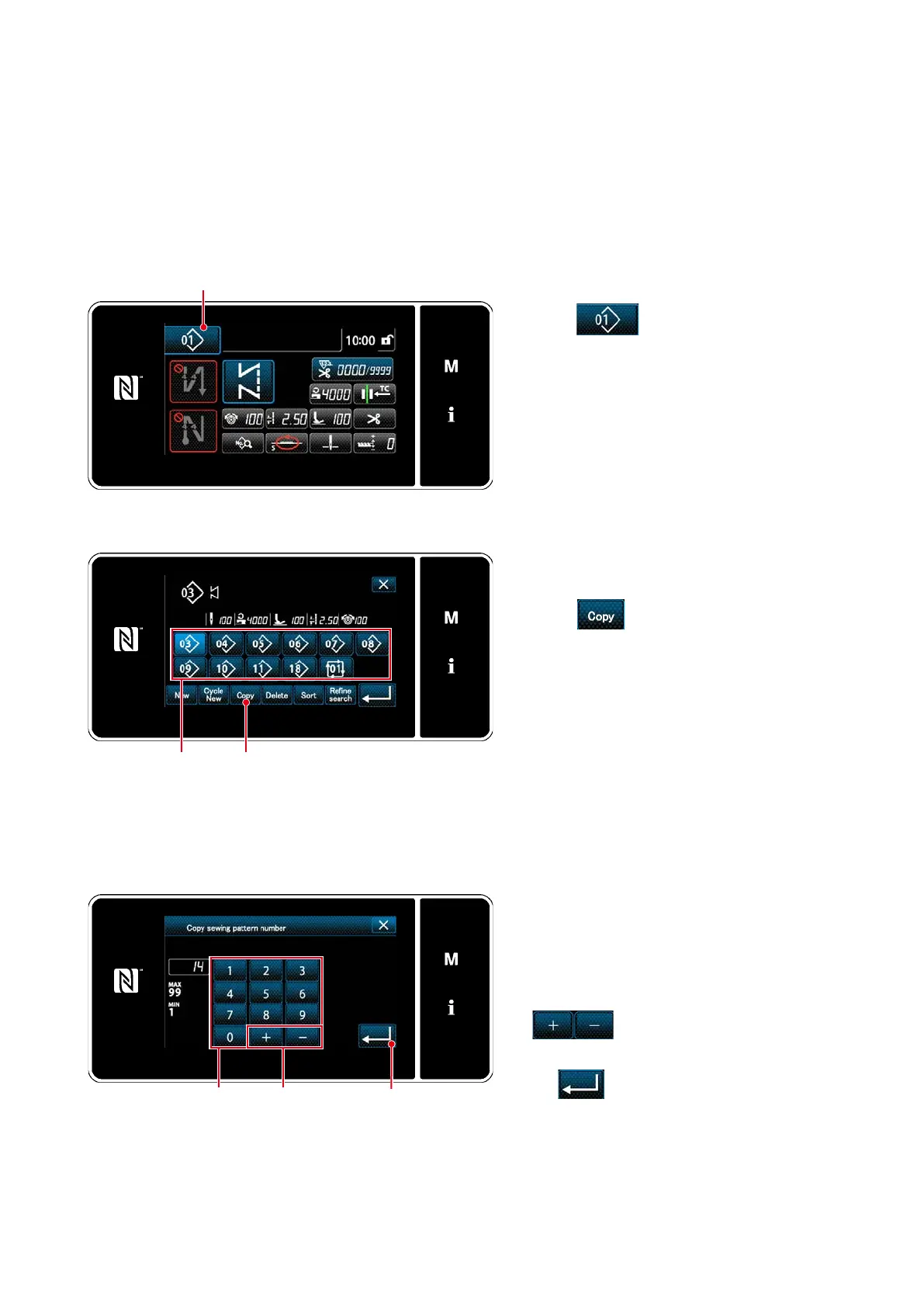
8-1-2. Copying a pattern
❶
2. Select the copy source pattern number from
list
❷
.
3. Press
❸
.
The "sewing pattern number copy screen" is
displayed.
❸
The selected pattern (sewing pattern and cycle pattern) can be copied to any other pattern of the specied
number.
* This operation is to be carried out under the maintenance personnel mode.
Explanation is given below using copying of a sewing pattern as an example.
①
Selecting the sewing pattern copy function
1. Press
❶
on the sewing screen un-
der the maintenance personnel mode.
The "sewing pattern number list screen" is
displayed.
<Sewing screen (Maintenance personnel mode)>
<Sewing pattern number list screen>
1. Enter the sewing pattern number to be reg-
istered using numeric keypad
❹
.
An unassigned registration number that
is closest to the entered value in the plus/
minus direction is displayed by pressing
❺
.
2. The created pattern is registered by press-
ing
❻
. Then, the current screen
returns to the "sewing pattern number list
screen". In the case the entered number
has already been registered, the prompt
message for overwrite conrmation is dis-
played.
②
Select the copy destination pattern number
❹
❺
❻
<Sewing pattern number copy screen>
❷



 To Next Page
 Loading...






