(6) Check program
1) Function of the check program
(
DDL-9000C-S
)
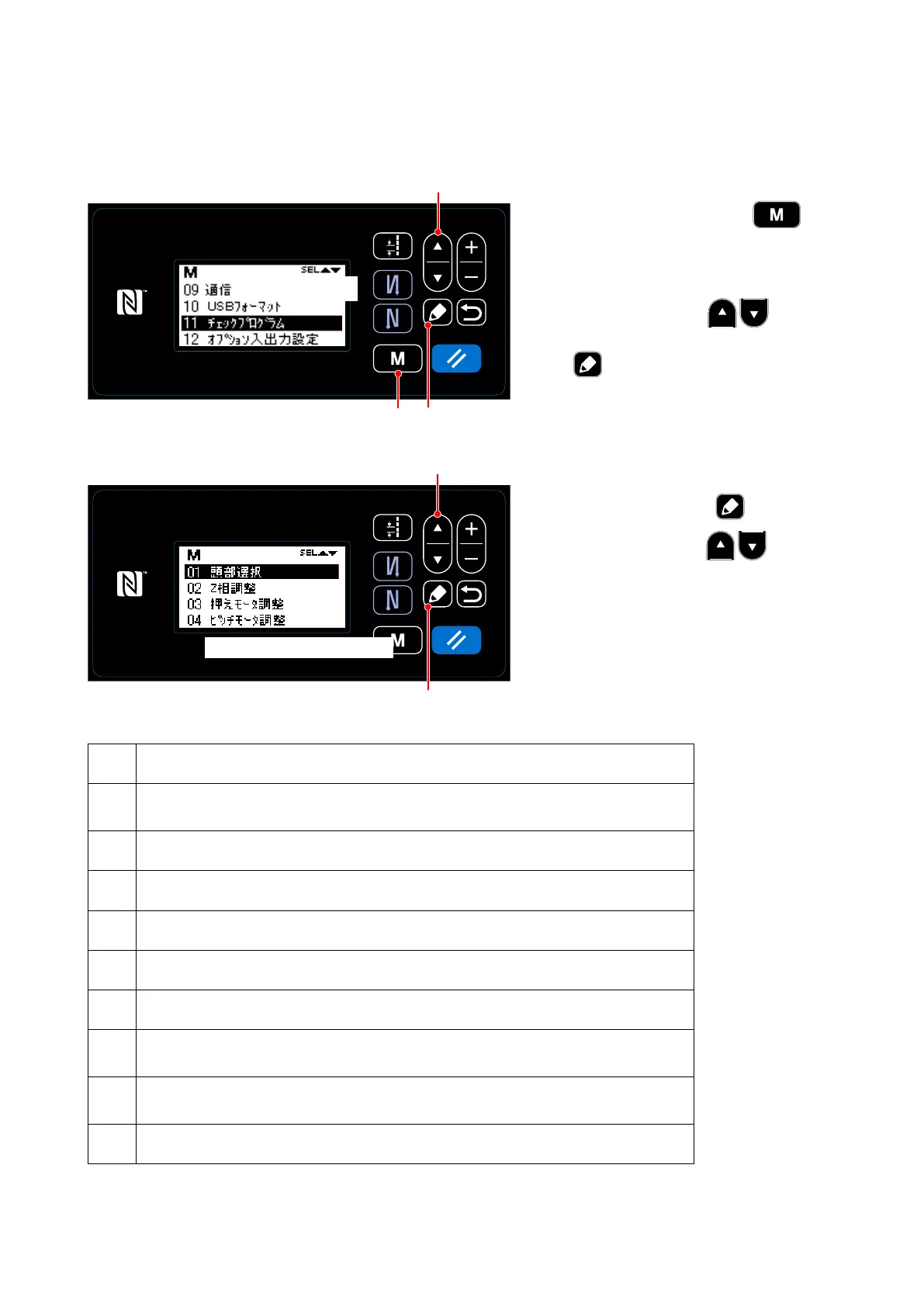
① Display the selection screen of a check program.
1. When you hold down the
❾ for three seconds on the sewing
screen, a mode screen for the ser-
viceperson 1 level is displayed.
2. After you press the ❶ and
select "11 Check program," press the
❺ to display the selection screen
of a check program.
❶
❺
❺
❶
❾
② Select the function.
1. When you press the ❺ button
after you press the ❶ and
select the function, you can use the
selected function.
The nine functions can be selected as
follows.
No. Content
01
Machine head selection
It is possible to select the machine type of a sewing machine.
02 Z-phase adjustment
03 Presser motor adjustment
04 Pitch motor adjustment
05 Feed driving motor adjustment
06 Vertical feed link adjustment
08
Sensor check
It is possible to check the state of a sensor (ON/OFF or numerical values).
09
Output check
It is possible to check the state of output (ON/OFF).
10 Compensation of neutral point of the pedal sensor
23頁と同じ
画面をご支給ください
– 88 –



 To Next Page
 Loading...







