3 Unit description
3 Unit description
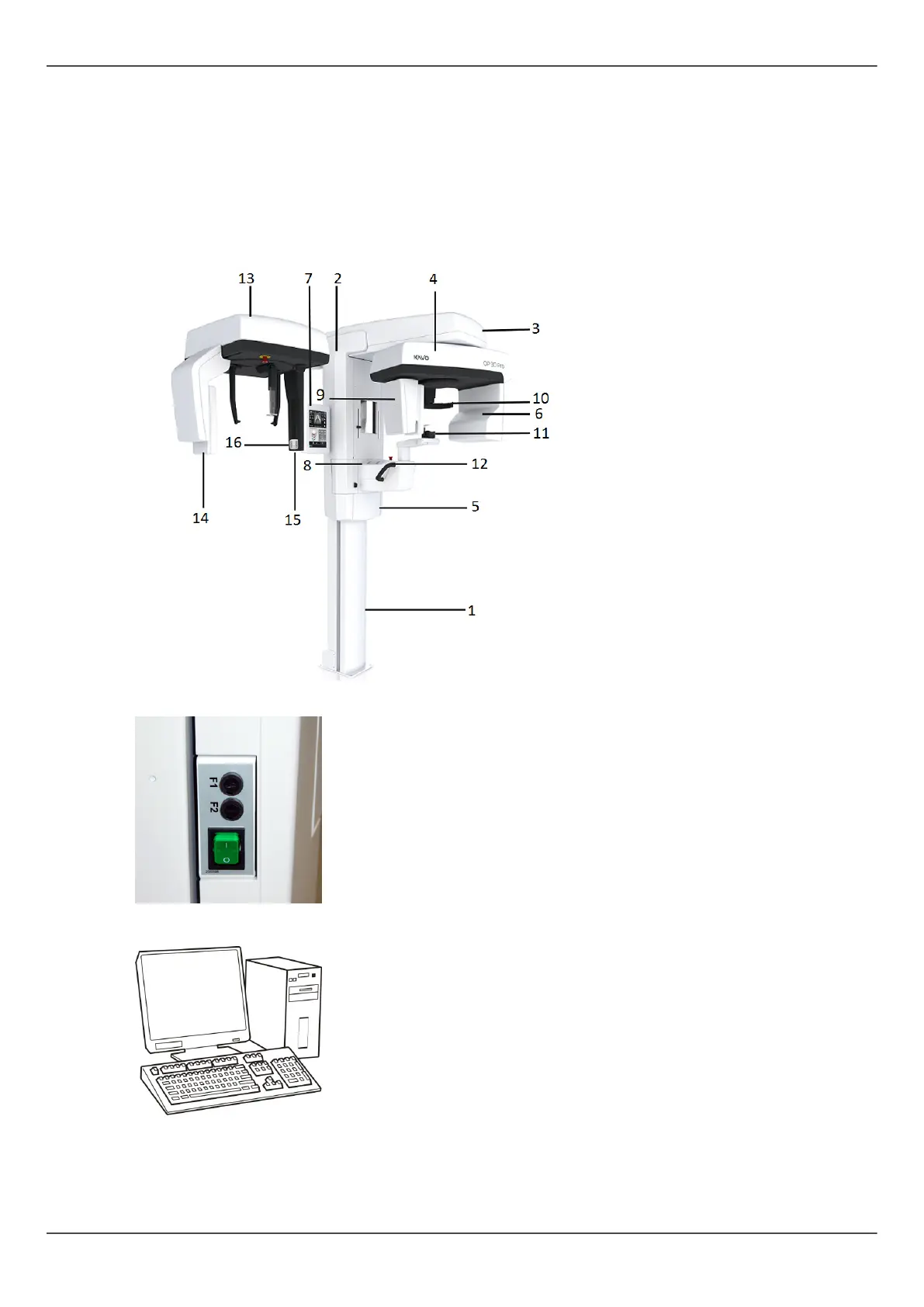
3.1 Main parts and controls
1. Column
2. Carriage
3. Main support
4. Rotating unit
5. On/off switch (rear of
carriage) and main fuses
6. Tubehead assembly
7. Touch screen display
8. Patient positioning panel
9. Sensor head
10. Head support
11. Chin rest
12. Handles
13. Cephalostat unit
14. Cephalostat sensor
15. Secondary collimator
16. Positioning panel
On/Off switch (used to power the unit on and off) and the main fuses.
PC with MDD approved dental imaging software and 3D viewing software (not included).
All software must conform to the MDD and the relevant legal requirements in the USA.
The PC must conform to all the unit and dental imaging software requirements.
ORTHOPANTOMOGRAPH
™
OP 3D Pro 13















 To Next Page