Page
78
9
Appendix
9. Appendix
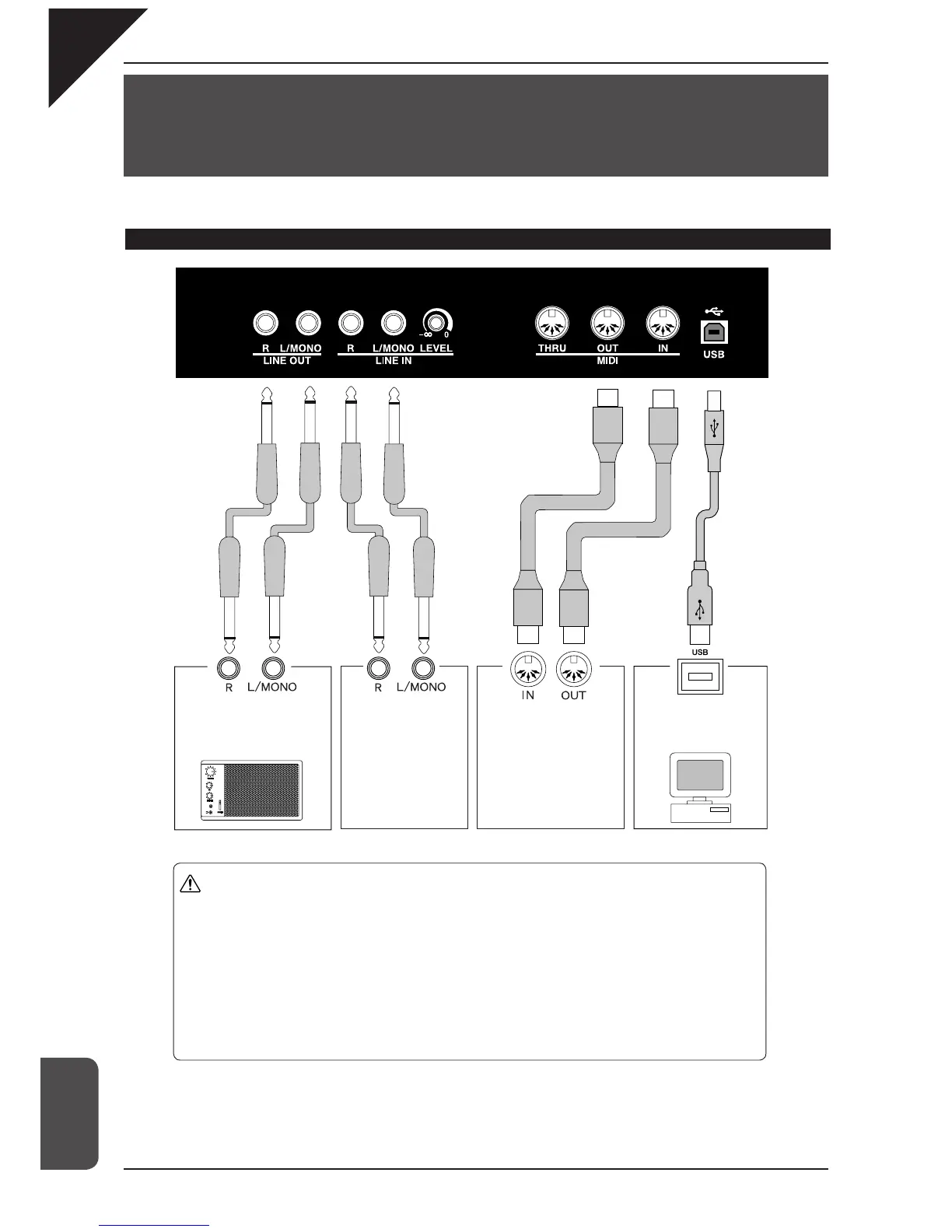
Connecting to other devices
Connect the CA piano to am-
plifi ers, speakers, recorders
or similar equipment.
Connect the stereo out-
puts from other audio
equipment or electronic
instruments to the CA
piano’s speakers.
Connect external MIDI
devices to the CA piano.
Connect the CA piano
to a Computer and
exchange MIDI data.
A pin
B pin
Caution
y
Before connecting the CA91 / CA71 / CA51 to other devices, make sure that the
power to the CA piano and any other devices is turned OFF. If connections
are established while the power is on, extraneous noise that can damage the CA
piano may occur and activate the protection circuit for the CA’s digital amplifi er,
preventing the CA piano from producing sounds. If this occurs, turn off the power
and then turn it on again.
y
Do not directly connect the LINE IN and LINE OUT jacks of the CA91 / CA71 /
CA51 together with a cable. An audio loop (oscillation sound) will occur, resulting
damage to the unit.



 To Next Page