Page
8
1
Part Names
and Functions
1. Part Names and Functions
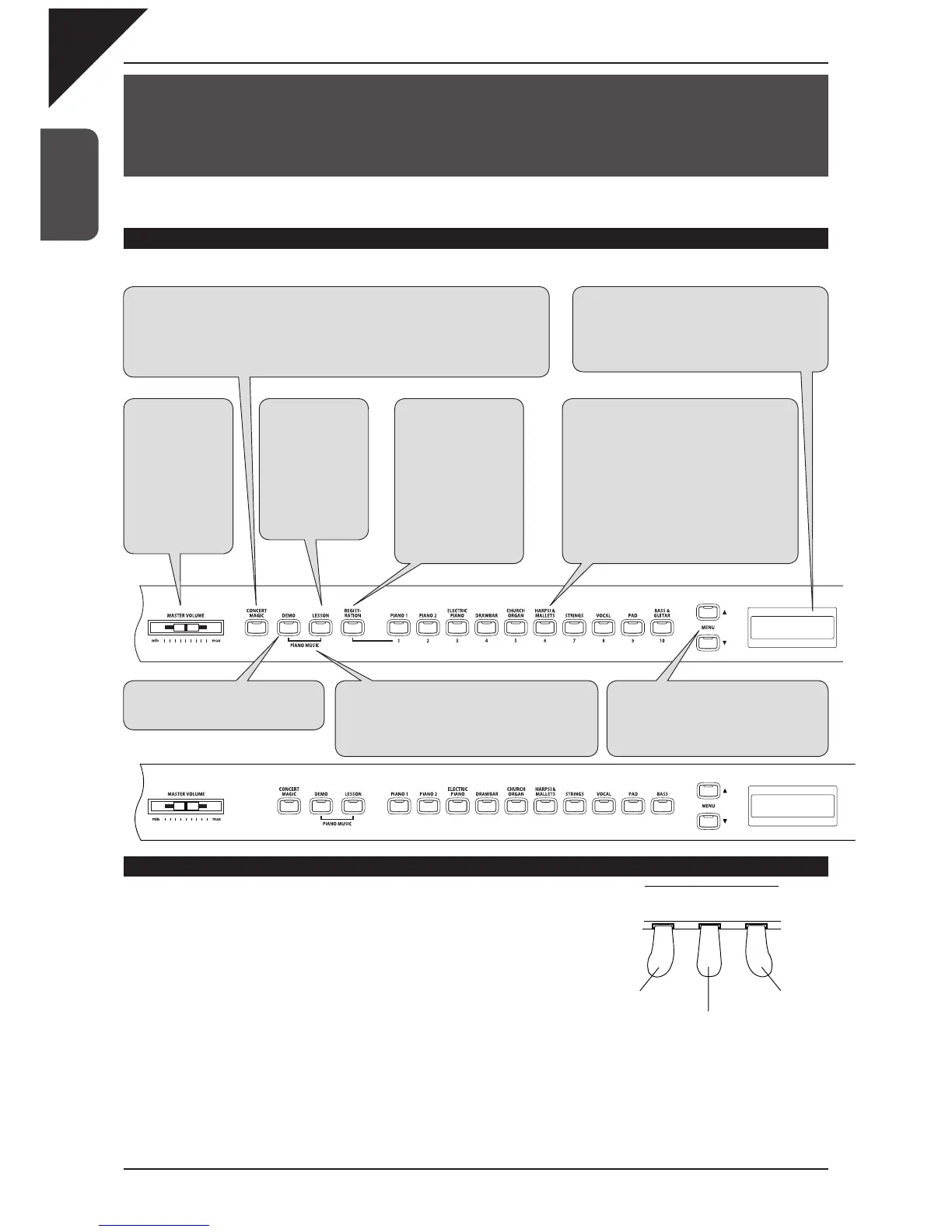
This section explains the locations and functions of the various panel sliders and buttons.
Panel
CA91/CA71
Using the pedals
The CA piano has three pedals—just like a grand piano. They are Sustain,
Soft and Sostenuto.
Sustain pedal
Sustains the sound after lifting your hands from the keyboard. The sustain pedal
is capable of responding to half pedaling.
Sostenuto pedal
Depressing this pedal after playing the keyboard and before releasing the keys sustains the sound of only the keys just
played.
Soft pedal
Depressing this pedal softens the sound and reduces its volume. When the rotary effect is active the soft pedal is used
to change the speed of the rotor between slow and fast.
Soft pedal
Sostenuto pedal
Sustain pedal
CA51
CONCERT MAGIC
Press the CONCERT MAGIC button to enjoy listening or performing a collection of prepro-
grammed piano songs. Concert Magic will provide the correct melody and accompaniment notes,
regardless of which keys you press. Anybody, young or old, can enjoy Concert Magic from the
moment they sit down at the CA piano regardless of their previous musical experience (page 45).
MASTER
VOLUME
The MASTER VOL-
UME slider controls the
master volume level of
the built-in speakers
and headphones. Move
this slider to the right
to increase the volume
and move to the left to
decrease the volume.
Sound buttons
Use these buttons to select the different preset
sounds. Press the SOUND SELECT button
under the name of the instrument you would
like to listen to. When the button is pressed, the
LED indicator will be turned on to indicate that
this sound category is selected. Multiple sound
types are assigned to each button. Repeatedly
pressing a SOUND SELECT button selects the
different sounds assigned to that button. The
name of the selected sound will be displayed in
the LCD display (page 13).
REGISTRATION
A registration is a setup
that memorizes most of
the panel settings such as
sound selections or effects
settings so that you can
recall them at the touch of
a button. 10 different regis-
trations can be saved and
accessed using this button
(page 25). * CA91 / CA71
only
PIANO MUSIC
Pressing the DEMO and LESSON buttons together
lets you enter the piano music mode. The CA piano
provides some hours of pre-recorded classical piano
music for your listening pleasure (page 12).
MENU
These buttons are used to access the vari-
ous virtual technician and menu functions
that control the CA piano’s tuning, system
and MIDI functions.
LCD display
The LCD display provides useful information such
as the currently selected sound type. It also shows
values or status when other functions are active.
*
A protective plastic fi lm is provided on the display. Re-
move it before use.
DEMO
Press the DEMO button to listen to the
various different demo songs (page 11).
LESSON
Press the LESSON
button to access the
etudes, Alfred lesson
books (USA, Canada,
UK, AU only), and the
finger exercises. Listen
or practice along with the
various etudes, songs,
and exercises (page 35).



 To Next Page