Page
9
1
Part Names
and Functions
Headphone
Headphone jack (x 2)
Use this Jack to connect a pair of headphones.
Up to two pairs of headphones can be connected.
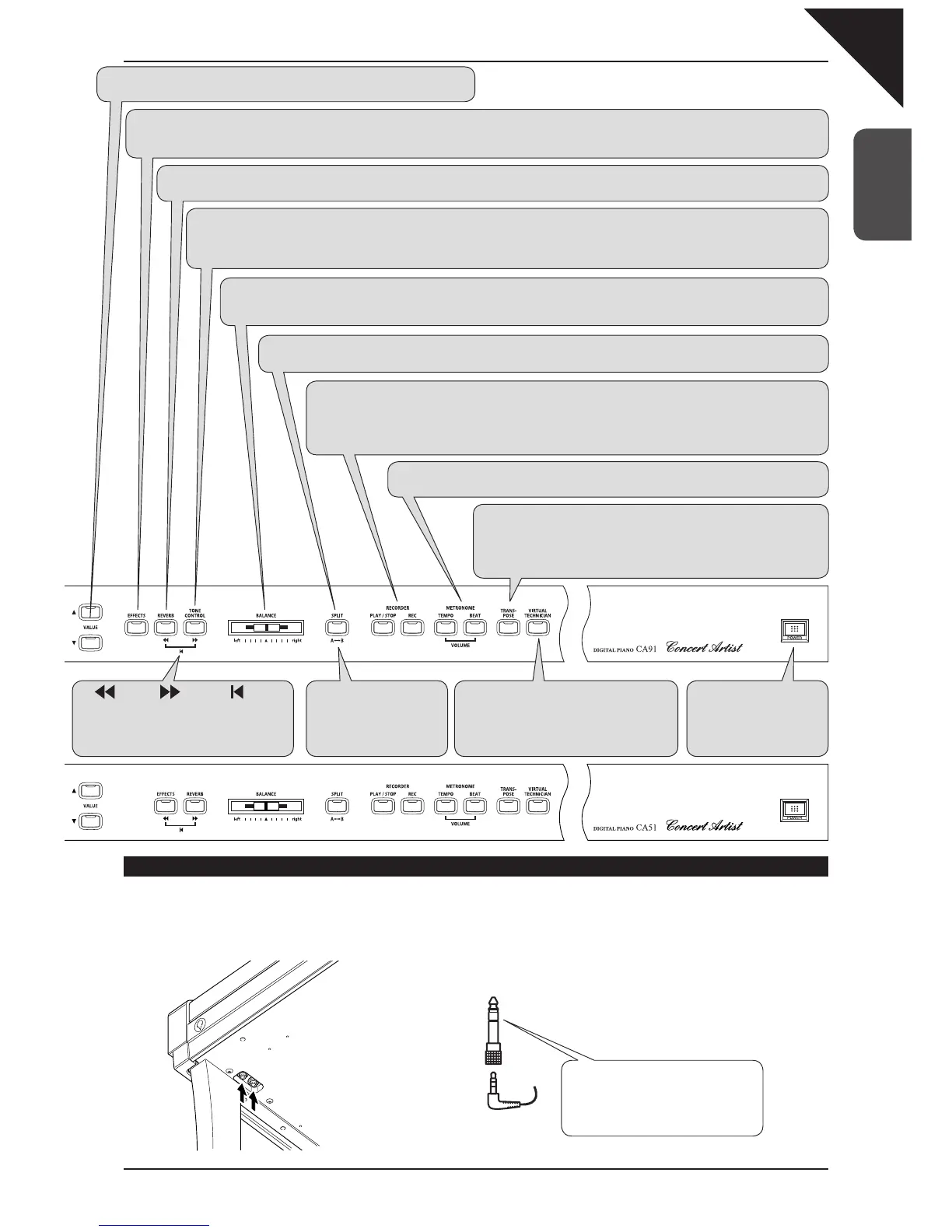
VALUE
These two buttons are used to change the value settings for the various functions.
EFFECTS
Press the EFFECTS button to turn the effects ON/OFF for the selected sound. The EFFECTS button is used to select the different effect types and
adjust their settings (page 20).
REVERB
Press the REVERB button to turn the reverb ON/OFF for the selected sound. The REVERB button is used to select the different reverb types (page 19).
TONE CONTROL
Press the TONE CONTROL button to access the CA piano’s built in EQ section. This button is used to turn on/off the tone control and select/
edit the various different EQ types. Use the tone control function to adjust the sound character of the CA piano to your taste (page 22).
* CA91 / CA71 only
BALANCE
Use the BALANCE slider to adjust the volume balance between two sounds in dual or Split mode. The BALANCE slider is also
used to adjust the balance of the two parts in the Concert Magic and lesson modes (pages 15, 17, 38, and 47).
SPLIT
The split function divides the keyboard into two sections—upper and lower—and lets you play each part with a different sound (page 16).
RECORDER
The REC button is used for recording your own songs and when using the lesson function, to record your
playing and compare with the built in songs, etudes, and exercises.
The PLAY/STOP button is used to select a song and part to play, and to start and stop play back of the re-
corded songs. It is also used to start / stop playback when using the lesson function (page 30).
METRONOME
Use these buttons to turn on / off the metronome, and to set the tempo, beat, and volume (page 27).
rewind forward reset
Use these buttons to play a song from a
specific bar or to find the beginning of a
song in the lesson function (pages 36 and
37).
A
ÅÆ
B (AB repeat)
Press this button to play
back a specific section of
a song repeatedly in the
lesson function (page 39).
POWER
Press the POWER to turn
the power on / off. Turn the
power off after use (page
10).
VIRTUAL TECHNICIAN
The virtual technician provides a set of spe-
cial functions that make it possible for you
to customize the CA piano to your personal
taste. CA91 / CA71 / CA51 (page 51).
TRANSPOSE
The transpose function lets you raise or lower the piano’s key in half
steps. This is especially useful when you have learned a song in one key
and have to play it in another key. The transpose feature allows you to
play the song in the original key, but hear it in another key (page 24).
Some headphones are designed with a re-
movable adapter that is used to connect to
different sized jacks. Sound may not be heard
from the built-in speakers if this adapter re-
mains in the CA headphone jack when the
plug is removed.
Caution



 To Next Page