Features of your vehicle
1284
Lighting
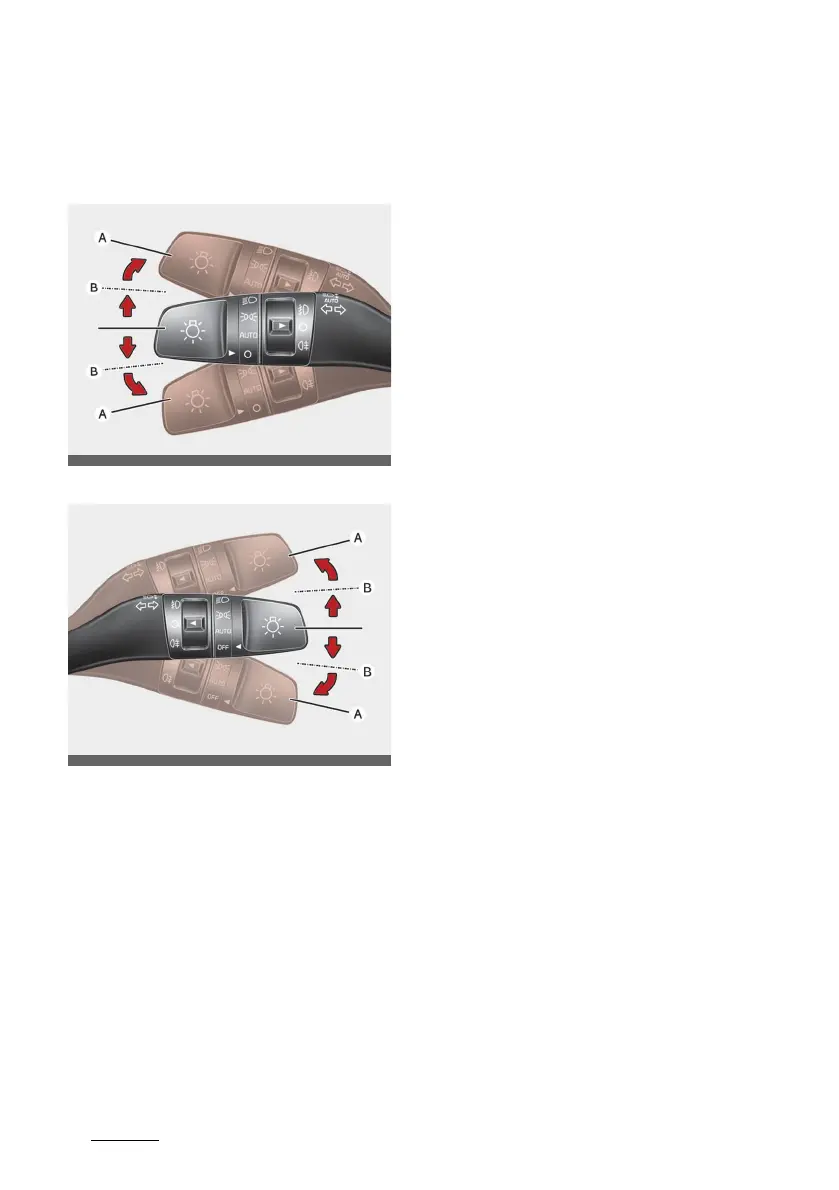
Operating turn signals and lane
change signals
Type A
Type B
The ignition switch or the ENGINE
START/STOP Button must be on for
the turn signals to function.
To turn on the turn signals:
䳜 Move the lever up or down (A).
The green arrow indicators on the
instrument panel indicate which
turn signal is operating.
They will self-cancel after a turn
is completed. If the indicator con
-
tinues to flash after a turn, man
-
ually return the lever to the OFF
position.
To signal a lane change:
䳜 Move the turn signal lever slightly
and hold it in position (B).
The lever will return to the OFF
position when released.
If an indicator stays on and does not
flash or if it flashes abnormally, one
of the turn signal bulbs may be
burned out and will require replace
-
ment.
One-touch lane change function
To activate a one-touch lane change
function, move the turn signal lever
slightly and then release it. The lane
change signals will blink 3, 5 or 7
times.
You can activate or deactivate the
One Touch Turn Signal function or
choose the number of blinking (3, 5,
or 7) by selecting "User Settings →
Lights → One touch turn indicator".



 To Next Page