Infotainment system
265
Infotainment system
Disconnecting a device
If you want to stop using a Blue
-
tooth device or connect another
device, disconnect your currently
connected device.
1. From the control panel, press the
[PHONE] button, and then select
Phone settings ▶ Paired devices.
2. Turn the [TUNE] knob to select
your currently connected device
and then press the knob.
3. Press the [1 RPT] button to select
Yes.
Deleting paired devices
If you no longer want a Bluetooth
device paired or if you want to con
-
nect a new device when the Blue
-
tooth device list is full, delete paired
devices.
1. From the control panel, press the
[PHONE] button, and then select
Phone settings ▶ Delete devices.
2. Turn the [TUNE] knob to select
the device to delete, and then
press the knob.
3. Press the [1 RPT] button to select
Yes.
䳜 When you delete a paired device,
the Call history and Contacts
stored in the system are also
deleted.
䳜 To re-use a deleted device, you
must pair the device again.
Using a Bluetooth audio device
You can listen to music stored in the
connected Bluetooth audio device
via your vehicle䳓s speakers.
1. On the control panel, press the
[MEDIA] button.
2. When the mode selection window
displays, turn the [TUNE] knob to
select Bluetooth audio and then
press the knob.
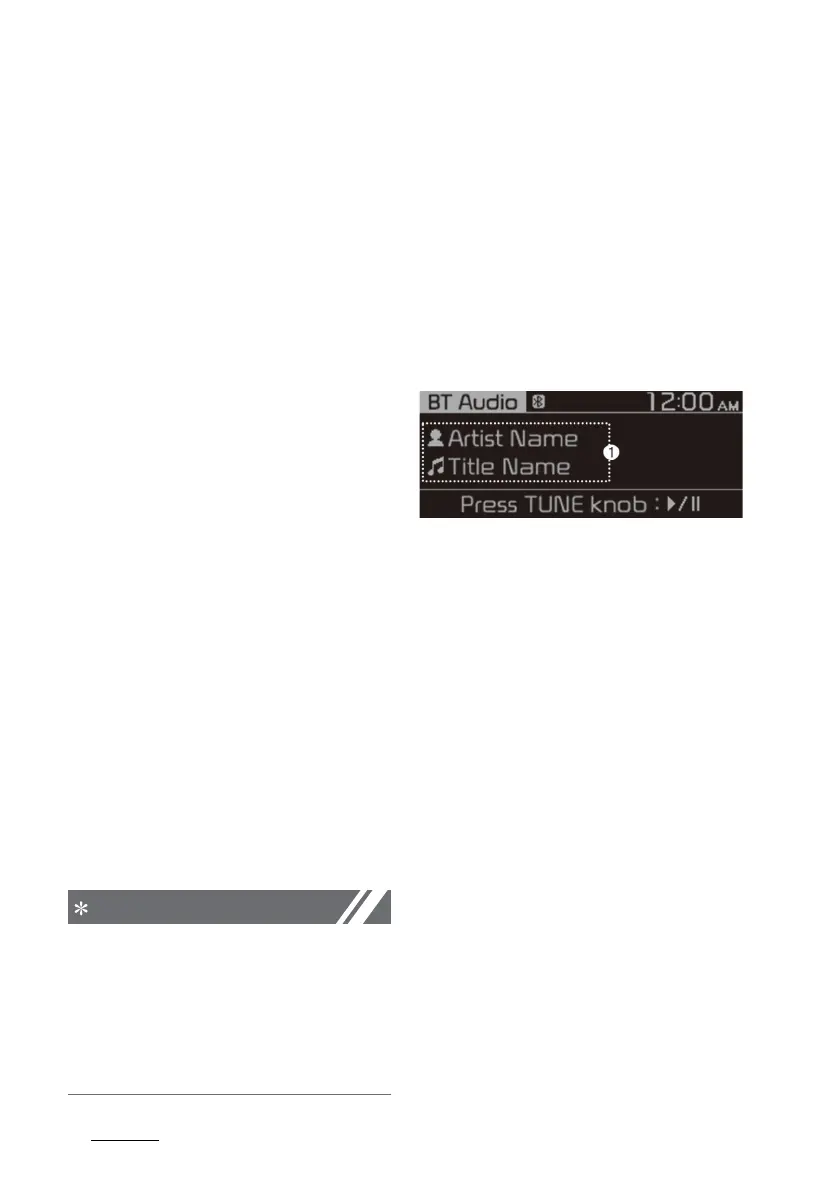
1. Information about the song cur
-
rently playing
Press the [MENU] button on the
control panel to access the following
a menu option.
䳜 Sound settings: You can change
the settings related to sounds,
such as location where sound will
be concentrated and the output
level for each range.
- Position: Select a location
where sound will be concen
-
trated in the vehicle. Select
Fade (Fader) or Balance, turn
the [TUNE] knob to select the
desired position, and then press
the knob. To set sound to be
centred in the vehicle, select
Centre (Centre).
- Equaliser (Tone): Adjust the
output level for each sound
tone mode.



 To Next Page