Driving your vehicle
1346
Smart Cruise Control (SCC)
䳜 The symbol of the Driving Assist
button can be applied indifferent
such as or depending
on the vehicle.
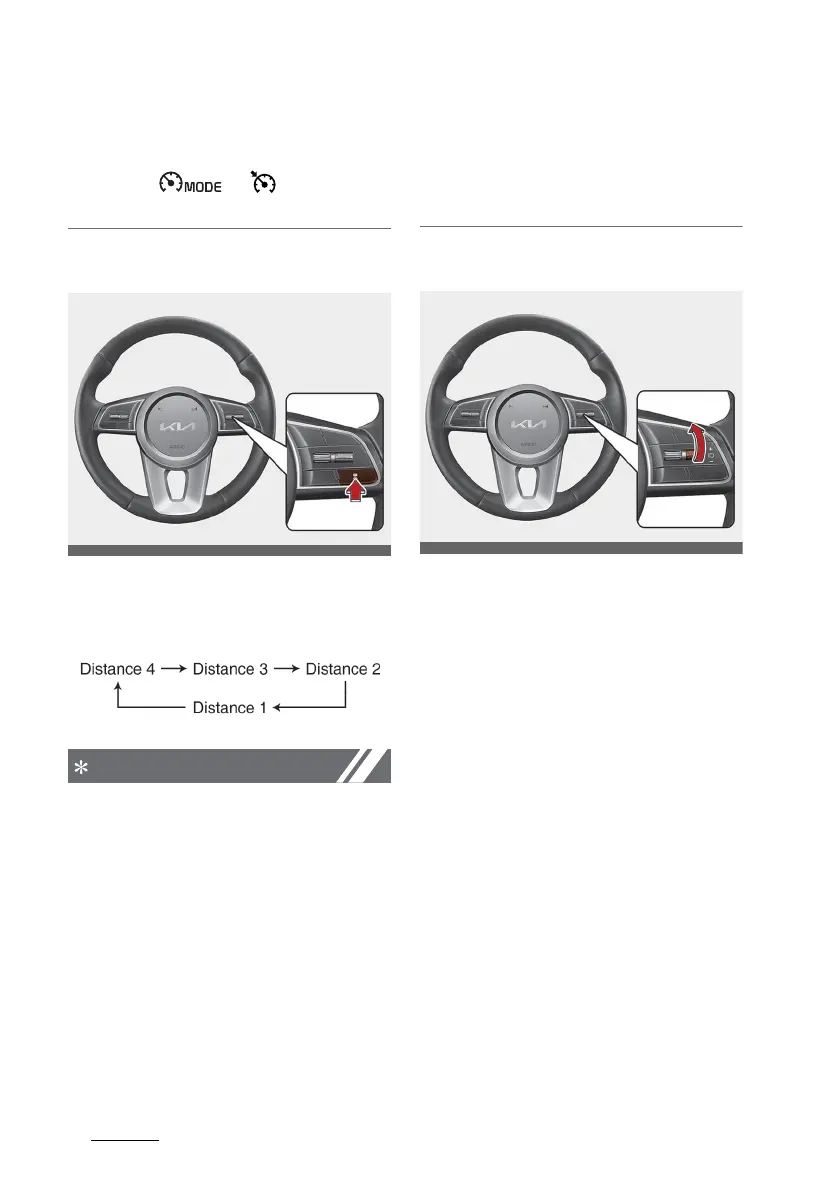
To set Vehicle Distance
Each time the Vehicle Distance but
-
ton is pressed, the Vehicle Distance
changes as follows:
䳜 If you drive at 90 km/h (56 mph),
the distance is maintained as fol
-
lows:
- Distance 4 - approximately
52.5 m (172 ft.)
- Distance 3 - approximately 40
m (130 ft.)
- Distance 2 - approximately
32.5 m (106 ft.)
- Distance 1 - approximately 25
m (82 ft.)
䳜 The distance is set to the last set
distance when the engine is
restarted, or when the function
was temporarily cancelled.
To increase speed
䳜 Push up the + switch, and release
it immediately. The cruising speed
will increase by 1 km/h (1 mph)
each time the switch is operated
in this manner.
䳜 Push up the + switch, and hold it
whilst monitoring the set speed
on the cluster. The cruising speed
will increase by 10 km/h or 5 mph
each time the switch is operated
in this manner. Release the switch
when the desired speed is shown,
and the vehicle will accelerate to
that speed. You can set the speed
to 180 km/h (110 mph).



 To Next Page