SECTION 2 - SET-UP
1-2-3
2-3
© 2018 Konami Gaming Inc. P/N 810352
CONCERTO CRESCENT
(Original Instructions)
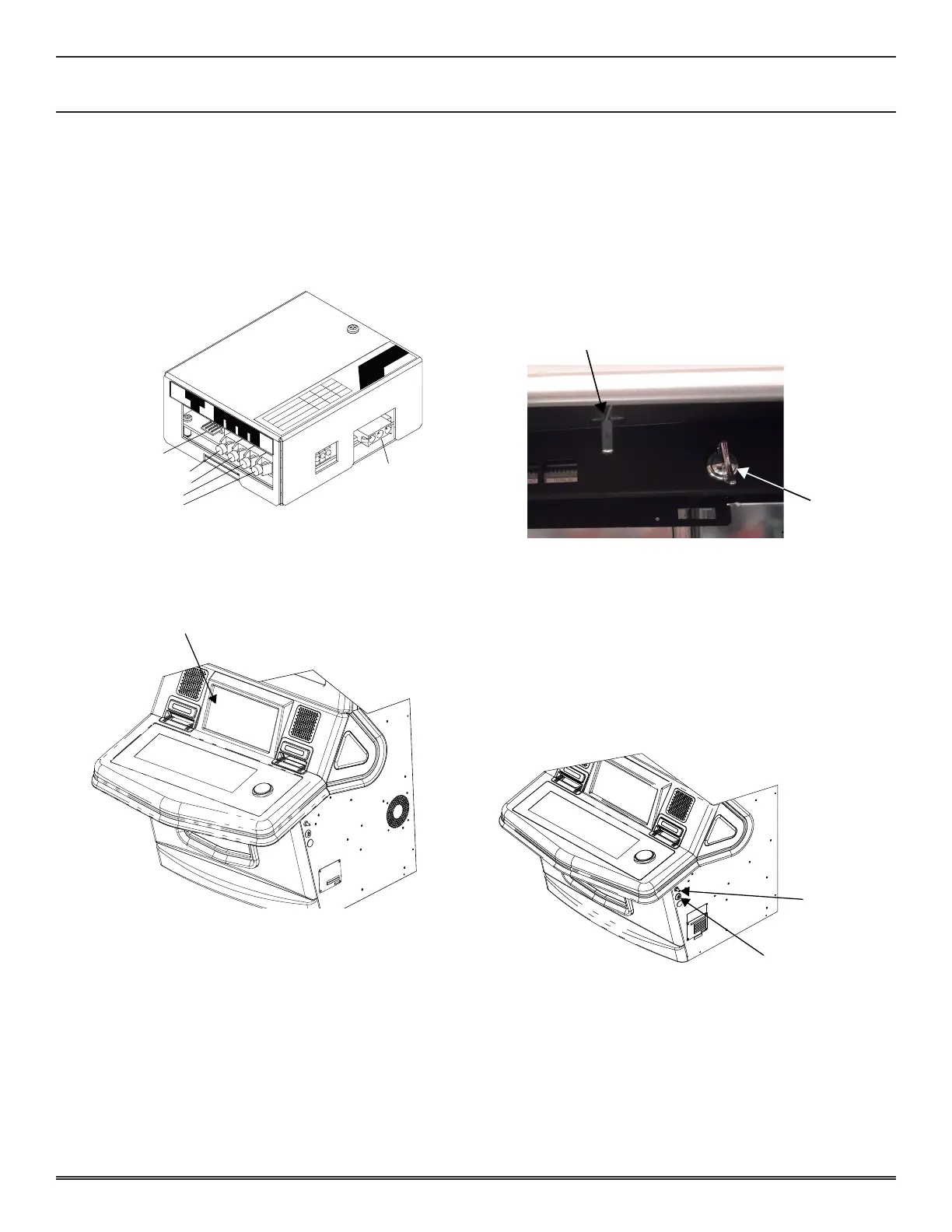
FIBER OPTIC INTERFACE
When ber optic communication lines are used, they are rst
routed to the SAS Unit mounted in the machine� The SAS
Unit is equipped with two input and two output ber optic
receptacles� The SAS unit is also equipped with a serial input/
output connector and attached wiring, the output of which is
connected to the CNB35 port on the Backplane board�
SERIAL
I/O
AC115V IN
Green : Communication
Blink
Lit Off
Normal
Error Idling
Normal
Error
Idling
Normal
Error Idling
Red : Opto IN2 Monitor
Yellow : Terminal Serial Data
SERIAL
I/O
OUT1 OUT2 IN1 IN2
SERIAL I/O
FIBER OPTIC OUT 1
FIBER OPTIC OUT 2
FIBER OPTIC IN 2
FIBER OPTIC IN 1
AC 115V IN
PLAYER TRACKING BRACKET
The SAS components are mounted on a removable bracket
installed on top of the box�
reMoval
1� Open the Main Door and turn power off�
2� Open main deck door�
3� Remove four 8-32 X 1/4 screws holding player tracking
panel�
4� Remove player tracking panel from main deck door�
installation
1� Install player tracking panel onto main deck door�
2� Secure with four screws�
OPENING AND CLOSING THE DOORS
Main deck door
1� To open main deck door, insert main deck door key into
key cylinder underneath main deck�
2� Turn key 90° clockwise�
3� Pull latch button with key turned�
4� Open main deck door�
Lock
5� Close main deck door with the key turned clockwise�
6� Turn key 90° counter-clockwise and remove key from
cylinder�
sub door
1� To open the sub door, insert key into cylinder on the right
side of cabinet�
2� Turn key 90° clockwise, and press sub door lever�
3� Pull door open�
4� Push main door closed and turn key 90° counter-
clockwise� Remove key from cylinder�
Sub Door
Lever
Key Cylinder















 To Next Page