KW Aufzugstechnik GmbH OPERATING MANUAL DAVID-613
DAVID-D613-V125-E 13.04.2021 Page - 236 -
All, except for the top Floor be approached
with inspection. The car is leveled and the
position is learned and accepted with the
red button on the HPG-60 or the quick but-
ton on the inspection control.
All flush values in mm were entered into the
shaft table of the control system on the ba-
sis of the floor height.
The car is driven flush with inspection in the
lowest floor and with the help of the HPG-60
this floor is synchronized. As a result, all
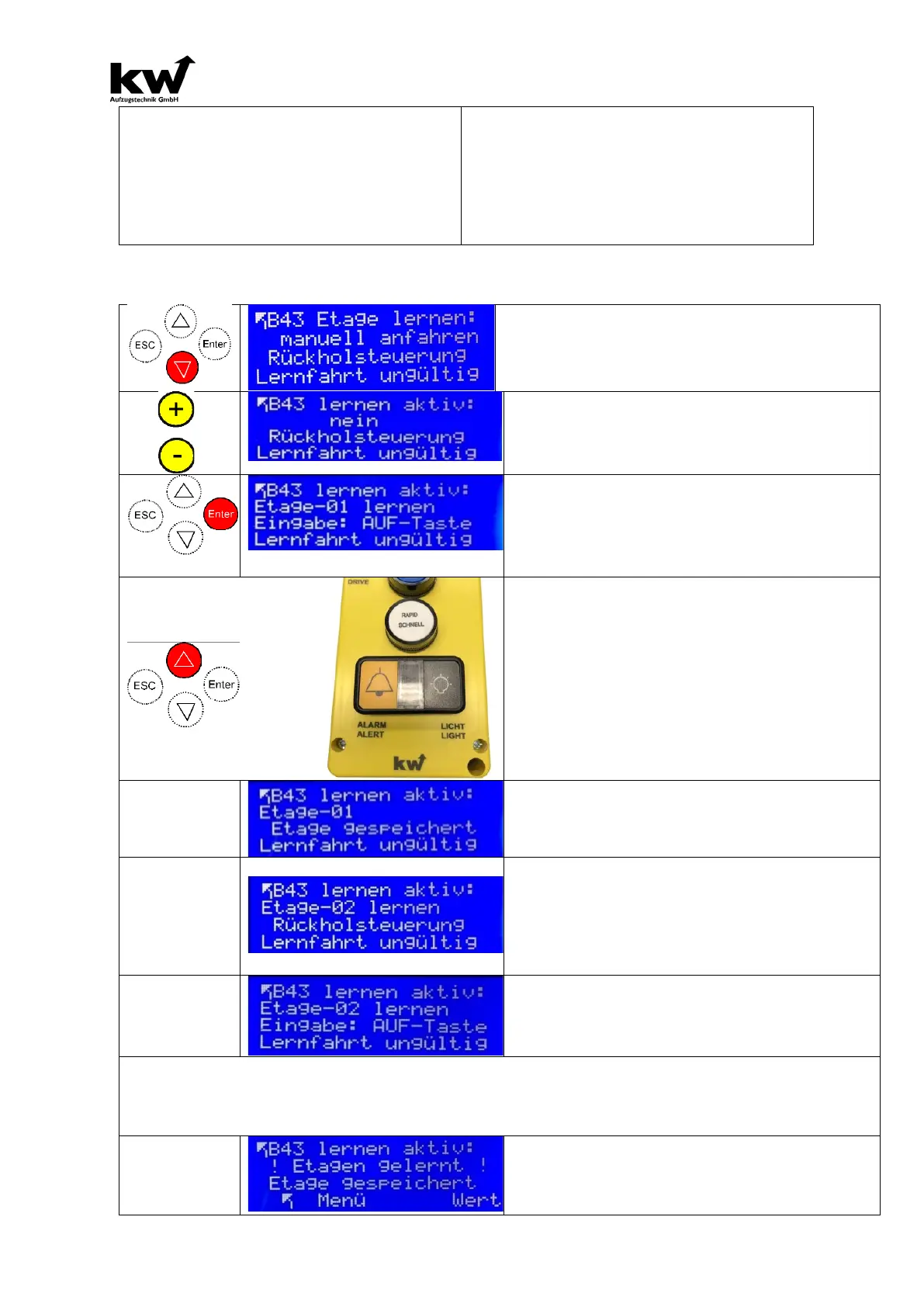
3.8A Learn floors with the method „ Manually start“
With the push button down the setting „manually
start“ choose.
Use the yellow keys to set the value "Yes".
.. and press the enter key!
The display now indicates that the lowest
floor is to be taught-in.
Therefore, the bottom floor will start manually
(INSPECTION OR RETURN CONTROL)
Now press the red "UP" button in the HPG or
press the QUICK button on the inspection
bulb
Result: The piezo sounds in the cabin for 1
second and in the 3rd line the text „Floor
saved“ is displayed as confirmation!
Pressing the UP-button on the Inspection
Onbulb or if the HPG-60 is being used, press
the ENTER button.
3rd line activitated: Display 3rd line: „Input: UP
1.) The floor-02 with start inspection (or return).
2.). Press the QUICK button on the inspection
bulb, or press the UP button if the HPG-60 is
Note: If the penultimate floor is reached, then the top floor is automatically occupied (end-switch
TOP: - 100mm).
Result: The piezo sounds in the cabin for 1 second & in the 3rd line the text „Floor stored“ is dis-
Now switch the elevator to normal opera-
tion



 To Next Page