SYS
F・1 F・2 F・3 F・4 F・5 F・6
F・7
INPUT
EXT
MULTI
WFM
VECT
PIC
CAP
AUDIO
STATUS
EYE
VPOS HPOS
F・D
MEM
RECALL
S‐CUT
Theexplanationsafterthispagefollowthesettingsbelow.
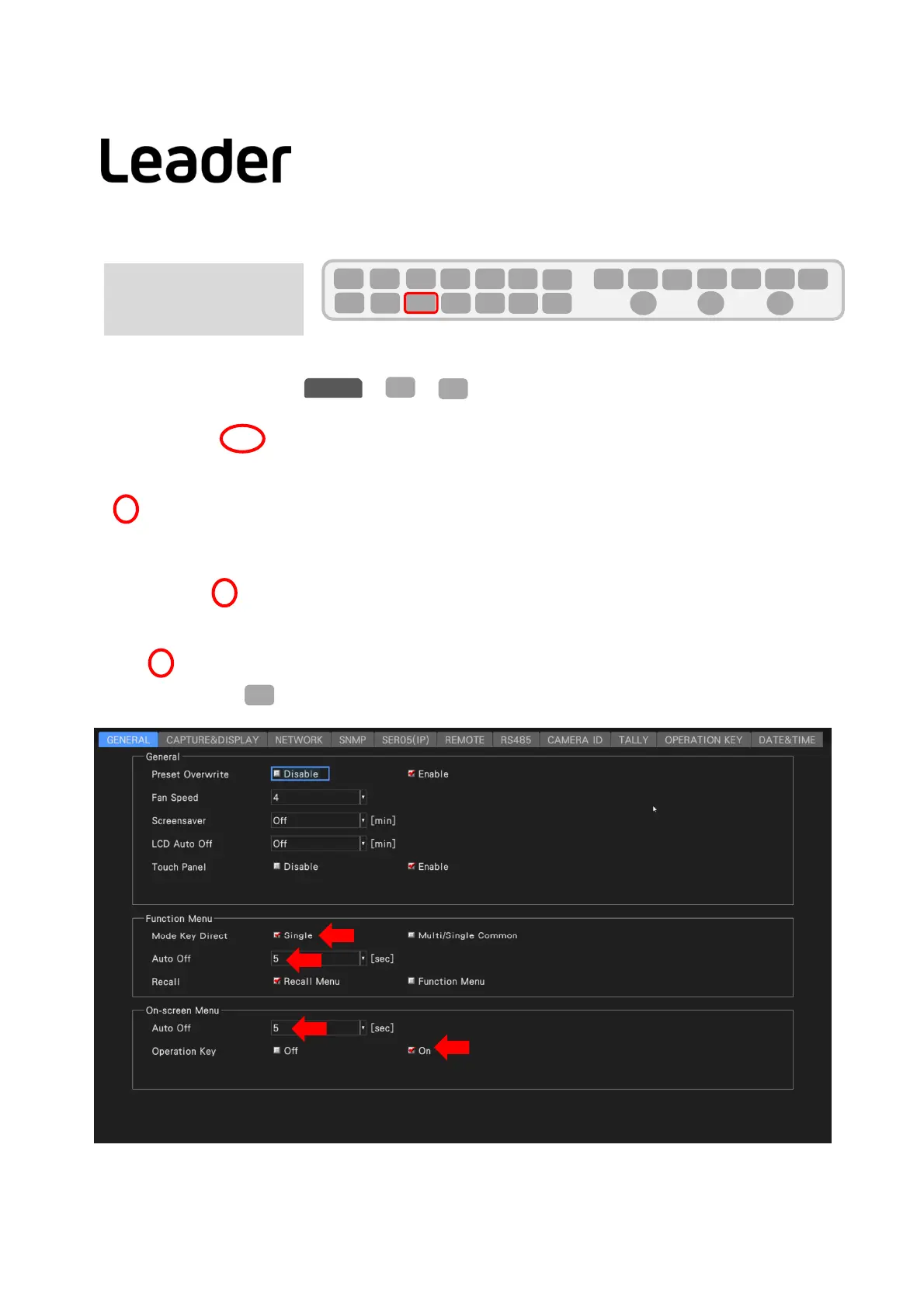
MakethefollowingsettingsinofSYS<F2.
FunctionMenu
●ModeKeyDirect Single Multi/SingleCommon
●AutoOff
Setthetimefromthelastkeyoperationuntilthefunctionmenudisappearsautomatically.
Off/1/2/3/4/5/10/20/30/60[sec]
On‐screenMenu
●AutoOff
Setthetimefromthelastkeyoperationuntilthemenudisplayonthescreenusedformouse/touchpaneloperationdisappearsautomatically.
Off/1/2/3/4/5/10/20/30/60[sec]
●OperationKey
SetOn/Offoftheoperationmenukeyusedformouse/touchpaneloperationdisplayedonthescreen.
OFF/ON
ConfirmthesettingswithF1(COMPLETE).
10
F・2
SYS
GENERAL
F・1
Settingsfor
QuickManual
LV5300/LV5350/LV7300QuickManual



 To Next Page