EYE
(LV5300, LV7300-SER02)
SYS
F・1 F・2 F・3 F・4 F・5 F・6
F・7
INPUT
EXT
MULTI
WFM
VECT
PIC
CAP
AUDIO
STATUS
EYE
VPOS HPOS
F・D
MEM
RECALL
S‐CUT
LV5300/LV5350/LV7300QuickManual
30
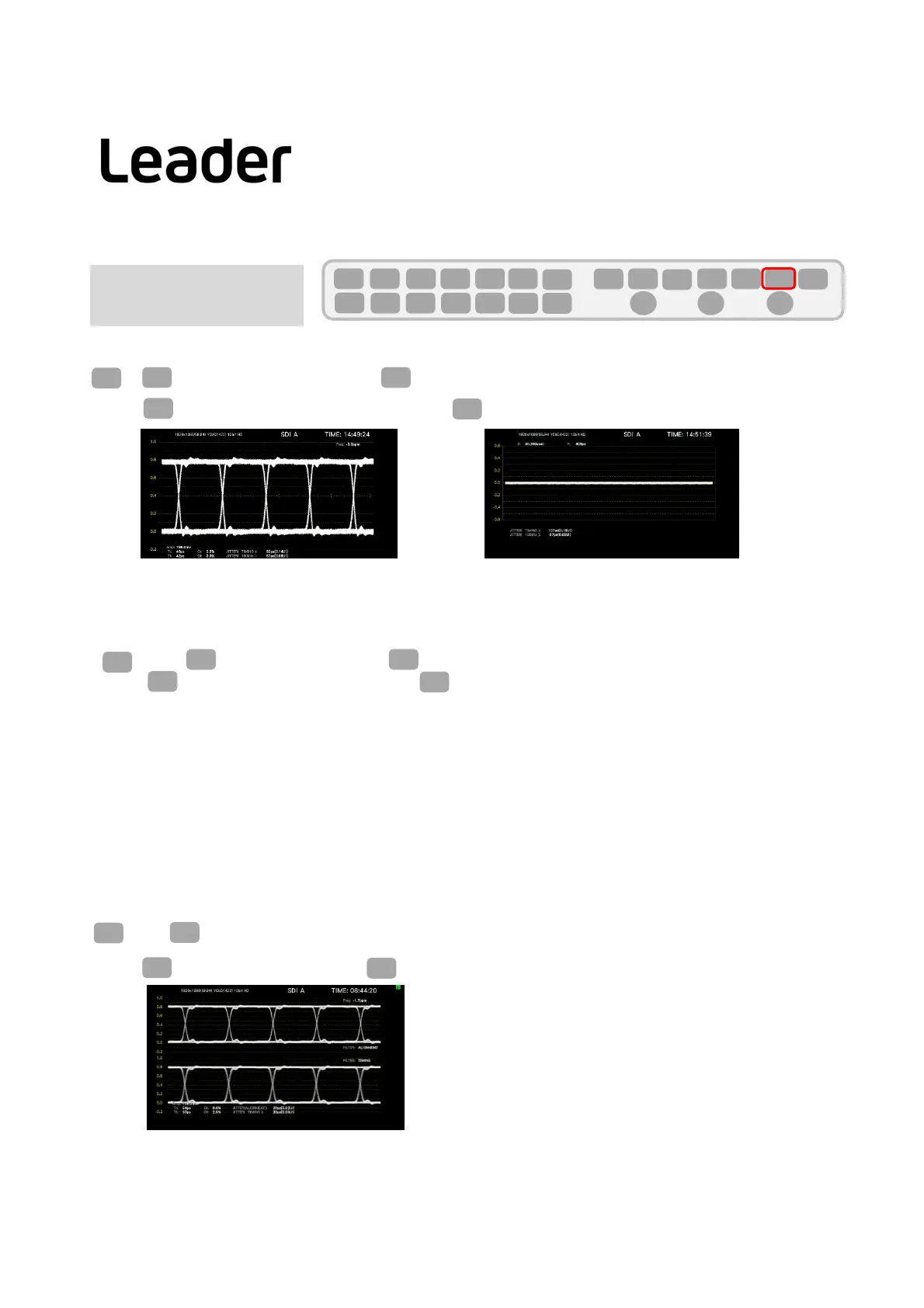
SwitchingbetweenEYEandJITTER
> (EYE/JITTERINTEN/CONFIG)> (EYE/JITTER)selectEYEorJITTERdisplay
EYE display JITTER display
(Note:TheEYEfunctiondisplayofLV5300andLV7300‐SER02isonlycompatiblewithSDIINPUT1.SDIINPUT2isnotsupported.)
Filtersetting
(EYE)>(GAIN/FILTER/SWEEP)> (FILTER)
100kHz: Jitterat100kHzorhigherismeasured.
1kHz: Jitterat1kHzorhigherismeasured.
100Hz: Jitterat100Hzorhigherismeasured.
10Hz: Jitterat10Hzorhigherismeasured.
TIMING: Timingjitterismeasured.Jitterat10Hzorhigheris
measured.
ALIGNMENT: Alignmentjitterismeasured.WhentheinputsignalisnotSD,jitterat100kHzandhigheris
measured.WhentheinputsignalisSD,jitterat1kHzandhigherismeasured.
TheselectedfilterisappliedtotheuppervalueoftheautomaticjittermeasurementandtheEYEandJITTERdisplay.
(ForthesimultaneousdisplayofEYEandJITTER,referto"Changelayout(general)-example2- ".)
EYE
F・1
EYE
F・2 F・3
F・1
Note:IfF1isnot(EYE/JITTERINTEN/CONFIG),pressEYE(EYE)twice.
F・1
EYE
Note:IfF2isnot(GAIN/FILTER/SWEEP),pressEYE(EYE)twice.
F・2
EYE
SINGLEdisplayandDUALdisplay
(EYE)>F7(DISPLAYMODE)canswitchthedisplaybetweenDUALandSINGLE.
DUAL display
Theupperpartshowstheappliedfilter,andthelowerpartshowstheTIMINGjitter.
EYE
F・7
Note:IfF7isnot(DISPLAYMODE),pressEYE(EYE)twice
F・7
EYE



 To Next Page