SYS
F・1 F・2 F・3 F・4 F・5 F・6
F・7
INPUT
EXT
MULTI
WFM
VECT
PIC
CAP
AUDIO
STATUS
EYE
VPOS HPOS
F・D
MEM
RECALL
S‐CUT
LV5300/LV5350/LV7300QuickManual
9
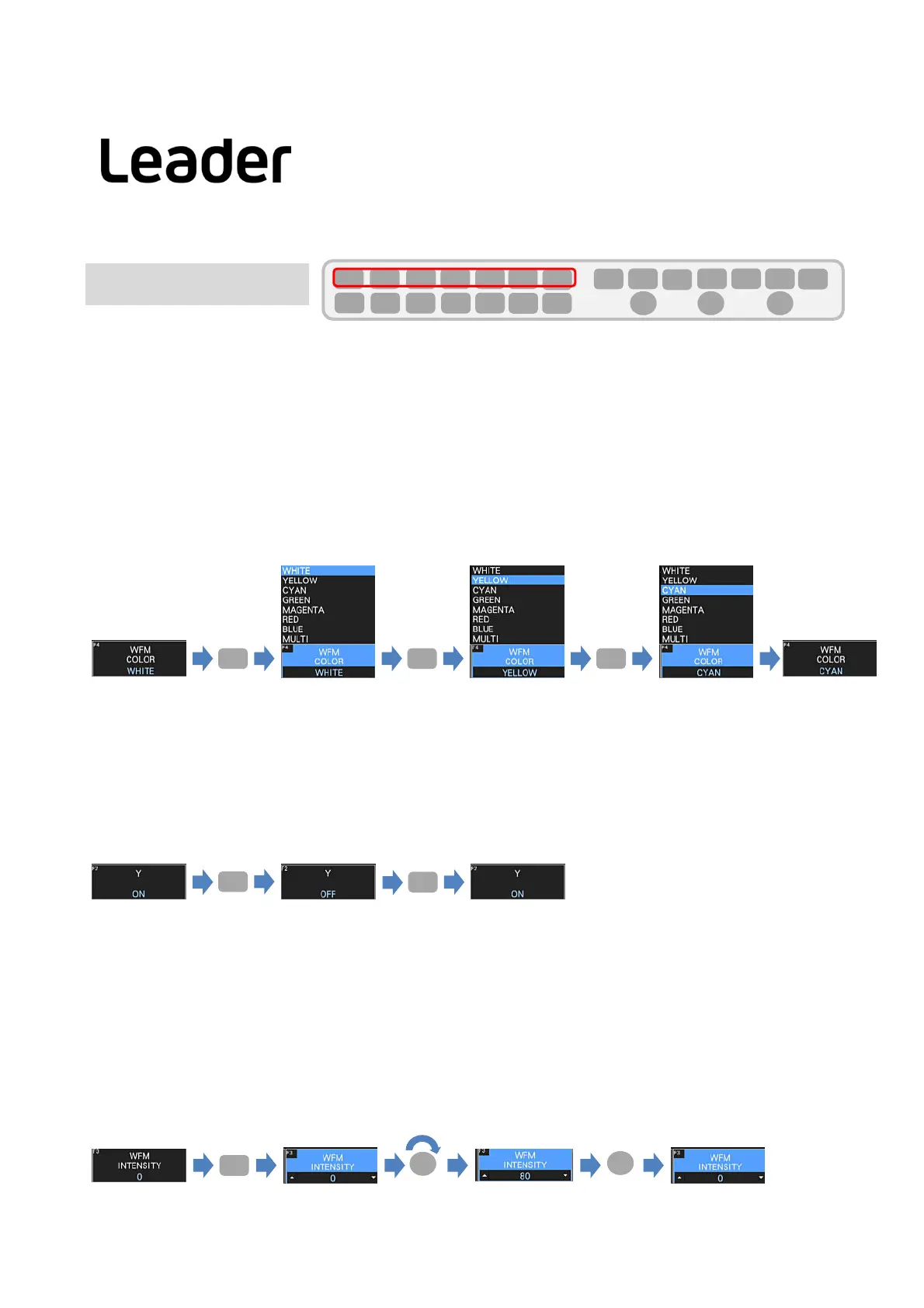
ExampleofchangingthewaveformcolorfromWHITEtoCYAN
① PressF.4.
② Apull‐upmenuappears.
③ PressF.4whilethepull‐upmenuisdisplayed.
④ ItchangesfromWHITEtoYELLOW.
F・4 F・4 F・4
①② ④③⑤⑥⑦
Selectionfunction
Iftherearemultipleitems,pressthefunctionkeywhilethepull‐upmenuisdisplayedtoswitchtheitems.
Itisalsopossibletoselectdirectlyusingamouseortouchpanel.
2.Switchingfunction
・Incaseofswitchingonly2suchasONandOFF,press
thefunctionkeytoswitch.
Themouseandtouchpanelareswitchedbyclickingortouching.
F・2
ExampleofchangingthewaveformYdisplayfromONtoOFFandOFFtoON.
① PressF.2.
② YchangesfromONtoOFF.
③ PressF.2.
④YchangesfromOFFtoON.
F・2
①② ④③
F・3
①② ④③
⑤⑥
3.Numericvaluechangefunction
・PressthefunctionkeyandturntheFDtochangethevalue.PressFDtoreturntothedefaultvalue.
Thevaluecanbechangedbyoperatingthemousewheelortouchingthe▲ or▼ icononthetouchpanel
duringthevaluechangefunction.
Exampleof
changingthewaveformbrightness.
① PressF.3.
②WFMINTENSITYchangestoavaluechangefunction.
③TurntheF・Dclockwise.
④WFMINTENSITYgraduallychangesfrom0to80.
⑤PressF・ D.
⑥WFMINTENSITYchangesfrom80to0atonce.
F・D
F・D
⑤ PressF.4whilethepull‐upmenuisdisplayed.
⑥ ItchangesfromYELLOWtoCYAN.
⑦ IfyoudonotpressF.4,thepull‐upmenudisappears
andisfixedtoCYAN.
Normally,thefunctionmenuisdisplayed,butdisappearswhenthekeyofthecurrentlyselectedmodeispressed.
Inaddition,it
canbesettoautomaticOFFintheGENERALtaboftheSYSmenu.
Function Operation



 To Next Page