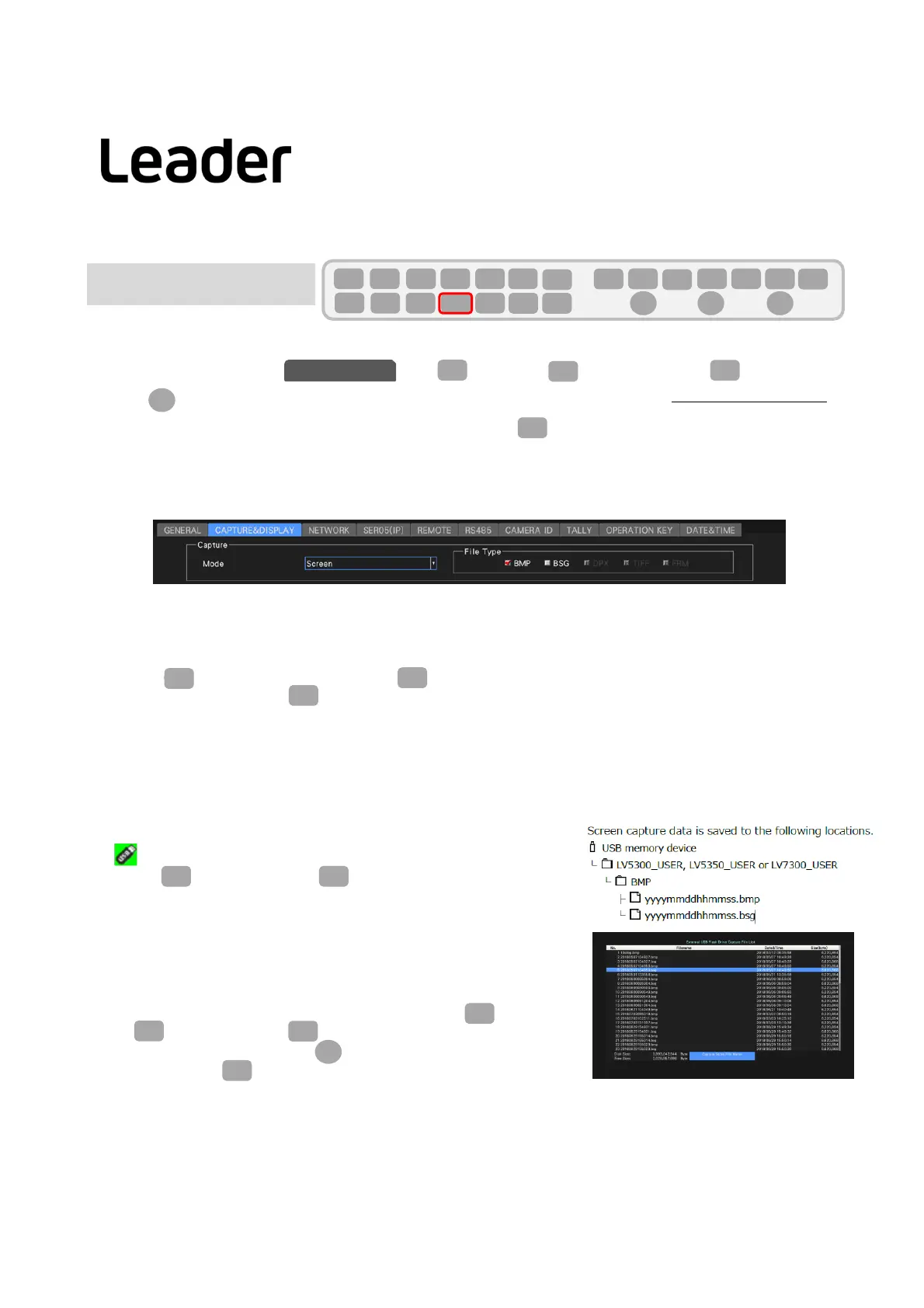
1.Screencapturesettings
ChangethedisplaytabtoCAPwithSYS(SYSTEM)>F2(SYSTEMSETUP)>F3(NEXTTAB).
UseFD(FUNCTIONDIAL)tosetCaptureModeto“Screen”andselectthefiletypetosavetoUSBmemory
fromFILETYPE“BMP”,“BSG”.Attheendofthesetting,pressF1(COMPLETE)toconfirm.
BMP: ThesaveddatacanbeconfirmedonthePC.
BSG: ThesaveddatacanbereadanddisplayedontheLV5300/5350andLV7300mainunits.
(PCAPisamodetocaptureIPpacketwhenLV5600SER05isinstalled.)
2.Performscreencapture
・Displaythescreentobecaptured.
・PressCA(CAPTURE).(WhenyoupressCA,thedisplayscreeniscapturedintheinternalmemory.)
・SelectthefollowingwithF3(DISPLAY).
REAL: Displaysthecurrentinputsignal
HOLD:Viewthecaptureddata.Videowaveforms,vectorsandeyepatterns
aredisplayedincyan.
BOTH:Thebrightnessofthecurrentinputsignalandthecapturedataishalved,andtheyaredisplayedin
layers.
3.SavetoUSBmemory
・InserttheUSBmemory.TheUSBmemoryisrecognizedand
Uisdisplayedintheupperrightofthescreen.
・PressF6(USB
MEMORY)>F3(STORE)tosavetoaUSBmemory.
4.CapturedatadisplayofUSBmemory
・CaptureddatasavedinUSBmemoryinBSGformatcanbereturned
tothemainunitfordisplay,andcanbeoverlaidwiththecurrentinput
signal.
・ConnectaUSBmemorytothemainunit,and
pressCAP(CAPTURE)
>F6(USBMEMORY)>F5(RECALL).
・SelectaBSGformatfilewithFD(FUNCTIONDIAL)fromthedisplayed
filelistandpressF1(RECALL)todisplaythecapturedscreen.
SYS
F・2
CAPTURE&DISPLAY
F・D
F・1
CAP
CAP
F・3
CAP
F・6
F・D
F・1
F・3
SYS
F・1 F・2 F・3 F・4 F・5 F・6
F・7
INPUT
EXT
MULTI
WFM
VECT
PIC
CAP
AUDIO
STATUS
EYE
VPOS HPOS
F・D
MEM
RECALL
S‐CUT
F・6
F・5
F・3
33
Scr eenCapture
LV5300/LV5350/LV7300QuickManual



 To Next Page