5. Set the engine throttle to one-half speed (1800
RPMs) using the PV380-R2 digital controller. (Page
4-9)
6. Check control panel gauges for proper readings.
7. Adjust seat position and mirrors.
8. Allow the engine to warm and fasten your seat belt.
9. Disengage the park brake.
1
2
3
4
5
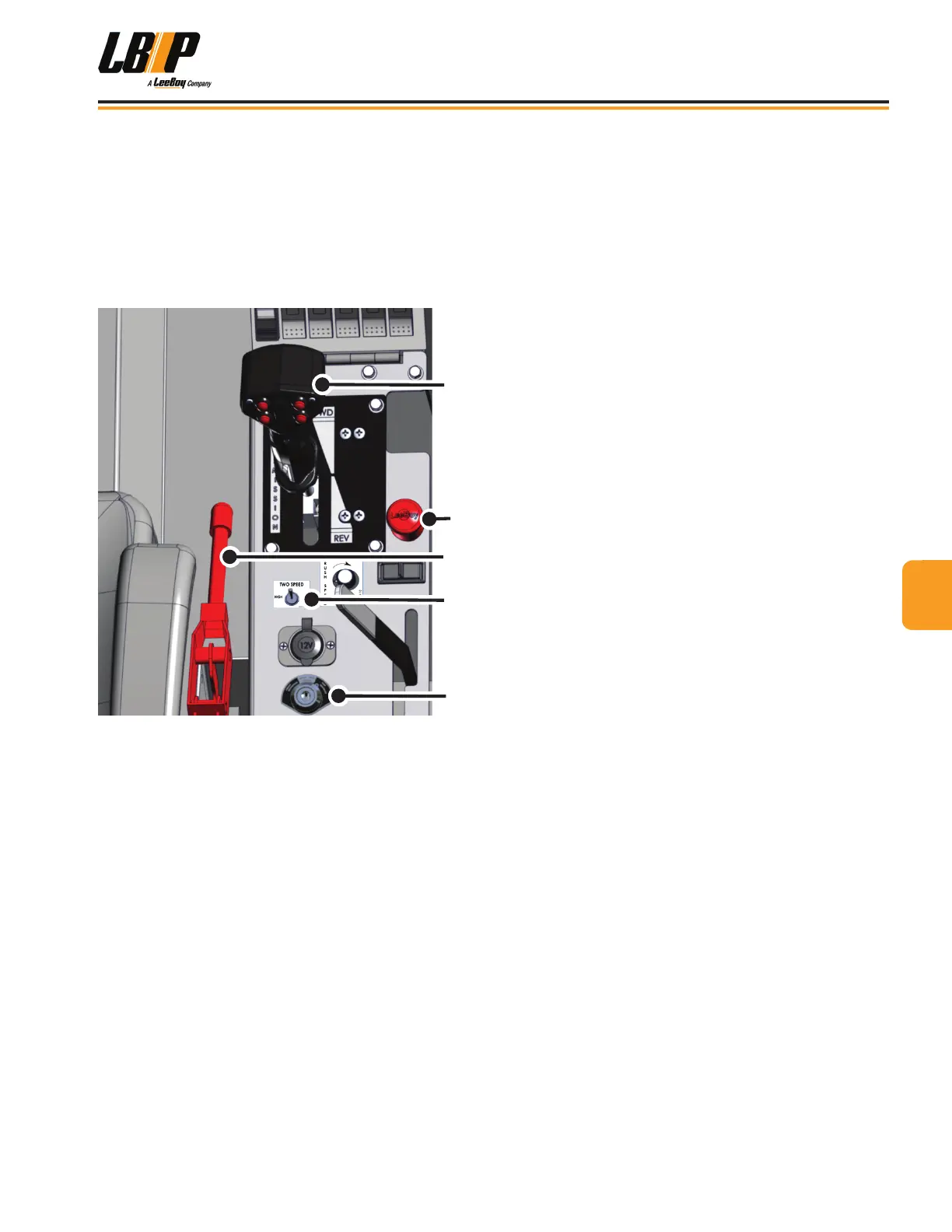
Figure 4-2. Start-Up Controls
1 - Joystick (Transmission Selector)
2 - Emergency Stop Button
3 - Park Brake Lever
4 - Speed Selector Switch
5 - Ignition Switch
Cold Weather StartingCold Weather Starting
• Engage the parking brake. (Figure 4-2)
• Place the transmission selector into the NEUTRAL
position.
• Turn the ignition key to the Start position. The “Wait
to Start” light will illuminate for a few seconds on the
PV380-R2 digital display controller.
• When the Wait to Start banner disappears, turn key to
the ON position to crank engine.
• Allow the engine to idle about ten minutes before
driving the machine.
Stopping the EngineStopping the Engine
1. Adjust throttle to idle using the decrease RPMs
feature on the PV380-R2 digital display (Page 4-9)
until idle speed is reached (1200 RPMs).
2. Apply park brake.
3. Turn ignition key counterclockwise to the OFF
position and remove key.
NOTE: The electrical system will continue to
operate for approximately 20 seconds after
the ignition is turned off. This allows the
engine ECU (Engine Control Unit) to store
critical engine data as it powers down.
Emergency Stop ButtonEmergency Stop Button
The purpose of the Emergency Stop Button (E-Stop)
is to shut down the engine and all machine functions in
an emergency situation. This additional safety feature
should only be used if the operator needs to shut down
all machine operations quickly. (Figure 4-2)
44
Operation
LB Performance CB95 Broom 4-5


 To Next Page