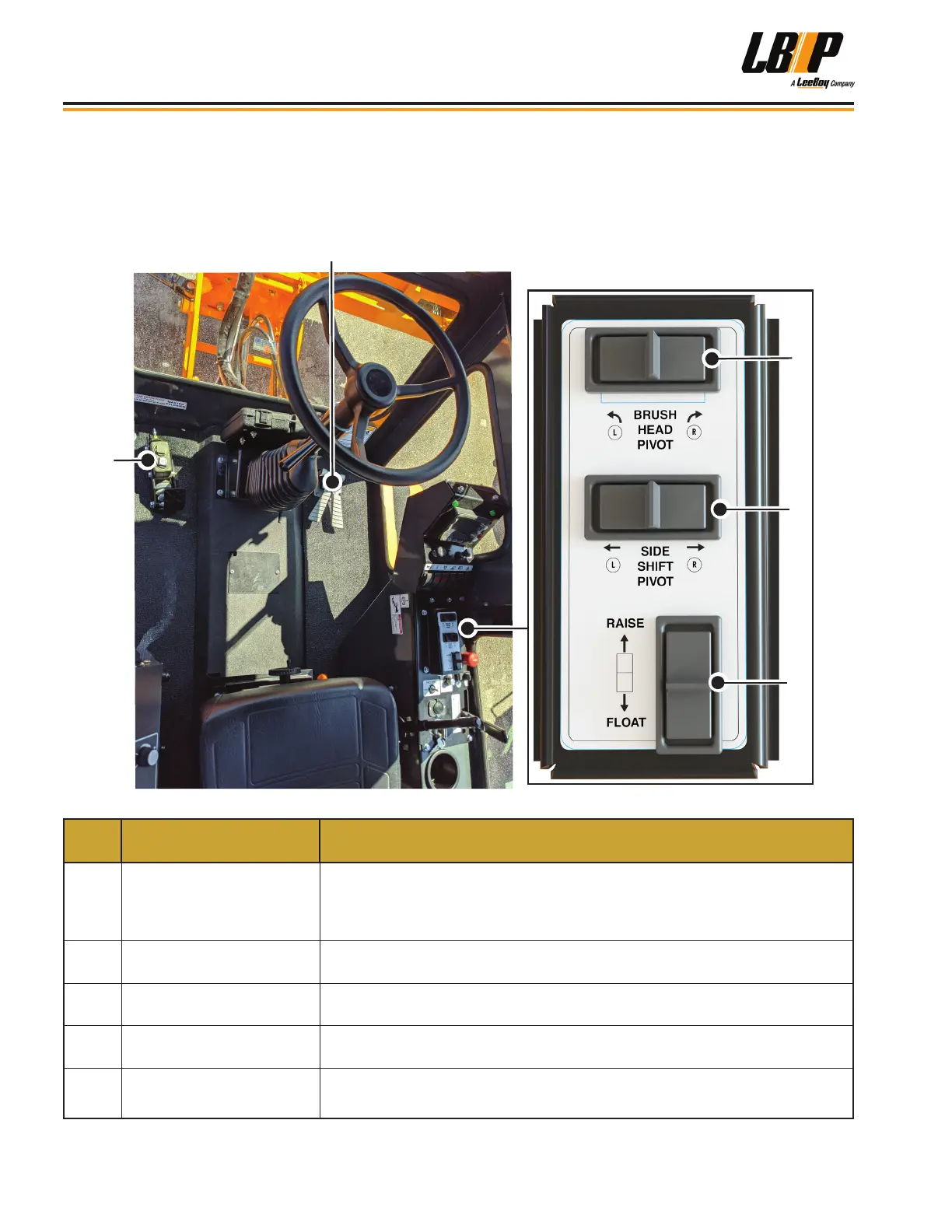
FOOT PEDAL CONTROLS OPTION
The optional forward and reverse foot pedal in lieu of joystick transmission control allows for a broader range of
operator driving opportunities. (See Page 4-22) Switches on the main control panel replace button controls on the
joystick while the other control panel items remain the same as shown on Pages 3-6 and 3-7.
2
3
5
4
Table 3-3. Foot Pedal Controls Option
ITEM
NO.
COMPONENT NAME FUNCTION
1
Forward/Neutral/Reverse
(FNR) Pedal
• Press the right pedal to move forward.
• Press the left pedal to move in reverse.
• The pedals automatically return to neutral when released.
2 Brush Head Pivot
Push the brush head pivot switch Left to swing the brush left; or right to swing
the brush right.
3 Brush Swing Side Shift
Controls the side shift brush swing. Press and hold to shift left ({) or right
(}).
4 Raise/Float
Push the Raise/Float button forward (raise) or back (oat) for brush raise and
oat control.
5 Brake Pedal
Starting: Firmly press pedal to start machine.
Braking: GENTLY press pedal to stop machine. The pedal is very sensitive.
Component Location
LB Performance CB95 Broom3-8


 To Next Page