Keypad FunctionsKeypad Functions
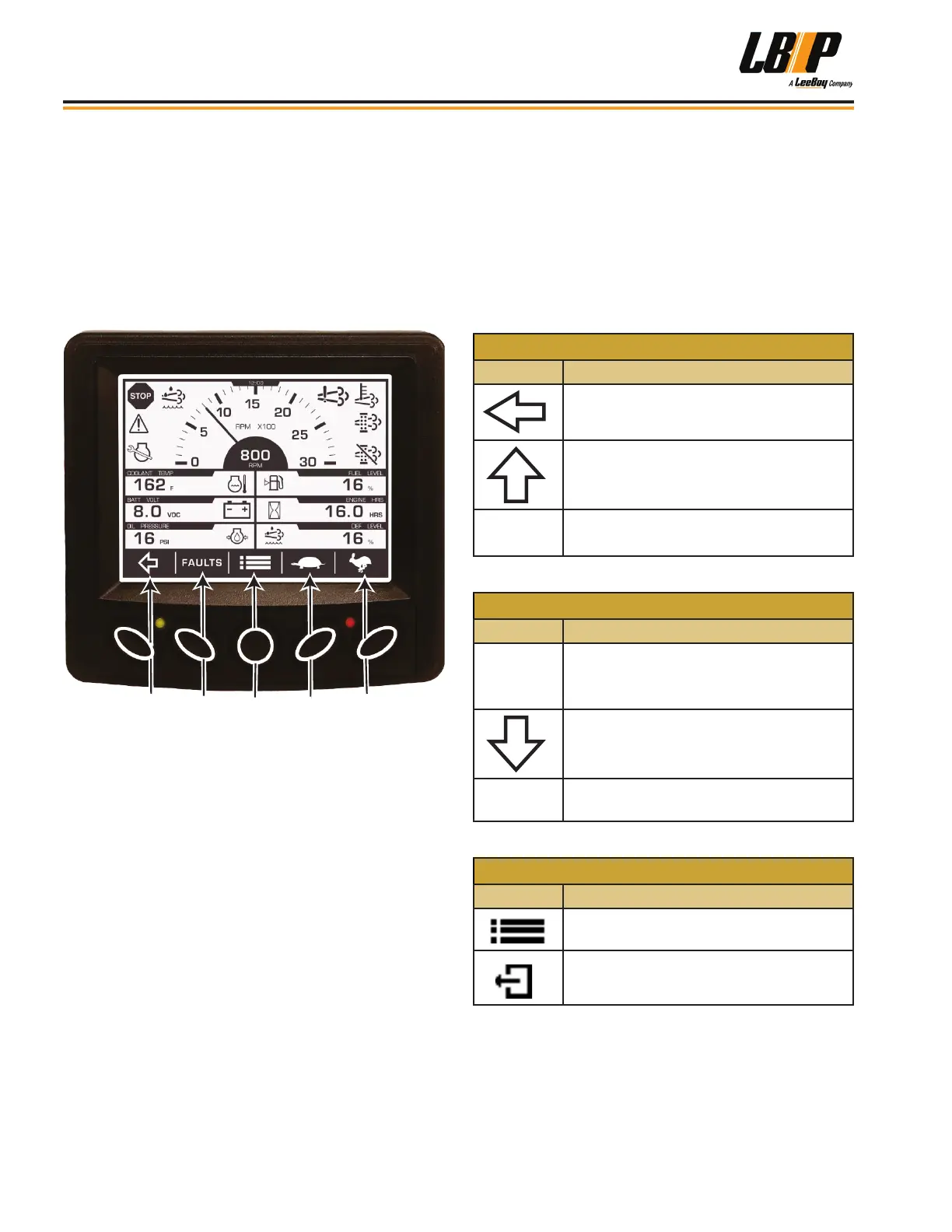
The keypad is a touch system with ve buttons along the
bottom that corresponds to the navigational menu bar
above the button (at the bottom of the display screen).
(Figure 4-11) Button functions can change depending
upon the screen displayed. When directed to press a
symbol within the procedural steps, it is referring to the
button below the displayed symbol on the navigational
menu bar.
1
2
3
4
5
Figure 4-11. Navigation and Keypad Functions
Engine and transmission parameters displayed include:
• Engine Speed • Engine Fuel Level
• Engine Temperature • Discharge Pressure
• Battery Voltage • Suction Pressure
• Coolant Temperature • Active Fault Codes
• Engine Oil Pressure • Stored Fault Codes
• Total Machine Hours
NOTE: Up to four (4) warning symbols can be
shown at a time (upper left icon area). The
most important symbol will be shown rst
followed by any others by priority.
The following tables show functions that each button
represents by the symbol appearing on the navigational
menu bar and its function, depending upon the screen
mode:
Table 4-4. Keypad Navigation Menu Bar Symbols
KEY 1
Symbol Function
Alternates between screen sets or
moves the cursor one position to the left.
Scrolls up in certain screens when in
specic menus.
-
Use to decrease numbers in various
screens.
KEY 2
Symbol Function
FAULTS
Displays diagnostic messages (faults)
and stored codes.
Scrolls down in certain screens when in
specic menus.
+
Use to increase numbers in various
screens.
KEY 3
Symbol Function
Navigates to the Main Menu entrance
point.
Serves as the Escape or Return to
Previous Menu button.
Operation
LB Performance CB95 Broom4-10


 To Next Page