Transmission Foot Pedal OptionTransmission Foot Pedal Option
Available for those who prefer is the optional forward
and reverse foot pedal in lieu of joystick transmission
control. (Figure 4-9) Adding the forward and
reverse transmission foot pedal in lieu of the joystick
control allows for a broader range of operator driving
opportunities.
If equipped with this option:
• The brake pedal is on the left side and must be
pressed to start the broom.
• The transmission pedal is on the right side and has a
left and right pedal:
• The left pedal moves the transmission into
reverse.
• The right pedal propels the broom forward.
• Releasing the pedal puts the broom in neutral.
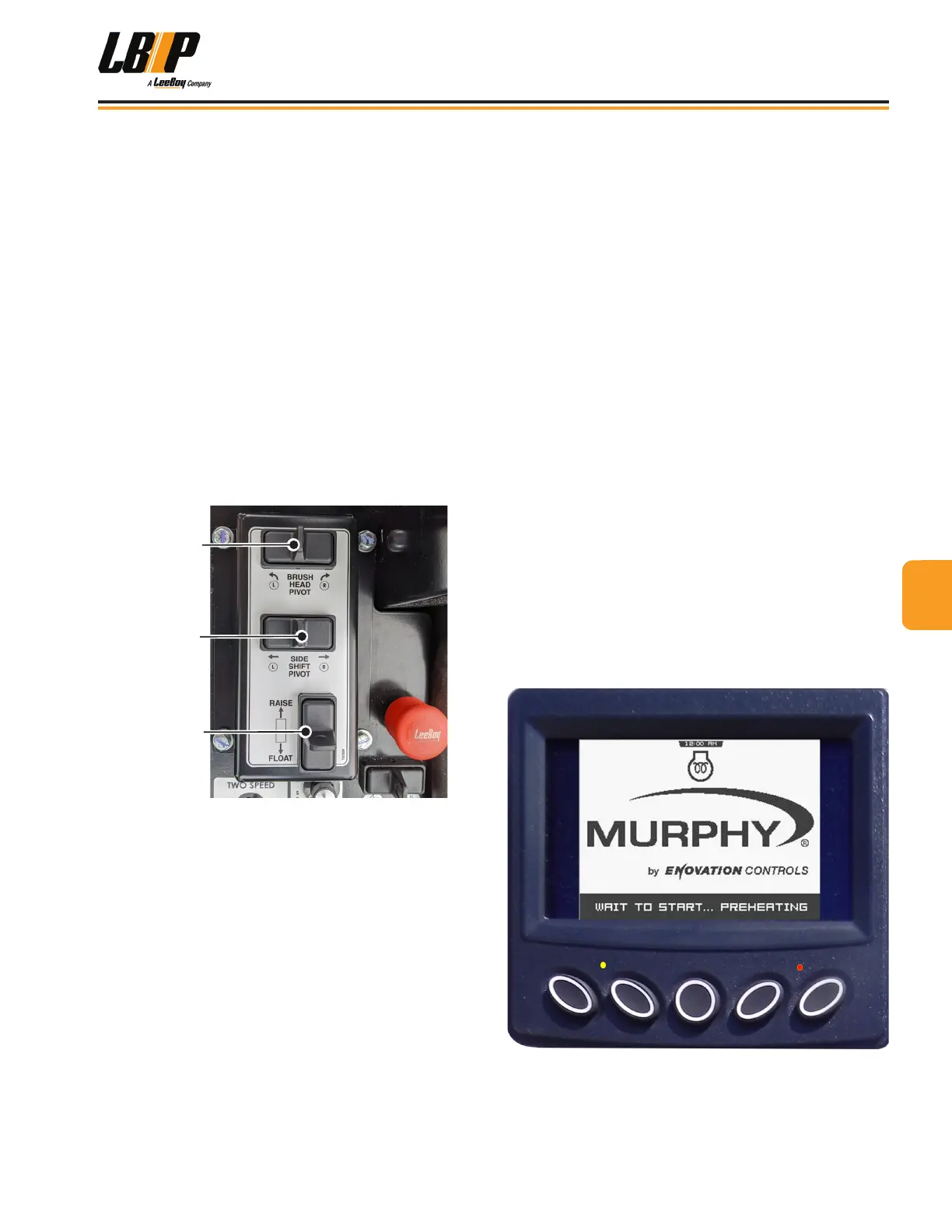
Raise/Float
Brush Head
Pivot
(Brush Swing)
(Side Shift Pivot
OPTION)
Figure 4-9. Control Panel Switches
Switches on the main control panel replace button
controls on the joystick if equipped with this option.
• Push the brush head pivot switch to swing the
brush left or right.
• Push the Raise/Float button forward or back for
brush raise and oat settings. (The side shift
feature is not available for this model, therefore
the switch is nonfunctional.)
PV380-R2 POWERVIEW™
DISPLAY
The PV380-R2 PowerView™ system is a multi-functional
display that enables operators to view standard engine
and transmission parameters along with active and
stored trouble codes. The digital display screen can
show single or multiple text descriptions, i.e., engine
temperature, voltage, oil pressure, engine RPMs along
with service reminders or fault conditions.
The operator can toggle through different screens for
displaying critical data broadcast by the electronic
engine and transmission Engine Control Unit (ECU).
Diagnostic codes with text descriptions of fault
conditions are enhanced by ultra-bright alarm indicators
that illuminate amber or red to alert the operator of a
condition requiring attention. The amber warning light
illuminates to visually alert the operator that a trouble
code or service reminder is being shown on the display.
If the red warning light illuminates, the operator should
shut down machine and promptly repair the problem to
prevent possible damage.
When turning the ignition key to the ON position, you will
see a Murphy logo with the “Wait to Start Preheating”
banner along the bottom of the screen. (Figure 4-10)
DO NOT start the engine until this message disappears
and the main gauge screen appears. (Figure 4-11)
Figure 4-10. Wait to Start Screen
44
Operation
LB Performance CB95 Broom 4-9


 To Next Page