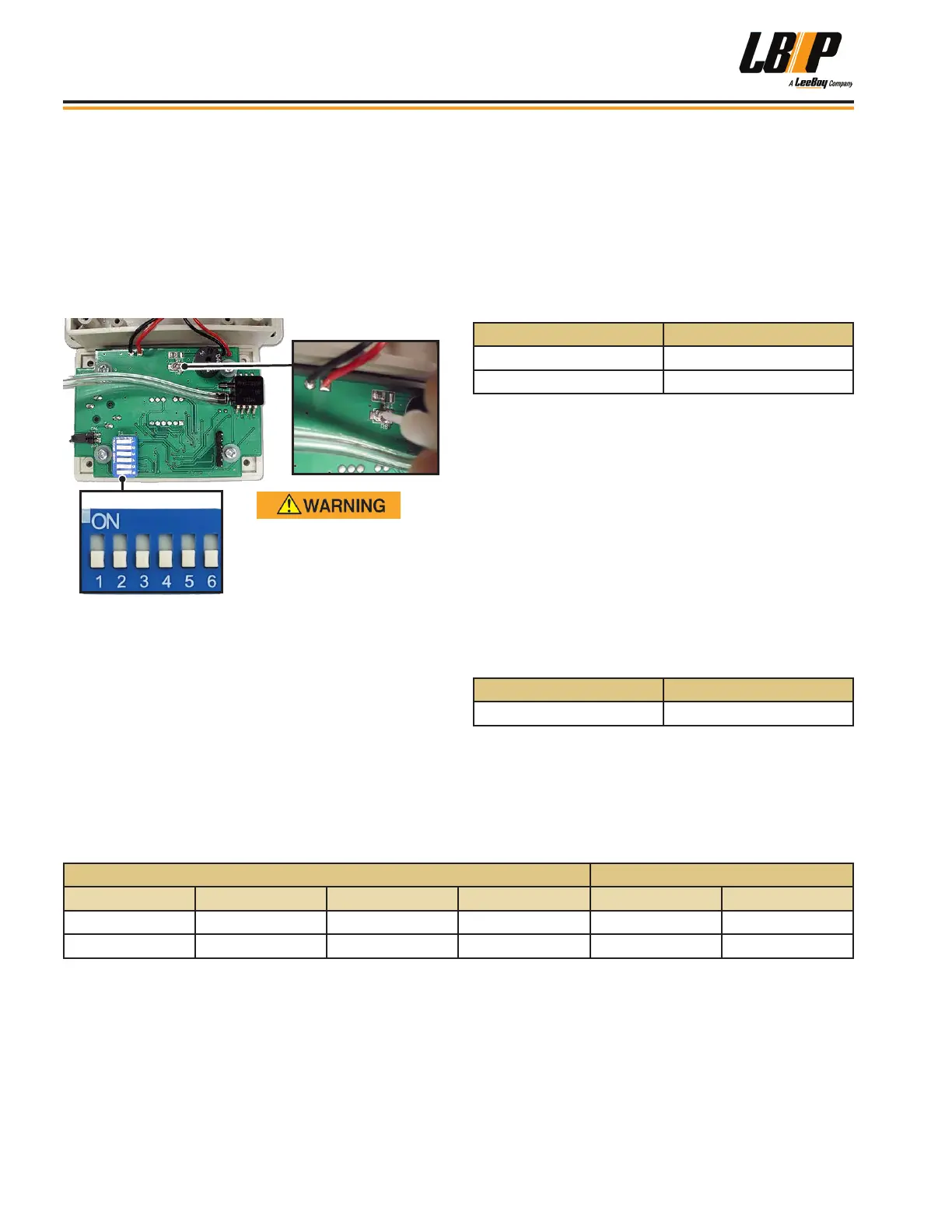
1. Remove the four screws on the cab unit cover.
(Figure 4-29 on the previous page.)
2. BEFORE touching the circuit board, discharge
static electricity by touching grounded metal.
3. To reset the alarm volume:
• Insert the small plastic screwdriver supplied with
your unit or toothpick) into the micro-volume
control. (Figure 4-31)
Dip Switch
DO NOT touch components
with metal objects to prevent
damage or memory loss.
Figure 4-31. Micro-Volume Control and Dip Switch
• With the unit powered up, the tone alarm will sound
afer 20 seconds.
• Adjust the volume by turning the control to desired
level.
NOTE: The audible alarm volume will be much
lower when the cover is replaced, so set
the cover in place and test the volume level
before reattaching the cover.
4. You can turn the sound on/off, set the alarm signal
pressure level, or set the pressure units using the
6-pin dip switch. (Figure 4-31) Refer to the follow
three tables, and use the plastic screwdriver to set
switch on or off.
NOTE: The dip switch appearance may vary.
Table 4-5. Set Sound On/Off
DIP 6 Alarm Sound
OFF Sound Off
ON Sound On
The unit is factory set to 20 Pa (0.08 inches H2O so
no action is required unless you need to change the
setting. ISO 23875 Cab Air Quality Standard requires
this setting with key on and blower motor off.
Check your local regulations and standards. If pressure
levels are undened, we recommend following ISO
23875 for best practices.
Refer to the Table 4-7 below to reset the alarm signal
pressure level settings.
Table 4-6. Set Pressure Units
DIP 5 Pressure Scale
OFF
Inches of H2O
Table 4-7. Set Alarm Signal Pressure Level
Switch Position Alarm
DIP 1 DIP 2 DIP 3 DIP 4 Pascal Inches of H2O
ON ON OFF OFF 40 0.16
OFF OFF ON OFF 50 0.20
Operation
LB Performance CB95 Broom4-20


 To Next Page